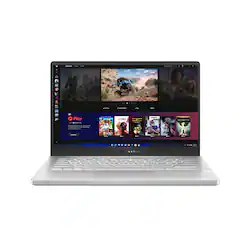
ASUS - ROG Zephyrus 14" Gaming Laptop - AMD Ryzen 9 - 16GB Memory - NVIDIA GeForce RTX 3060 - 1TB SSD
Model: GA401QM-211.ZG14
SKU: 6452913
This item is no longer available in new condition. See similar items below
The vast majority of our reviews come from verified purchases. Reviews from customers may include My Best Buy members, employees, and Tech Insider Network members (as tagged). Select reviewers may receive discounted products, promotional considerations or entries into drawings for honest, helpful reviews.
Customers are impressed with the ROG Zephyrus 14" Gaming Laptop's performance, graphics capabilities, and long battery life. Many appreciate its compact size, portability, and lightweight design, making it ideal for those on the go. However, some users note that the device can get warm and produce noticeable fan noise during use. The lack of a webcam and some concerns about the keyboard backlight are also mentioned.
It is amazing how the power of a high end desktop gaming PC from two years ago can fit into a 14inch laptop under 4lbs. The Ryzen 9 5900HS cpu in this thing has enough power to be relevant for at least 3 years. The RTX 3060 is a good balance of speed and power efficiency, although the 6GB may require realistic graphic detail adjustments in near future games. I do not think any gpu more powerful or higher wattage would be possible in this chassis. The RTX runs through Radeon iGPU which does reduce performance in cpu bound games, but allows freesync adaptive sync to eliminate stutter and tearing. The usb-c port on left side of unit supports displayport/hdmi directly from RTX 3060 with optional adapters. I verified Gsync works through usb-c port with displayport adapter to my external monitors. I have seen a lot of complaints that the HDMI port is not connected directly to RTX but I actually feel this is a good thing because it allows longer battery life when hooking up to projectors during business presentations where the power of RTX is not always needed. For simple slides and video, the Radeon is sufficient and the RTX can be used via Optimus if presentation requires more graphical grunt. The cooling system is about as good as physically possible in a chassis this small without using a more expensive vapor chamber design. The liquid metal thermal interface on cpu helps minimize cpu thermal throttling issues. If running simultaneous cpu + gpu stress for prolonged periods, expect some mild throttling on either gpu or cpu as they share heatpipes. The VRMs seem to have dedicated cooling plate and pipe. Asus engineers seem to have found best balance between power and thermals. The touchpad is small but very smooth and responsive. The keyboard has good layout. The backlight is improved in uniformity compared to last year, but still difficult to see in medium light conditions (especially at low keyboard light brightness). I put a 2021 G14 black keyboard cover on system and I think it makes system look better in medium/bright light rooms. The speakers are loud and actually have some low frequency response. Probably the best speakers outside of a Macbook Pro. The screen on my unit had minimal light bleed and good black levels. For text and videos, I had no complaints. Unfortunately, I do notice ghosting from the relatively lower response time. It is definitely better than last year’s model, but resembles a fast VA panel more than a fast IPS. Anybody sensitive to ghosting/response time should consider something else or use external monitor when not traveling. The single m.2 slot and single SODIMM slot is disappointing but understandable. There is literally no space to fit additional slots due to small system. I wished all 16GB was soldered with open slot for user to add more. But I suspect more than 90% of users will find the 8GB soldered + 8GB SODIMM sufficient. At least there is option to increase RAM to 8 soldered + 32 sodimm in future even if only first 16GB will be dual channel. Overall is probably the most processing/graphical power in the smallest/lightest laptop available on the market (Apple ecosystem users should also seriously consider Macbook Air or Pro M1). It is easy to carry around and allows use of up to 100watt PD USB-C charger to reduce need to take 180watt brick on trips. Just remember to get external webcam or learn how to use phone camera as webcam because there is no builtin webcam on this laptop.
Posted by AYoshi
Performance: This is truly a powerful machine. For my usage(Schoolwork, light gaming, youtube), it is more than enough. When I play valorant, it runs at a constant 144fps(I limited it) and rarely drops at all. The same is true for when I play Splitgate. Genshin Impact is also very smooth at high graphics 60fps. However, this performance comes with fan noise and keyboard heat. The WASD keys stay cool compared to the rest of the keyboard when gaming, but it does still get warm. But, this is a small laptop, so there is limited cooling space. Keyboard: I love typing on this thing. Period. Travel distance is great, and the ergolift makes my hands feel comfortable while typing my essays. Touchpad: The glass trackpad on this thing feels great. Others may feel that the trackpad is too small, but I personally have no problems with the size and it works for my usage. Battery: I'm sure that you guys already know this, but the battery life is impressive. After an hour of usage doing college work, I used 10%. After 4 hours, I've used 40%. I guess that means that this laptop actually lasts 10 hours like others have said. Speakers: Comparable to a Macbook's speakers. That says a lot. Now, lets move on to the cons. Connectivity: My model comes with the Mediatek Mt7921. Idk if this is normal for the 2021 g14, or maybe it's just a BestBuy thing. The wifi speeds on this computer are SLOW. On my OnePlus 8T, when I'm downloading at 40mbps, the g14 is downloading at around 10mbps. When my phone is downloading at around 10-20mbps, the laptop is downloading at 1-3 mbps. This means that when downloading large games, it took hours before I was able to finally open it up and play. Quality Control: This is probably one of the G14's biggest issues. The QC is horrendous. I haven't seen many people talk about the power button, so I'm not sure if it's just my unit, but there are gaps and it isn't even. Not a huge problem, but may be irritating to some. Additionally, when I first pulled the computer out of the box and set it on my table, the computer base wasn't even and would wobble if I pressed on the corners. If the screen was closed, the computer would wobble when I pressed on the top left corner of the laptop. When the screen was open, the computer would wobble if I pressed on the right palm rest. I could fit my watch's wrist strap between the rubber feet and the table. To fix this, I took off the bottom panel/base and reclipped it firmly and rescrewed all the screws back in. Boom. Problem fixed. No more wobble. I suspect that one of the pressure clips wasn't fit in, resulting in an uneven base. MORE Quality Control: My left fan rattles. The fan under the WASD keys. I'm not sure whether that's the CPU or GPU fan, so I just said WASD keys. You guys have no idea how I felt when I sprinted upstairs after receiving my delivery from the FEDEX driver, then opened the box, booted it up, just to hear rattling sounds. For some reason, the fans only rattle at low speeds, and don't seem to rattle when it gets to 2900 RPM and above. The uneven base only made it worse. The rattle was a bit quieter after I fixed the uneven base. But it was still there. Overall, this would've been a great computer if not ruined by quality control.
Posted by Ivan
The ROG Zephyrus G14 is a well built compact laptop. I was pleased with the form and weight however, it took some getting used to coming from larger computers. Generally I found the system to be fast and responsive but there have been quite a few technical issues which were resolved through system updates and installing the latest drivers. My first few weeks with this device were focused on troubleshooting issues which I’d like to say is understandable. In use, the laptop can get very loud especially when plugged in and on turbo mode. This would primarily be during gaming, though, it does also get loud when in seemingly less intense activities. I personally don’t have an issue with the fan noise but I have noticed that in turbo, while gaming, the keyboard would get hot and uncomfortable to use. Apart from the heat (which I have only experienced once so far) the keyboard feels so good to use. Way better feel and key placement than the magic keyboard I use at work. The backlighting is good unfortunately, the white light on silver keys makes it difficult to see in different light conditions. The lights also pulse when the laptop is asleep while charging which is a fun feature. The audio quality is really good and I’ve been told that I sound loud and clear during “video” calls. You may notice that there isn’t a built in webcam. Fortunately the display hinges are very sturdy and can easily support a plug and play webcam. The display is sharp and beautiful. I love the colors and tone so much that I don’t think I’ve had to adjust the brightness at any point. My last point will be on the fingerprint reader. It works about 97% of the time. Just remember to reinstall the driver from the Asus website and add multiple fingers to improve your chances.
Posted by Jadayne