Finding the right camera is about capturing the moments that mean the most to you. Whether you want to shoot landscapes, action shots or portraits, or to film your next great adventure, you need the right camera or camcorder. Although there is a lot of technical information available, you don't have to learn all the details to make an informed, confident decision. Use this guide to help answer your basic questions, so you can find the right camera or camcorder.

Choosing the right type of camera.
What's most important to you when it comes to taking pictures? Maybe you need a portable, easy-to-use camera you can slip into your pocket for high-quality candid shots of your kids. Or maybe getting the perfect photo of a sunset on your next vacation is worth carrying a more advanced camera. The best place to start figuring out what you need is to ask the right questions.
What type of photos do you want to take?
Family and friends
Need a camera for a family reunion or a weekend trip with friends? A high-quality point-and-shoot is small enough to fit in a purse or large pocket and even lets you capture short videos.
Extreme sports and underwater photos
If you're an outdoor adventurer, you need a camera rugged enough to keep up with your lifestyle. Action cameras let you wear the camera or mount it on your equipment for in-your-face video footage. Water resistant cameras can easily handle accidental splashes or wet weather, and some are submersible for use while snorkeling or swimming. Shockproof cameras are designed to withstand jarring bumps and drops, and freezeproof cameras work well even in extremely cold conditions.
Travel
A long-range zoom will come in handy here, giving you the flexibility to take pictures up close or at a distance with a single lens.
Exceptional image quality
You'll get the sharpest photos with a mirrorless camera or DSLR camera. You'll also get the chance to improve your photography skills with interchangeable lenses, precise manual focusing and better results in low-light settings.
What kind of camera are you willing to carry around?
If you love the appeal of a DSLR or mirrorless camera but can't see yourself carrying it around all day on a sightseeing trip, you might be better off with a smaller, lighter camera. When image quality matters more than size, however, a DSLR or mirrorless camera with a larger sensor and more features is worth the extra weight.
Even if you already own a DSLR camera or plan to purchase one, there may be times when it makes sense to have a point-and-shoot camera as well. Different types of cameras work best in different situations. While a smartphone is convenient for spontaneous shots, a point-and-shoot gives you better quality for all-day events, and a DSLR gives you even higher quality for when it matters most.
Smartphones vs. digital cameras
With the rapid advances of camera technology in smartphones, you may be wondering, "Why do I even need a digital camera at all?" Good question. Smartphones offer respectable quality when it comes to capturing spur-of-the-moment photos and videos, but they often fall short when it comes to image quality. Don't be misled by the number of megapixels alone. A digital camera features a much larger image sensor than the tiny sensors available in phones. A bigger sensor produces clearer, more vibrant photos than a smaller sensor, even if the number of megapixels is the same. Digital cameras shoot better in low light or when you need to zoom in on your subject, along with featuring more versatility and settings, longer battery life, better flash and a larger lens. A digital camera can also offer better video quality than a smartphone, making this option a great choice for vloggers.

Point-and-shoot cameras.
Available in a wide range of models, from basic to true professional-grade, point-and-shoot cameras aren't just for novices. From rugged cameras for adventure seekers to premium models that offer impressive performance in an ultracompact package, there's a point-and-shoot camera to fit almost any need.
General use cameras
Slim, lightweight and pocket-friendly, these cameras offer a step up in image quality compared to most smartphones. Optical zoom lets you capture more detailed close-up photos, and faster shutter speed reduces blur on action shots. The larger image sensor and lens of a point-and-shoot also capture better photos in low light. Some of these cameras offer built-in Wi-Fi for easy sharing.
Benefits:
- Faster and more versatile than a camera phone
- Ultracompact models are the slimmest, lightest available
- Built-in Wi-Fi, available on some models, makes it easy to share photos and videos on the go
Recommended for:
- Casual social events and everyday photos
- Beginners and casual photographers
- People who already own a camera but need something lighter and smaller for all-day trips and events
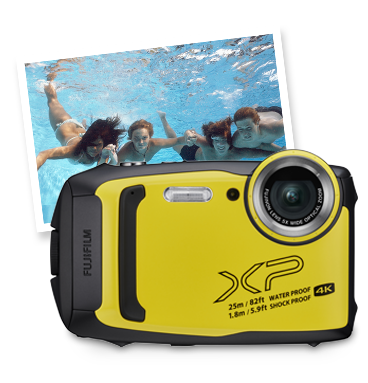
Water-resistant cameras
If you need a camera tough enough to survive your next snorkeling trip or rock climbing expedition, invest in a water-resistant, waterproof, or shockproof camera. With a solid, weatherproof exterior that can keep moisture out or even be submersed in several feet of water, waterproof cameras are safe to use in almost any weather or environment. Plus, they're just as at home at the beach or in the backyard as they are in more extreme environments.
If you need a camera that can withstand shock from drops or freezing temperatures, invest in a shockproof or freezeproof camera. Although the toughness and durability of these cameras makes for a slight increase in size and weight, the payoff is a camera you can take almost anywhere, without worrying about accidental damage.
For the best all-terrain protection, get a camera that boasts all three of these features together – waterproof, shockproof and freezeproof. A camera this rugged will be tough enough for almost any adventure.
Benefits:
- Waterproof, shockproof and/or freezeproof cameras thrive in almost any environment
- Often include built-in GPS, depth meter and compass
- Simple and easy to use while on the go
- Large buttons and controls for easy use with gloves or underwater
Recommended for:
- Outdoor enthusiasts and adventure seekers
- Vacations at the beach or water park
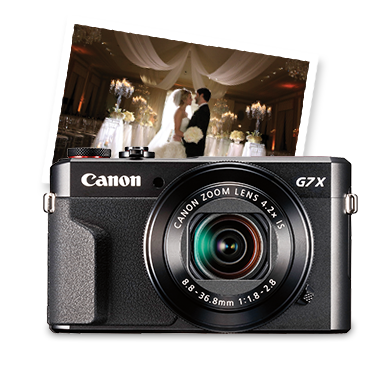
Low-light cameras
Without enough natural light entering the lens, the pictures you take indoors or outside at dawn or dusk can appear grainy and dark. That's when you need a low-light camera with a larger image sensor (or high ISO sensitivity) to capture more light. As a bonus, the larger pixel size will also give you better pictures in bright light and any other setting.
Getting crisp, clear images in low-light settings is not about how many megapixels are crammed into the sensor but about the size of each pixel. A larger pixel size can capture more light. So can a larger maximum aperture. The larger the maximum aperture (i.e., the lower the f-stop number), the easier it will be to take high-quality photos in low-light settings without a flash.
Benefits:
- Allows you to take pictures indoors or in low light without a flash
- Captures crisp, clear images with less noise
- Larger pixel size captures more natural light
- Larger maximum aperture makes the camera even more sensitive in low light
Recommended for:
- Indoor photos
- Photos at dawn or dusk and on overcast days

Long-zoom cameras
If you want to get close to the action or zoom in on distant subjects while traveling, a long-zoom camera gives you the flexibility you need for shots at almost any distance. Long-zoom cameras feature at least 10x or greater optical zoom, with some models featuring 20x or greater optical zoom. The longer the zoom range, the closer you can zoom in on details from far away. For example, a camera with 10x optical zoom might allow you to frame the silhouette of an old barn from a distant hillside, while a camera with 30x optical zoom would allow you to frame the weather vane on the barn's roof.
Long-zoom cameras sometimes include an electronic viewfinder (EVF) for easier shooting outdoors, where bright light can obscure the LCD screen. The electronic viewfinder also enables precise framing of the exact shot you want to capture and reduces blurring as a result of holding the camera close to your body as you peer through the viewfinder. Holding the camera away from your body increases camera shake, especially at longer zoom ranges. Look for a camera with image stabilization to further reduce blurring when taking pictures with the zoom extended.
Benefits:
- Allows you to zoom in close when you can't physically get closer
- Often includes an electronic viewfinder for outdoor shooting, stability and precision
- Larger, more secure grip
- Fast shooting speed and quick response for action shots
Recommended for:
- Travel, sports and wildlife
- Everyday versatility in a single camera

Premium cameras
Point-and-shoot cameras span a wide range of options, from basic entry level to high-end models. Premium models offer the best of the best when it comes to point-and-shoot, including sharper lens quality, more durable construction and advanced features. Even though they may look the same as a basic model, the technology and features packed inside are what set these cameras apart.
A larger aperture allows for excellent low-light performance, and, with a faster shooting speed and quick autofocus, you can capture an image at the exact moment you want. Besides the auto modes available on all point-and-shoot cameras, some premium models also come with a manual control option, which allows you to shoot creatively with fewer limitations. You may also be able to shoot in RAW format for advanced editing.
Benefits:
- Best overall point-and-shoot performance in a small, simple package
- Great for fast-action and low-light shots
- Often includes built-in Wi-Fi and/or GPS
- Full manual control available on many models
- Expandability options for external flashes, lens adapters and other accessories
Recommended for:
- Enthusiasts
- Users who want to manually adjust settings for creative control
Mirrorless cameras.
If you're asking, "What is a mirrorless camera?" you're not alone. It's a fairly new type of camera that many people are just learning about. The mirrorless camera, formerly known as a compact system camera, is a hybrid between full-function DSLR cameras and convenient point-and-shoot cameras. Mirrorless cameras are typically smaller and lighter than most DSLRs, since they omit the optical viewfinder and mirror box, but they have a broader array of features and functions than point-and-shoot cameras, such as faster autofocus and shooting speed. A big difference between a mirrorless camera and a point-and-shoot is the interchangeable lens. Like with a DSLR camera, this feature gives you the ability to change lenses based on the type of photos you want to take. With a mirrorless camera, you'll get both the premium image quality and interchangeable lens system of a DSLR plus the compact camera body of a point-and-shoot all in one convenient package.
Benefits:
- Features image quality comparable to a DSLR but in a smaller, lighter package
- Often better and faster than a point-and-shoot
- Ability to change lenses for almost any type of shot
Recommended for:
- Premium-quality images with a camera that's lighter and more compact than a DSLR
- Fast-action shots of kids, pets and sports
Additional Resource:
DSLR cameras.
A DSLR camera, or digital single lens reflex camera, is the clear choice if you want to take your photography to a higher level.
Let's dispel the myth that DSLR cameras are for the pros, or those who have the ability to invest huge chunks of time into a photography hobby. It's just not true. The great news is that you don't need to be a professional photographer to use a DSLR. The technology has evolved to the point that just about anyone can pick up a DSLR camera and start shooting significantly better photos – today.
The big benefit of a DSLR is its versatility. A DSLR camera is a must-have for the pro who wants complete manual control. But it's also a great option for casual photographers looking to improve their photography skills and even parents who want a fast-acting, autofocusing, don't-want-to-miss-that-shot camera to capture their kid's big moments. The ability to choose from a wide variety of lenses is also a major benefit to owning a DSLR camera.
Although there's a lot to learn about DSLR cameras, there's no need to be intimidated. Our DSLR Buying Guide will help you understand the basics and explore which DSLR camera is right for you.
Benefits:
- Premium image quality and versatility
- Fast lens means you get your shot
- Ability to change lenses for almost any type of shot
Recommended for:
- Enthusiasts and professionals
- Casual photographers who want the best image quality, speed and versatility
- Anyone who prefers shooting with an optical viewfinder
Additional Resource:
Camera lenses.
One major benefit of owning a mirrorless camera or DSLR is the ability to switch lenses in order to get the exact shot you want. The type of lens attached to your camera is what allows you to capture a wide variety of creative images, including detailed photos of subjects as tiny as a bumblebee or wide-angle shots of a sweeping landscape.
Zoom lenses allow you to capture subjects up close or at a distance by changing the focal length. The longer the focal length, the farther you will be able to zoom in on your subject. Prime lenses, on the other hand, are fixed at a specific focal length, but they typically produce sharper images and perform better in low-light settings.
To learn more about lenses, take a look at our Lens Buying Guide.
Camera technology.
Now that you have a better understanding of the types of cameras available and how you might use them, let's take a closer look at the technology inside these cameras. Although it's helpful to understand how things like megapixels, sensors, aperture and zoom work together, keep in mind that most cameras have fully automatic modes, including autofocus. So even if you're new to photography, you can start taking frame-worthy photos right away, without knowing all the ins and outs of how it happens.
Megapixels or image sensors: Which is more important?
Megapixels
If you're confused about what the "right" number of megapixels might be for your needs, you're not alone. It used to be a common thought that more megapixels equaled better photos. But that's not the whole story. Cramming too many megapixels onto the sensor makes for tinier pixels, which can't capture light as easily. The result is noisy (or grainy) photos. Bottom line? Rely more on the size of the camera sensor to determine image quality than on the number of megapixels.
Camera sensors
The sensor is the technology that actually uses the light brought into the camera to create your image. The sensor can be just as important as the number of megapixels when it comes to image quality. In fact, when you're looking at a camera sensor, bigger is better. This is why a camera phone with a large number of megapixels may produce inferior photos compared to a digital camera with fewer megapixels.
What to look for
- All cameras carried at Best Buy have enough megapixels for normal use
- Someone who needs to print larger images or do a significant amount of cropping and enlarging will want a camera featuring 20 or more megapixels
- Remember when comparing cameras, a bigger image sensor is better
Lens quality
The sharpness and detail of an image depends heavily on the quality of the lens. A fast lens (with a large aperture or low f-stop number) captures more light, which improves the camera's performance in low-light settings. A larger aperture also allows you to focus on a small portion of the scene and blur the background for a soft, stylish effect.
Video
The ability to shoot high-quality videos is one of the bonuses of owning a digital camera. When a single shot won't fully capture the moment, switching to video mode lets you record memories you'll treasure forever, such as your baby's first steps or your daughter's graduation. For the highest quality videos, choose a camera with 4K UHD recording. This resolution delivers crisp, detailed videos with a professional feel. You'll also want to look for a camera with video-specific autofocus technology, which ensures that your subject always stays in focus, even while panning or shooting fast-action videos.
Because of the larger image sensor compared to a smartphone camera, most digital cameras shoot higher quality videos, especially in low light, with DSLR cameras boasting the highest video quality.
LCDs and viewfinders
It used to be that you could only frame the shot by peering with one eye through a viewfinder; however, today's digital cameras feature an LCD screen that allows you to frame the shot by looking at what's on the screen. Some cameras feature both a viewfinder and an LCD screen, while some only include the LCD.
A higher resolution LCD screen displays the image in sharper detail. Touch screens allow you to change settings and navigate menus on your camera using touch rather than pushing buttons. For shooting videos or capturing images at odd angles, an articulated LCD screen comes in handy. These screens rotate so that you can see what you're shooting even if you're holding the camera above your head or crouching low for an artistic angle.
Since shooting in bright sunlight can make it difficult to see what's on the LCD screen, some cameras also feature an electronic viewfinder that allows you to frame the shot by holding the camera up to your eye. This also helps stabilize the camera and reduce camera shake when the zoom is extended for long-distance shots.
Wi-Fi, Bluetooth and GPS
One of the best parts of taking photos is sharing them with people we love. Built-in Wi-Fi or Bluetooth connectivity allows you to upload photos to your smartphone or tablet for easy wireless sharing. Some cameras even allow you to post pictures and videos directly from your camera to Facebook, YouTube and other sites. GPS technology tracks the exact location where each photo was taken, allowing you to create a visual map of places you've traveled. And if you're concerned about privacy, you can always disable the GPS tracking.
Wi-Fi, Bluetooth and GPS technology can be found on a wide range of point-and-shoot cameras, as well as some DSLR and mirrorless cameras. Some include Wi-Fi or Bluetooth and GPS technology — all in one camera. These features are especially popular with travelers, or anyone who likes to shoot and share on the go.

Special camera features.
A wide range of features is available that can help you take better shots with less effort, such as burst mode, scene selection and smile shutter. As technology advances and cameras become smarter, it's easier than ever for anyone to take professional-looking photos. Here are just a few of the special features available on many digital cameras.
Panorama
Wish you could capture the entire landscape in one seamless photo? Panorama mode allows you to take several pictures and then stitch them together into a single shot – a feature used most often for sightseeing and nature photography.

Scene modes
Instead of leaving it up to your camera to determine the correct settings for the photo you want to capture, you can select a scene mode such as portrait, landscape, beach, sports or night mode. Your camera will automatically adjust the settings based on the mode you select. You can also choose creative modes, such as black and white or sepia, for an artistic look and feel to your photos.

Face detection
How does your camera know where to focus, with so many subjects in the background? Face detection ensures that if you're taking pictures of people, the camera will autofocus on the subjects' faces rather than on objects behind and in front of them. Most cameras with face detection are able to focus on multiple faces at once for better group shots on the first take.

HDR (high dynamic range)
Not sure how to choose the right exposure and settings on your camera? Cameras with an HDR function can take multiple pictures of a single scene – all at different exposures. Then the camera chooses the best parts of each photo and combines them into one great shot. This is especially helpful for high-contrast scenes, such as when you're struggling to get just the right exposure for both a bright sky and a dark landscape.
Choosing the right camcorder.
Exciting moments and meaningful occasions deserve to be preserved as they happen — in motion. Unlike the shoebox-sized behemoths of days past, today's camcorders are lighter, smaller and more versatile, making it easier than ever to capture memories wherever they happen. The right camcorder will let you relive your memories in exquisite detail and with rich sound.
What can a camcorder do?
Owning a camcorder might seem redundant in an age when phones, DSLR cameras, tablets and even watches can shoot video. However, the video capability of those devices is usually designed to be an accessory that takes a back seat to other functions. Video quality and ease of use often suffer as a result. Though there are plenty of occasions where it's appropriate to multitask with one device, having a dedicated tool for shooting video affords quality and convenience. Consider the following advantages of a camcorder:
Better quality
Footage shot on a phone can look great when you're watching it on a small screen. But put that same video on a larger screen, such as a TV, and the image quality suddenly becomes dull and blurry. Unlike video captured from a phone, camcorders can use larger sensors, optical zoom lenses, image stabilization and low-light performance to deliver dazzling images. That means you can enjoy better quality video on more devices, from the phone to the big screen.
Better sound
Built-in microphones, volume controls and audio inputs provide better control of the full experience — sights, sounds and all.
Autofocus
Autofocus technology makes your camcorder ready to shoot at a moment's notice. And since the autofocus on camcorders is designed specifically for videos and not photos, you can expect extra smooth focus for that birthday surprise or last-minute performance.
Longer recording
A camcorder gives you one or more dedicated storage options, so your video isn't fighting with your workout playlist for space and battery life like it can on your phone. Plus, unlike phones, camcorders are designed for longer run times.
Ergonomic design
Camcorders are designed to provide comfortable use for extended periods of time, with easy-to-grip edges and straps, mounting options, and convenient access to buttons and controls. You'll be the envy of all the other parents jockeying for position in the auditorium.
Camera and camcorder accessories.
Now that you've learned the basics and have a better idea of what you're looking for in a camera, here are a few suggestions about choosing accessories.
- Don't forget to pick up a memory card to store your photos and videos.
- First-time camera shoppers should consider package deals that include a camera bundled with accessories, such as a memory card, camera bag and/or additional lens for a DSLR or mirrorless camera. You'll save more on a package deal than you would buying each item separately.
- Be sure to protect your purchase with the right bag and lens cleaners; plus find other accessories to complete your purchase, such as extra batteries, tripods, chargers and more.
Shop online or in store.
BestBuy.com offers you a huge selection of cameras of all types. Your local Best Buy store has a wide variety to try out and compare. Plus, our Blue Shirts are on hand to provide answers and superior customer service.