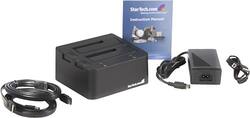
StarTech - Drive Dock - External - Black
- Key Specs
- Storage Drive Type: HDD (Traditional, mechanical hard disk drives are the most common type of storage because they're relatively inexpensive and offer huge capacities. However, they also generate both noise and heat. Solid state drives, also known as SSDs, are many times faster than hard disk drives and have no moving parts to wear out, but typically offer less capacity for the same price.)
- Interface(s): USB, eSata (Refers to the types of connections that devices use to interact and communicate with each other.)
- General
- Product Name: Drive Dock - External
- Brand: StarTech
- Model Number: SATADOCK22UE
- Performance
- Storage Drive Type: HDD (Traditional, mechanical hard disk drives are the most common type of storage because they're relatively inexpensive and offer huge capacities. However, they also generate both noise and heat. Solid state drives, also known as SSDs, are many times faster than hard disk drives and have no moving parts to wear out, but typically offer less capacity for the same price.)
- Compatibility
- Internal Or External: External
- External Hard Drive Type: Other (Physical characteristics of the hard drive, including size, weight and how you connect to your device.)
- Interface(s): USB, eSata (Refers to the types of connections that devices use to interact and communicate with each other.)
- Dimensions
- Product Height: 2.8 inches (The out of box height of the item. Height is measured as the vertical distance from the bottom of the item to the top as it would be primarily used or placed.)
- Product Width: 5.2 inches (The out of box width of the item. Width is measured as the horizontal distance from one side of the item to the other as it would be primarily used or placed.)
- Product Weight: 19.3 ounces (The out of box weight of the item.)
- Other
- UPC: 065030832335
Easily connect and swap two 2.5 or 3.5in SATA hard drives through eSATA or USB
This dual drive SATA HDD Dock provides fast, convenient access to 2.5" or 3.5" SATA (SATA, SATA II, SATA III) hard drives (HDD) or solid state drives (SSD) through either USB or eSATA, without ever having to open a computer case or mount hard drives in an enclosure.
Supporting one or two drives (tested with up to 4TB 3.5" and 1TB 2.5" drives per bay), SATADOCK22UE can be connected to the host computer through either USB 2.0 or eSATA - then, it's just a matter of inserting the desired 2.5" or 3.5" SATA drives (or combination of both) into one of the two (or both) docking station slots for instant access.
The docking station supports plug and play installation on most operating systems, making it a perfect solution for data recovery, drive imaging, software testing, or any environment that requires fast access to massive amounts of data (uninstalled or archived hard drives etc.). Plus, SATADOCK22UE features a small form factor design that requires minimal desk space for permanent connection to the host computer and provides enough hard drive surface exposure to optimize dissipation of operating heat.
SATADOCK22UE supports any 2.5" or 3.5" SATA drive and data transfer speeds of up to 1.5 Gbps (using eSATA) and 480Mbps (using USB 2.0) between host and dock - ensuring effortless data dumps or backups and hassle-free file transfers. The inclusion of a high-output power adapter versus other competitive dual drive dock models ensures stable performance for even the latest power hungry high-capacity hard drives. The value of this hard drive docking station can be extended, using a SATA to IDE hard drive adapter (SAT2IDEADP), which enables you to use any 2.5 or 3.5in IDE hard drive in a SATA hard drive dock slot.
Whats Included
- StarTech.com eSATA USB to SATA Hard Drive Docking Station
- Power adapter
- Owner's manual