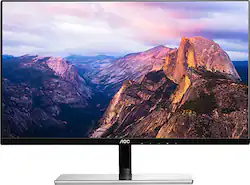
AOC - i2779vh 27" IPS LED FHD Monitor - Black/Silver
Model: I2779VH
SKU: 5770306
This item is no longer available in new condition. See similar items below
Customers have good things to say about the i2779vh 27" IPS LED FHD Monitor's screen size, price, and ease of use, frequently praising its clarity and resolution. However, some customers noted that the monitor lacks built-in speakers and has a limited number of HDMI ports. A few also mentioned that the stand could be improved and that the refresh rate is not the highest. Overall, the positive feedback on the screen size and value outweighs the negative comments regarding the monitor's features.
For the purpose I bought this, I'm thrilled. I wanted a second monitor to use at home with my laptop for productivity. My original plan was to get a 29-34 inch ultrawide (I do have discrete graphics in my laptop to power it) but the price of this panel and it's size caught my eye. Honestly for coding I really appreciate the extra height and it is plenty wide for tiling windows side by side. So for productivity this monitor is great. Something else I really liked was that it has vga input in addition to HDMI and display port which saved me having to buy another display port cable since I have enough old vga cables laying around and my laptop only has mini display port and vga out. Another plus is that the length of the power cable is generous (probably about 5-6+ ft) so it can reach if you need it too. It also has a reasonably small bezel (still far from bezel-less) which is great for minimizing the distance between it and my laptop monitor which makes for a more seamless experience. The cons, none of which are deal breakers for me and my use case, are the stand was somewhat difficult to attach a task made much easier with 2 people. Most of the plastic housing is glossy black, not matte. The support post that holds the monitor on the stand is not very rigid so if you bump your desk the monitor will shake for a little while (a matter of 2-3 seconds). It is only 1080p. The footprint of the stand is relatively large, but it is thin and flat so you can still use the space it takes up to hold smaller stuff. There is no up or down sliding adjustment, only tilt and no left right swivel. I haven't used it for gaming at all so I can't comment on that aspect (I'd expect it might be somewhat subpar for that use case, though it does claim decently low latency). For the price I paid I'm very happy with this monitor and if you are just looking to have some more low-cost screen real estate for productivity I would highly recommend this monitor.
Posted by OnlyAName
I already had one of these monitors for my office. Bought a second for a co worker. Love the ips it does not strain your eyes and allows you to use it all day with no glare. It is the perfect size for my needs and I am on a computer all day long. Very nice design easy to set up and use. The only negative are the speakers are on the back of the monitor and tend to distract my co workers. When you plug in an HDMI cable you CANNOT use other speakers.
Posted by horseman
I was looking for replacements for two older, mismatched monitors for my Mac Pro. I was a bit reluctant to buy this one at first. I thought AOC was some sort of generic or off-brand company. After talking to the clerk, she told me that is a very good brand and not many people know about it. In the store the sample images they had onscreen looked really nice and it was on a deep sale price. Bought two. They have a lot of image settings where you can adjust as you need. They even have a "break reminder" that displays a pop up message on screen to take a break! Was cute for the first few times but I quickly turned that off. Still may be good for some people. I did notice after a few days (may have been there since the beginning) that one pixel was out on one monitor. Not anything for me to return and mostly not noticeable. Other monitor is perfect. So far no other dead pixels. The design is nice and modern, however I would have liked a black base instead of the silver. But it's growing on me. The one thing I wish it had was a height adjustment. For me, I sit high in a chair so I had to build some platforms for them to raise up to a better eye level. Also, one of the monitors was a real bear in the way you connect the base to the monitor arm. Just be careful that you don't scratch the front when trying to get the base on. The other one fit nicer. However, both did exhibit a bit of skew in that they are not level. I think it is in the design or construction for the arm and base connection. I had to put some small shims under to make them level as I am finicky about things like that! Overall, nothing that is drastically bad and the pros outweigh the cons.
Posted by Tron8888
The vast majority of our reviews come from verified purchases. Reviews from customers may include My Best Buy members, employees, and Tech Insider Network members (as tagged). Select reviewers may receive discounted products, promotional considerations or entries into drawings for honest, helpful reviews.