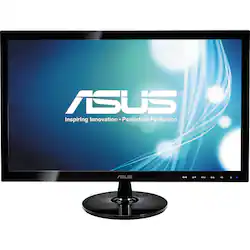
ASUS - 21.5" Widescreen LED Monitor - Black
Model: VS228H-P
SKU: 3706202
This item is no longer available in new condition. See similar items below
The vast majority of our reviews come from verified purchases. Reviews from customers may include My Best Buy members, employees, and Tech Insider Network members (as tagged). Select reviewers may receive discounted products, promotional considerations or entries into drawings for honest, helpful reviews.
I was happy to find a monitor this size for such an impressively low price. Overall it has been a good monitor, but 4 months after purchase one of the pixels went out leaving me with a black spot on the left side of my screen(see picture). Since then no others have gone out, and the screen has decent color, but a blacked out pixel is pretty annoying to stare at while working.
Posted by TheManDotCom
My new Asus M51BC-B08 computer came bundled with this Asus VS 228H-P monitor. I'm using the DVI connection, although it also has HDMI and VGA inputs. The 1920 X 1080 screen has a non-reflective surface, thankfully, and I find it superb for photography work. And of course if it is good for that, it will be good for about anything. I have just one real gripe about this monitor, and that is, for me at least, the controls are not intuitive, and therefore, I found it difficult to adjust. In the first place, the controls are six buttons on the bottom edge of the monitor--you can't see them from the working position. Second, the tiny control identifier markings on the front edge of the black monitor frame are in a dark gray color, and cannot be seen in normal lighting. A simple task like adjusting brightness becomes a major pain of going through a menu system, and pushing a number of buttons that you can neither see nor identify easily. Asus can do better, and should, because this is otherwise an excellent monitor. But after all is said and done, once you get it set the way you want it, it's great. I should mention that there are lots of preset modes requiring only one or two buttons that will probably satisfy most users. Another mini gripe is that I had a hard time finding an English manual. The one listed on the Asus website for download was in a format that the computer couldn't digest. But I eventually found one at another site. In summary, this is a fine monitor, and I have enjoyed using it except for the control system, which honestly is not used that often anyway.
Posted by Standav31
I was looking for a monitor to add to my desktop. The major items I needed were VGA input and VESA mount. I have it mounted on a multi-monitor stand. The VESA mounting is not listed on the specs but I verified it in the store before purchase. This in Monitor #3 on my desktop. Since it also has DVI and HDMI inputs I have also have it connected as Monitor #2 on my laptop computer. All I have to do is switch inputs between VGA and HDMI to share the same monitor between computers. I purchased this to replace a TV (with VGA) input to get a better display in the computer mode. This monitor size is large enough to be a good monitor but small enough to be used on most multi-monitor (3 and 4 monitor stands). The weight is light enough for most stand or arm mounting. The three different inputs make possible to use on most current and future computers. In the VGA mode my computer motherboard only recognizes it as "Analog display" not a specific model so it uses the general drivers. Due to the computer using the general Analog driver I am not able to get the published 1920 x 1080 resolution. It is equipped with a headphone jack that can provide audio out in the HDMI input mode, but has no speakers. I have not used it in the DVI input mode so I cannot comment on it. Very good price for features. It comes with part of the desktop stand installed on the monitor but was easily removed when installed it using the VESA mounting, instructions were in the setup guide. Almost did not find in my store, it was not with all the other monitors on display. I found Best Buy has additional monitors in the store connected to the computer systems. I had found online before I went to the store.
Posted by endymionno
Customers praise the 21.5" Widescreen LED Monitor's picture quality, affordability, and HDMI connectivity. Many appreciate its size and ease of setup, finding it easy to integrate into their workspace. While some users noted minor glare, the overwhelmingly positive feedback centers on the monitor's performance and value.