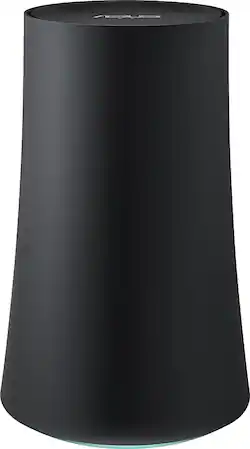
ASUS - OnHub Wireless-AC Router with NAT Firewall - Slate Gray
Model: SRT-AC1900
SKU: 4588401
This item is no longer available in new condition. See similar items below
Customers are enthusiastic about the OnHub Wireless-AC Router's ease of use and strong signal, with many praising its simple setup and reliable connection. The router's extended range is also frequently highlighted as a positive aspect, enabling better Wi-Fi coverage throughout homes. While some users noted that performance could be improved, the overwhelmingly positive feedback centers on the user-friendliness and reliable signal strength.
The vast majority of our reviews come from verified purchases. Reviews from customers may include My Best Buy members, employees, and Tech Insider Network members (as tagged). Select reviewers may receive discounted products, promotional considerations or entries into drawings for honest, helpful reviews.
I really wanted a router that I could prioritize devices on from my room, from my phone, so I could stream movies to my chromecast and cut my roommates bandwidth off (he streams shows while he torrents) while I do it. I have a rather large 3 bedroom apartment and above 15 competing wifis, so the signal can get noisey. From my room I was getting 14 mbps on a good day. Now I am getting 80 mbps from my phone. Really did not expect that. All of the tp link reviews complained about poor reception at distances. I figured Asus would do a better job and boy did they.
Posted by Mingram
This router covers all of the dead spots in my house (including a casita) and areas that I had to use extenders for before. It was very easy to install but it does require a smart phone for installation.
Posted by VinAZ
I used to be a network power user, but as I got older, I just want things to work. I've tried several times and setups before biting the bullet for this one. 2 combo modem/routers from my cable provider (first mistake), a Tp-Link combo of my own (didn't seem to be stable for my cable internet service), adding range extenders (I didn't like how I had to keep switching SSIDs from my main to my extended network). Things were just getting way too complicated, my iot devices kept cutting out and staying disconnected, and the fastest I could ever get was when I was wired into my laptop, then the speeds dropped off on wifi. Fast forward to this OnHub. I did my research and I've read that the Asus had better antennas for larger homes, although there were less of them. I went for quality, not quantity. I also got this one price matched, as I found a better price elsewhere, so I called and customer service was friendly and helpful and got the better price. Setup was a breeze! You do need an iOS or Android phone to set things up with their app, which I didn't mind (some people who previously reviewed minded). It made things clear and easy to do. I was up and running in mere minutes! Keep in mind though, that you still need a modem - coax from the wall to the modem is your internet, then the ethernet cable from the modem to the onhub connects your wifi. The app itself managing your network is simple and clear. There's a dashboard to show your health of the network, you can see your devices connected and the data it's downloading and uploading. There's a parental control feature that lets you pause Internet to any device you want. There's also a device priority feature which prioritizes your data. So simple, I LOVE IT! This is how all network routers should behave - all automatic and smart. For the cons, I'd say it is lacking for the power user. There's no way to set up static IP (I don't really need that feature), there's no feature to add an external USB drive to it for a network drive, there's no WPS feature (not that I know of), and there's only one extra ethernet port to get wired in (you'll need a switch if want to connect more to it)
Posted by Selectstart