The vast majority of our reviews come from verified purchases. Reviews from customers may include My Best Buy members, employees, and Tech Insider Network members (as tagged). Select reviewers may receive discounted products, promotional considerations or entries into drawings for honest, helpful reviews.
The Aluratek Android Auto/Apple carplay adapter works like a champ. A quick flick of the switch on the module changes the mode between Android Auto and Car Play.
Posted by DavidS
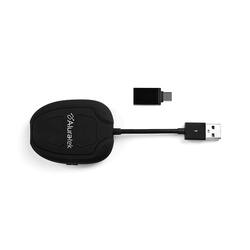
I had never heard of Aluratek until visiting Best Buy looking for a case for an older phone. Their "Wireless CarPlay Adapter" was hanging up in the mobile accessories section. Since I have an iPhone and my wife has a Samnsung, I wanted to find something that worked with both for our 2019 Subaru Legacy Premium. After a little browsing, I found this online. I was apprehensive at first due to the low cost and the appearance. When it arrived, it met all of my expectations: It is a cheap accessory in every regard. The rubberized finish reminds me of early 2000s proucts, and its light weight suggests that this uses a very thin PCB and some hastily-manufactured SOCs which do 90% of the work. Surprisingly, it works fairly well: I have only had this a week, but so far it works about 90% of the time. Because CarPlay uses both Bluetooth and a second line of communication (WiFi for wireless, USB for wired) this device like any other CarPlay device has a built-in modem for WiFi Direct. Pairing was quick. Once Bluetooth is connected, the devices pair up WiFi nearly instantly. It was a hassle-free "installation." That being said, it isn't perfect of course. When it is working, there is an obvious delay in audio, much more so than with a wired connection. You will notice it right away if you are connected and watching a video on your phone while hearing the audio several hundred milliseconds later. That audio also translates into poor voice navigation, especially if you need to make a lot of turns in the city. You generally will have plenty of advanced notice on the highway. As far as music goes, you won't notice or even care about the latency. It has failed to connect properly on three occasions however. Twice after booting, the Bluetooth audio must not have connected, as my phone was being controlled by my radio controls just fine but the audio was coming from my phone. There was another occasion when the connection simply crashed completely. This may be as much a fault of my iPhone 12 Mini 64GB as anything else, as I have had similar issues wired... but generally speaking, when wired, my connection failed to initiate entirely, where in this case the audio connection was the only point of failure at startup. Startup is, of course, a bit more delayed. But it isn't terrible. You will see a bland looking Aluratek splash screen as the connections are established and your stereo recognizes the device over USB. When things do fall into place, it is relatively seamless even if it takes a few seconds longer. I did initially set up my wife's Galaxy S21+ with this and it seems to work, though I'll be frank: I expected more from Android Auto than what I saw. Since I have not used AA myself, I couldn't tell you if it is the fault of the device or if it's just AA that lends to low resolution and jittery scrolling in navigation. I don't think my wife will care. If this device can be updated via USB or Bluetooth and there are firmware upgrades to be made to improve connectivity, I'll be very happy but frankly, I don't expect much. It seems to do the job, but if you absolutely require a 100% reliable connection, I'd spend a bit more on a better device. It's a good start for now, but not without its flaws. Thankfully, it hides easily in the compartment under the radio, because this thing is ugly. It looks like a miniature radar detector from 1998 and I imagine that after a few years of riding around in my car it will look worse.
Posted by MortallyWounded
This a good tool to avoid the wires and keep a good connection
Posted by VictorG