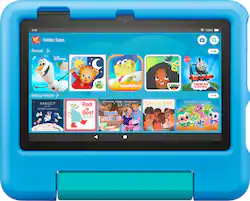
A full-feature tablet for kids. Includes ready-to-go bundle - Fire 7 Kids tablet includes a sturdy Kid-Proof Case with built-in stand, 1-year of Amazon Kids+, and a 2-year worry-free guarantee.
Q: Can you use headphones with this tablet?
A: Hello! Yes, you sure can. You can use Bluetooth headphones or you can connect a 3.5 mm headphone to this as it has a 3.5 mm jack on the side of the tablet. Hope this helps and have a great day!
Q: Can Disney+ be added to this tablet?
A: Hello AntimoClan, Thank you for your question, Yes, you can add the Disney+ app on this tablet. Easy-to-use Parent Dashboard allows you to filter content based on child's age, set educational goals and time limits, and grant access to additional content from Netflix, Disney+, and Zoom. Have a great day!
A: Hello, The Fire HD8 Tablet does have a microphone and camera! Face Time is not available as that is an IOS feature. However, the Drop In feature with Alexa works the same way for video calling. You can go to the Alexa App on your tablet and follow these steps: -Select communicate -Select the contact icon in the top right corner -Select the menu in the top right corner -Select Add contact to add individuals you want to communicate with, then hit import contacts to enable Alexa to use contacts from your devices address book. If your contacts are linked through the Alexa App already you will be able to use drop in video calling with other echo/ tablet users as long as they are in your contacts. Hope that helps, and have a great day!"
A: Yes, it does support ABCmouse
A: Hello and thank you so much for your question! The term we use for this feature is called App Pinning and yes you can. You will want to navigate to your Settings Icon>Security and Privacy>Toggle App Pinning On>Go to App pinning Preferences to set to desired settings. Once that is all complete, you can enable and disable App Pinning by loading an app or video and then tapping Square icon or swiping up during video playback to make the Square icon visible and tap it. There you can tap the icon of the app you want to pin and tap Pin. This will disable any button pressing or screen tapping until you tap and hold both the Square and Go Back Arrow simultaneously to help prevent a child from moving away from the video or accessing anything they shouldn't be. Thanks again for your question and I hope you have a terrific day!
Q: Is a case included with the tablet??
A: Hello, Pamela2022! The Kids and Kids Pro tablets come with a case included, but our regular Fire Tablets do not come with a case. Thank you for your question, and have a great day!