Presidents’ Day SaleEnds February 16. Limited quantities. No rainchecks.Shop now

Skip to contentGo to Product SearchGo to Footer
Main Content
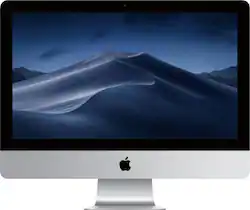
product image

Apple - 21.5" iMac® - Intel Core i5 (3.4GHz) - 8GB Memory - 1TB Fusion Drive - Silver

Model: MNE02LL/A
SKU: 4881200
This item is no longer available in new condition. See similar items below
  • Key Specs
    • Screen Size: 21.5 inches (Size of the screen, measured diagonally from corner to corner.)
    • Processor Model: Intel 7th Generation Core i5 (Your computer's processor is like its brain. Working in combination with system memory, the power of the processor determines the complexity of software you can run, how many programs you can have open at the same time, and how fast those programs will run. Most computers feature an AMD, Intel or Snapdragon processor.)
    • CPU Base Clock Frequency: 3.4 gigahertz (Actual central processing unit (CPU) speed may vary by device configuration and design. The average rate at which the processor is able to execute tasks under normal operating conditions as asserted by the manufacturer.)
    • Storage Type: HDD
    • Total Storage Capacity: 1000 gigabytes
    • System Memory (RAM): 8 gigabytes (Random-access memory (RAM) is a computing device's short-term data storage, which allows active information to be accessed quickly. The size and type of RAM determines how efficiently the device can handle large amounts of information at one time. For example, gaming or video editing requires more RAM for optimal performance.)
    • Graphics: AMD Radeon Pro 560 (Often referred to as a "graphics processing unit" (GPU), this device is responsible for displaying image content and decoding/encoding video content in programs and games.)
  • General
    • Brand: Apple
    • Model Number: MNE02LL/A
    • Product Name: 21.5" iMac® - Intel Core i5 (3.4GHz) - 8GB Memory - 1TB Fusion Drive
    • Color: Silver
    • Year of Release: 2018
  • Display
    • Display Type: LED
    • Screen Size: 21.5 inches (Size of the screen, measured diagonally from corner to corner.)
    • Screen Resolution: 3840 x 2560 (UHD) (Screens come in a range of resolutions (measured in pixels, horizontal x vertical). The higher the resolution, the greater the picture quality.)
    • Touch Screen: false (Touch-screen devices make navigating more intuitive. Using a touch-screen display, you can do things such as tap to select, hold and drag to move items, swipe to scroll, and pinch to zoom.)
    • Multi-Touch Screen: true (A screen that recognizes multiple points of contact, allowing for intuitive navigation functions such as pinch to zoom.)
  • Processor
    • Processor Brand: Intel
    • Processor Model: Intel 7th Generation Core i5 (Your computer's processor is like its brain. Working in combination with system memory, the power of the processor determines the complexity of software you can run, how many programs you can have open at the same time, and how fast those programs will run. Most computers feature an AMD, Intel or Snapdragon processor.)
    • Processor Model Number: Not provided
    • CPU Base Clock Frequency: 3.4 gigahertz (Actual central processing unit (CPU) speed may vary by device configuration and design. The average rate at which the processor is able to execute tasks under normal operating conditions as asserted by the manufacturer.)
  • Storage
    • Storage Type: HDD
    • Total Storage Capacity: 1000 gigabytes
    • Hard Drive Capacity: 1000 gigabytes (The amount of data that can be stored on the device's mechanical hard drive. Hard disk drives (HDDs) typically have larger capacities than solid state drives (SSDs) but may have slower speeds.)
  • Memory
    • System Memory (RAM): 8 gigabytes (Random-access memory (RAM) is a computing device's short-term data storage, which allows active information to be accessed quickly. The size and type of RAM determines how efficiently the device can handle large amounts of information at one time. For example, gaming or video editing requires more RAM for optimal performance.)
    • Type of Memory (RAM): DDR (Each type of RAM delivers a different level of speed, bandwidth, energy efficiency and performance.)
    • Number Of Memory Slots: 0
  • Graphics
    • Graphics Type: Integrated (Dedicated graphics uses a separate graphics card for processing video images. Because it does not use memory from the system's RAM, there is no extra burden on the CPU and graphics are processed more efficiently. Integrated graphics shares system RAM to process video images.)
    • GPU Brand: AMD Radeon
    • Graphics: AMD Radeon Pro 560 (Often referred to as a "graphics processing unit" (GPU), this device is responsible for displaying image content and decoding/encoding video content in programs and games.)
  • Compatibility
    • Operating System: Mac OS (The operating system manages all software and hardware, including files, memory and connected devices. Most importantly, it lets you interact with your device and your programs in a visual way; otherwise, you'd be typing computer code to get anything done.)
  • Connectivity
    • Display Connector(s): 1 x HDMI, 2 x Thunderbolt (The number and type of connectors used to connect to an external display.)
    • Number of HDMI Outputs (Total): 1
    • Number of Thunderbolt Ports (Total): 2
    • Number Of DVI Ports: 1
    • USB Ports: 4 x USB-A (The number and type of USB ports the product has.)
    • Number of USB Ports (Total): 4
    • Wireless Connectivity: Wi-Fi, Bluetooth (The manner in which a device sends data to another device over a short distance without the use of wires or cables.)
    • Wireless Standard: N (The wireless networking protocol used by the device. Each iteration of the protocol is based on the 802.11 standard developed by the Institute of Electrical and Electronics Engineers (IEEE) Standards Association. Denoted by letters following 802.11 (802.11a, 802.11ac, etc.), each version, published in alphabetical order, encompasses all previous versions.)
    • Wireless Networking Standard: Wi-Fi 4 (The wireless networking standard used by the device. Each iteration of the standard developed by the Wi-Fi Alliance corresponds to an existing IEEE 802.11 protocol; for example, standard 802.11ac (or AC) is termed Wi-Fi 5. Refers specifically to the standard the device is designed to use, but ultimately determines product interoperability and backward compatibility including previous versions.)
    • Number Of Ethernet Ports: 1
  • Cooling
    • CPU Cooling System: Air, Air
  • Camera
    • Built-In Webcam: true
    • Front-Facing Camera: true
    • Front Facing Camera Video Resolution: 720p (Refers to the number of pixels, both horizontally and vertically, used by the camera facing the user to capture video. The higher the resolution the finer the video detail that can be seen.)
    • Built-In Microphone: true
  • Features
    • Media Card Reader: true (A hardware device that allows for access to data on a memory card and enables the transfer of its files to a computer. These devices may have one or multiple slots for various types of memory cards, and may be integrated into the computer or available as an external device.)
    • Mac Features: Siri
    • Stylus Dock: None
  • Dimensions
    • Product Height: 17.7 inches (The out of box height of the item. Height is measured as the vertical distance from the bottom of the item to the top as it would be primarily used or placed.)
    • Product Width: 20.8 inches (The out of box width of the item. Width is measured as the horizontal distance from one side of the item to the other as it would be primarily used or placed.)
    • Product Depth: 6.9 inches (The out of box depth of the item. Depth is measured as the distance from the front of the item to the back as it would be primarily used or placed.)
    • Product Weight: 12.5 pounds (The out of box weight of the item.)
  • Certifications Listings & Approvals
    • ENERGY STAR Certified: true (Devices carrying the ENERGY STAR service mark, such as computer products and peripherals, kitchen appliances, and other products, generally use 20% to 30% less energy than required by federal standards.)
    • EPEAT Qualified: true (The Electronic Product Environmental Assessment Tool (EPEAT) was designed to provide an environmental assessment tool for purchasers. In order to qualify for EPEAT, a product must meet all 23 required criteria.)
    • EPEAT Level: Gold (The Electronic Product Environmental Assessment Tool (EPEAT) was designed to provide an environmental assessment tool for purchasers. In order to qualify for EPEAT, a product must meet all 23 required criteria. Products are rated Bronze, Silver or Gold based on how many of 28 optional criteria they meet (below 50%, 50%, 75%).)
  • Included
    • Wireless Keyboard: true
    • Wireless Mouse: true
    • Speaker(s) Included: true
  • Warranty
    • Warranty - Parts: 1 year
    • Warranty - Labor: 1 year
  • Other
    • UPC: 190198086235

iMac performance is at an alltime high with faster Intel Core processors, powerful Radeon Pro 500-series graphics, Thunderbolt 3 (USB-C) connectivity, and stunning Retina 4K displays that shine 43 percent brighter and support one billion colors.

Compare Preconfigured Models of iMac 21.5-inch

    Whats Included
    • 21.5" iMac® - Intel Core i5 (3.4GHz) - 8GB Memory - 1TB Hard Drive
    • Lightning to USB Cable
    • Magic Keyboard
    • Magic Mouse 2
    • Power cord
    • 21.5" iMac® - Intel Core i5 (3.4GHz) - 8GB Memory - 1TB Hard Drive
    • Lightning to USB Cable
    • Magic Keyboard
    • Magic Mouse 2
    • Power cord

    Q: Does Best Buy offer set up like the Apple Store does? Or any recycle programs for old Macs?

    A: You need to be very specific with Geek Squad and the Apple set up. If you just as to have your files transferred over to the new computer they will make a "transfer" file with all of your documents. It will not carry over anything else. You are better off doing a "time machine" backup just prior to the transfer and ask the Geek Squad to to a Time Machine backup transfer for that specific date and time. This will then clone your new computer with everything, including applications and customization. They will resist and tell you to just download the applications again, however, you will then need to add you modifications and all of your passwords. It is not an easy task. ALSO, tell them what you want to NAME your computer and the password. If you do not they will call your computer Owner and it is VERY HARD to change without messing up the root for all of your files. Not aware of any recycle program, but most of the time you are better donating the old equipment. Good Luck and hope this helps.

    Q: Does Best Buy have technicians who can increase Ram from 8GB to 16?

    A: If Best Buy doesn't, Apple can recommend a certified technician in your area. I wanted to increase my ram, so I got the name of a certified technician in my area and they told me this machine was built plenty fast and that I should use it before I upgrade. I took their advice and haven't had any cpu issues at all!

    Q: Can I play Fortnite on this computer

    A: Yes, I played it max settings and I had no issues at all.

    Q: is this computer compatible with any type of Brother printers?

    A: If your printer comes with wifi it won't be a problem, connection is super fast and super easy. It also comes with 4 USB and 2 thunderbolt ports as well as an ethernet port. So I don't think you'll have any printer connectivity issues with the iMac. Hope this helps.

    Q: Apple imac 21.5 1TB Fusion Drive Assuming that this model comes with Sierra, What happens when High Sierra comes out? Would I be eligable for a free up-grade? When is it expected to come out?

    A: It did come with Sierra. High Sierra is available for download, on Sept 25th, according to what I've read online. This machine would certainly be eligible for the download. I always wait a week or 2 after an update or a new OS is available though. I like to sit back and read what others say about it....are there any bugs to be worked out, etc.... When it seems bug free, then I'll download. The reason I bought the new iMac is because my old one, would not be eligible for anymore new operating system downloads.. My old unit is just over 7 years old. I won't even try to put High Sierra on it.

    Reviews