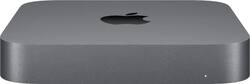
It's a huge update to Mac mini, ever. Eighth-generation 6-core processor. Faster 2666MHz DDR4 memory. A variety of new ports, including Thunderbolt 3, HDMI 2.0, and available 10Gb Ethernet.¹ And blazing-fast all-flash storage so you can load giant files and launch apps faster than ever.² The re-engineered Mac mini offers perfect performing. Ready for the desktop. And beyond.
A: It involves the complete disassembly of the unit and removing the motherboard from the case. Here is a link to the rear down from https://m.youtube.com/watch?v=i1gFhTuFjHE
A: Unfortunately no. They only carry standard configs of Apple and there are only 2 standard models.
A: Don’t have them do it. Just make a Timemachine backup and do it yourself. If you have a portable HD, which I must highly recommend, or even a large capacity SD card these days, you can make a time machine backup. When you power up the new one, the computer will ask you at the right time to plug in your portable HD and simply transfer EVERYTHING over to the new computer. If you have a larger drive than the new one, then you can just choose which apps Not to load on the new one.
Q: Hello, the mac mini open box, is Apple's warranty for 12 months? Thanks
A: It depends on when the computer is initially turned on and registered. If it has never been registered, then Apple will have to decide when it starts after you call customer support
A: You can’t upgrade the internal storage as it is soldered. The only option is to special order a mini with more storage and pay Apple’s high premium. You can obviously add fast external storage cost-effectively, however I ran in to an unexpected snag when trying to migrate a TM backup of my old User dir from a dead MacBook Pro to my new mini with only 250 gb SSD internal and 1 TB external storage. The migration utility wants any Users dir to go to the internal drive and it is an all or none migration. My old User dir is about 300 gb so it was no go. Maybe a Users dir could be recreated on the external drive and then the internal Users could be a link?
Q: What software is installed.....Need Garage Band.
A: GarageBand appears to be included. See https://www.apple.com/mac-mini/specs/ and scroll towards the bottom of the page to see a list of all "Built-in Apps". Note, they do specify "iMovie, GarageBand, Pages, Numbers, and Keynote are available on the Mac App Store. Downloading apps requires an Apple ID and a device that is compatible with the OS version required for each app." I believe mine had it on there already when I first booted up.