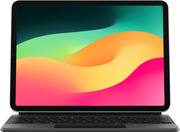
Customers find value in the Magic Keyboard's high-quality keyboard, ease of use, and sleek design. Many appreciate its protective qualities and long battery life, although some find the weight and price to be drawbacks. The charging feature also receives positive feedback. However, concerns exist regarding the level of iPad protection and the keyboard's foldability.
You can check out my YouTube Review here: (https://youtu.be/q4e7_Cr9fqs) WHY SO EXPENSIVE? - Let’s get the first vomit inducing point out of the way. Apple products cost a premium, so you can get an elite status saying, “look at me I’m rich or willing to sell my kidney for one of their products.” Now that we are done with that lets move on. - You are buying an actual keyboard, with full-size, backlit keys, with a scissor mechanism with 1mm travel that are quiet. These are the same switches and keys that are used on their newest laptops. - The backlit keys work in conjunction with the light sensor of your iPad to work dynamically based on your environment. - You are buying an actual track pad, that is a single piece of glass, designed with multi-touch gestures in mind, with equal pressure points across the entire pad. It may be small, but I doubt you’ll find a better one in a case and you’d be hard pressed to find a better one in a laptop. - This “Case” provides front and back protection. So, is this keyboard case ridiculously expensive? Compared to other Apple products. Not at all. It is competitively priced. Compared to non-apple products? You are paying about twice as much. But for that price you are getting the absolute best peripherals (mouse and touchpad) that seamlessly work, requires no extra hassle, and fits all together in a single package. OTHER FEATURES: - The iPad attaches to the floating cantilever design via magnets which allows for easy placing and easy removal, so you can easy go from “laptop mode” to “tablet mode” to draw on it or use it for other things. Which other cases don’t allow you to do easily. - The floating cantilever design also gives you the ability to find the best angle for any given circumstance. Whereas, most other cases just allow you to pick between a couple different choices. This gives it the maximum portability as it can be used on nearly any surface. - It comes with a USB-C port for passthrough charging via the 3 pogo pins. Which could also be argued is wireless charging for your iPad. This also frees up the USB-C port on your tablet for other things. - This case doesn’t have a battery, doesn’t need to be charged, and doesn’t need to be turn on or off. As it is powered completely by the three pogo pins from the iPad itself. Once it attaches the keyboard seamlessly connects, as does the trackpad, and produces less lag than its Bluetooth counterparts. Once you remove the iPad everything powers down and disconnects just as easily. - First time setup is seamless. You place your iPad on the stand, and it does everything for you. You just start typing or using the mouse immediately. CUSTOMIZABILITY: - Cursor color, - Size, - Tapping, - Pointer speed. - Form shaping - Etc. LAYOUT OF THE KEYBOARD: I wish there as an actual delete key as I tend to use that often. But Instead I have to use control D. Also, for the 11 inch model not everything is full sized like it is for the 12.9 inch model. PROS: - In true Apple fashion it just works. - Keys feel great to type on and are very responsive. - Mouse pad feels excellent. I am very picky and hate most mouse pads. But this has excellent feel, your finger moves smoothly over it, and the clicks are crisp and just the right pressure no matter where you press. - Can use the same shortcuts on the iPad as you use for the Mac for the most part. - Touch controls on mouse are intuitive. You think this should work and it usually does. - Heavy which is a good thing. This allows it to not just fall over when placed on a desk or in your lap. As the heavy part is the tablet itself which is opposite of a normal laptop. - The whole thing is solid. It feels quality. The hinge is stiff, hard, and snaps into place. The magnets are strong, so your device doesn’t just fall off. This makes it ultra-portable. CONS: - Battery drains just a bit faster than without the keyboard. This is very minor. - Hard to adjust the brightness of the keyboard. It doesn’t need function keys but adding that to the arrow keys would have been nice. - Mouse support still has a way to go before it feels like a true laptop. As somethings that feel intuitive to do on a laptop still doesn’t work well on the iPad. - Click and dragging text. Especially in Microsoft Word. - In YouTube app (which I don’t think supports keyboards) you can click next video panes. Must use your finger instead. - Mouse doesn’t always register you are over a click area. So you have to move and then replace or just use your finger. -When selecting a place inside a word it will highlight the whole word instead of where the cursor is. Which then makes you have to use the arrow keys to be perfectly exact. - Mouse would not always click on things and I instead had to use my finger. This should improve with future updates. It was better when _ feature was turned off. - Heavy. Which takes the overall weight of the iPad over some of the lightest laptops. - Not all apps support keyboard and mouse. Such as YouTube. - Scissor key switches are susceptible to dust and debris. Also, does not do well with liquids. CONCLUSION: This is a classic Apple product. In the sense that it just works, and it elevates the overall experience of an existing product. But cost is huge. But in my opinion worth it for my needs. But that will be a choice you will have to make yourself. If the cost is justified by the things you gain from it. For me, I had two problems with the iPad. The first being it was hard to get into a super comfortable position when you were using it. As you either had to hold the device or put it in a case and choose one of two positions to get the right angle and only if it was on a hard surface. Forget about using it on your lap or while prone. And if you had to move it around a lot it would fold into itself often and usually require two hands to set it back up. So, there was a huge lack of stability and portability there. This is completely solved with this new case. As it takes on everything that is great about a laptop but in a smaller package. I can lay prone and put it on my chest. Or I can set it on any surface and type. If I’m working out or fixing something while watching a video it is easy to place and move around with one hand. The second problem I had was I had a hard time making it a productive device without keyboard and mouse support. I’ve used my iPad as a tablet for a long time, but I struggled to make it a productive device. Immediately, and I mean immediately upon attaching this keyboard my tablet went from being just a tablet to a productive machine. As it feels like a laptop but in a more compact form. Most of the apps that I used worked seamlessly with mouse and keyboard and I forgot I was using a tablet at all. The screen itself is great. As is the battery life.
Posted by SirGalahad
I'm an average person, just like you. I use my iPad for a variety of tasks, including writing, browsing the web, watching videos, and playing games. I'm not a tech expert, but I know what I like in a keyboard. I've been using this keyboard for a few weeks now, and and it's the best keyboard I've ever used with my iPad. It's comfortable to type on, it has a great trackpad, and it's very portable.--------------------------------------------------------------------- DESIGN AND BUILD QUALITY This is a beautifully designed and well-built keyboard. It's made of high-quality materials, including aluminum and plastic. It is very thin and lightweight, but when you add up the iPad it gets a little bit heavy, but it's easy to carry around. It has a floating cantilever design, which means that the keyboard deck is suspended above the base. This gives it a sleek and modern look, and it also makes it easier to clean. The keys are backlit, so you can see them even in low-light conditions. The keys are also well-spaced and have a comfortable amount of travel. Overall, this keyboard is very sturdy. It doesn't flex or bend when I'm typing on it and is very quiet. I can type on it without disturbing my wife. It's easy to clean, I can simply wipe it down with a damp cloth.------------------------------------------------------------------------------------------------- TYPING EXPERIENCE The keys are well-spaced and have a comfortable amount of travel. They also have a nice tactile feedback, which makes it easy to tell when you've pressed a key. It's comfortable it is to type on. I can type for long periods of time without my fingers getting tired and is very quiet. I'm a somewhat fast typist, and the keyboard keeps up with me, and even though I'm not a touch typist it makes it easy to type accurately. I like the fact that the keys are backlit so I can type on it even in low-light conditions.------------------------------------------------------------------------------- TRACKPAD It has a great trackpad. It's large relative to its size, responsive, and it supports a variety of gestures. It's made of glass, which gives it a smooth and comfortable feel. And it's also very accurate, making it easy to point and click on things, and also supports a variety of gestures, such as swiping to scroll, pinching to zoom, and tapping with three fingers to show Mission Control. These gestures make it easy to navigate your iPad and interact with apps. I like the fact that the trackpad is large. It gives me plenty of space to move my finger around. And, it's very accurate, I can easily click on small icons and text. I like the fact that it supports gestures because it makes it easy to navigate my iPad and interact with apps.---------------------------------------------------------------------------------------------------------- ADDITIONAL FEATURES The keyboard has a few more features that I like: I like the Touch ID sensor. It makes it easy to unlock my iPad, and it's more secure than using a passcode. I like the USB-C passthrough port. It allows me to charge my iPad while it's attached to the keyboard, so I don't have to worry about running out of battery. I like the adjustable viewing angles. I can find a comfortable position to work or relax, no matter what I'm doing. The additional features make it a very versatile and convenient keyboard.---------------------------------------------------------------------------------------------------------------------- CONCLUSION This is a great keyboard for the 11-inch iPad Pro. It's well-designed, well-built, and has a great typing experience. The trackpad is also large, responsive, and accurate. It also has a few additional features that make it very useful, such as the Touch ID sensor, USB-C passthrough port, and adjustable viewing angles. Overall, I'm very happy with it. It's the best keyboard I've ever used with my iPad even though it is the most expensive too.
Posted by FernandoR
Great Design, and workability. Apple quality is far above the other competitors products. Although other versions will suffice, this keyboard has it all. I use this with my iPad Air 5th generation. It gets charged when it connects magnetically to iPad. The price is significant and it should be considered if you are anything but a graphic designer.
Posted by CoryLee
The vast majority of our reviews come from verified purchases. Reviews from customers may include My Best Buy members, employees, and Tech Insider Network members (as tagged). Select reviewers may receive discounted products, promotional considerations or entries into drawings for honest, helpful reviews.