Outlet EventEnds Oct. 26. Limited quantities. No rainchecks.Shop now

Main Content
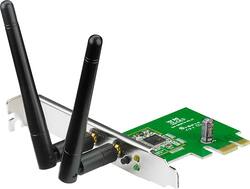
product image

ASUS - 802.11n PCI Express Wi-Fi Adapter - Multi

Model: PCE-N15
SKU: 4346493
This item is no longer available in new condition. See similar items below
  • Key Specs
    • Adapter Type: Wireless
  • General
    • Brand: ASUS
    • Model Number: PCE-N15
    • Product Name: 802.11n PCI Express Wi-Fi Adapter
    • Color: Multi
  • Network
    • Compatible Wireless Standard(s): Wireless-N (The wireless networking standard(s) the device is backwards compatible with. This includes networking protocols based on the IEEE 802.11 standard (alphabetically ascending) and the Wi-Fi Alliance standard (numerically ascending), both of which provide high-throughput wireless local area networks (WLANs). Devices designed to work with specific standard(s) will be backwards compatible with previous versions but may not run at optimal performance when using earlier iterations.)
  • Compatibility
    • System Requirements: PC: Windows XP (32- or 64-bit), Vista (32- or 64-bit) or 7 (32- or 64-bit); Linux: Kernel 2.6 (Ubuntu) (The software that a product must have for it to be able to integrate with another product.)
  • Dimensions
    • Product Height: 0.9 inches (The out of box height of the item. Height is measured as the vertical distance from the bottom of the item to the top as it would be primarily used or placed.)
    • Product Length: 0.9 inches (The out of box length of the item. Length is measured as the longest dimension of the item.)
    • Product Width: 4.7 inches (The out of box width of the item. Width is measured as the horizontal distance from one side of the item to the other as it would be primarily used or placed.)
    • Product Weight: 2.2 pounds (The out of box weight of the item.)
  • Warranty
    • Warranty - Parts: 3 years
    • Warranty - Labor: 3 years
  • Other
    • UPC: 610839379774

This Asus PCE-N15 Wi-Fi adapter features a PCI Express interface for simple connection to your computer and provides quick access to an 802.11n wireless network by utilizing a reliable 2.4GHz wireless operating frequency.

Networking Buying Guide

  • Complies with 802.11n standards: Backward compatible with 802.11b/g networks.
  • Speeds up to 300 Mbps: For fast data transfer.
  • 2.4GHz wireless operating frequency: Helps ensure efficient operation.
  • PCI Express interface: Enables simple connection to your computer.
Whats Included
  • Asus 802.11n PCI Express Wi-Fi Adapter
  • 2 dipole antennas, low-profile bracket
  • Support CD-ROM
  • Owner's manual

Q: Can you inform me if this item will meet my needs?

A: Yes, this PCIe wireless adapter is compatible with your HP as long as it has a free PCIe slot. If you've installed any other PCIe devices in this machine then you should double check and make sure you have a free PCIe slot. To install this adapter you just want to make sure the card is physically seated properly in the PCIe slot and then install the drivers for this wireless adapter. This adapter is compatible with your Motorola Surfboard modem/router.

Q: Is this adapter compatible w/my: Asus Desktop, Model# CM6730-06

A: If your PCIe slot is not occupied then yes, you can install this card into your system. Please note that you have only 1 PCIe slot and 2 PCI slots. The PCIe card does not work in a PCI slot.

Q: Will this replace my existing LAN

A: You could use this to replace your wired connection in a desktop computer IF you have a wireless access point or wireless router. I personally prefer wired connections because they are more secure and faster. The advantage to wireless access is portability. You can move your computer to a different location and not have to worry about moving the network cable with it.

Q: Lenova H520 with Windows 8.1 compatable?

A: Yes, there is a driver available on the ASUS site to support Windows 8.

Q: Compatable with Mac?

A: The specs say no. System Requirements PC: Windows XP (32- or 64-bit), Vista (32- or 64-bit) or 7 (32- or 64-bit); Linux: Kernel 2.6 (Ubuntu)

Q: will this work on my ET1331G-05w emachines computer

A: Please ensure that your computer has PCI Express. For full details, please visit http://www.asus.com/us/Networking/PCEN15/specifications/

Q: What is the difference between a PCI and PCIe slot and how can I tell the difference?

A: Look inside your Motherboard and see if the picture of the slot resembles the one in your motherboard.