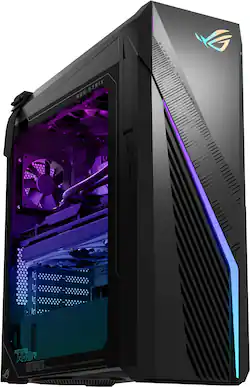
Annihilate your competition with this ASUS ROG gaming desktop. The Intel Core i7 processor and 32GB of RAM deliver rapid performance during fast-paced action, while the 1TB SSD provide plenty of storage for large files and downloads. This Bluetooth-enabled ASUS ROG gaming computer features an NVIDIA GeForce RTX 4060Ti graphics card for tear-free rendering of 4K games.
A: I'll answer my own question. I spent several hours searching through videos, threads, etc. and didn't find much. A couple of videos sharing that you can mount an SSD directly to the bottom of the case (inside near PSU). I went to Best Buy today and found an Insigna Dual SSD Hard Drive Mounting Bracket (NS-PCDSSDM). It fits perfectly! I mounted 2 SSDs to the mount, attached the SATA cables and power connectors to the drives, slid the power cables out of the way, attached the mount to the bottom with the included screws, tucked the extra power cables into the case, closed everything up, and all seems to be working fine. One concern is the drives may get too hot. I'll have to keep an eye on that. Note: I don't think you can mount a mechanical HDD in this location. It's too tight for the cables.
Q: Is this gaming oc vr ready? Will it run smoothly with vr?
A: I can only relate my sad little tale. I recently purchased a Quest 3. I'm a hobbyist and play around writing Unity applications and when I found out I couldn't use my old laptop for PCVR (1080Ti) I purchased this desktop computer. I figured it would far exceed anything I needed and I could upgrade it in years to come. All applications like Virtual Desktop, Immerse, BigScreen and SideQuest all work as expected. But I've been unable to get Link to connect to the Oculus App, in spite of purchasing the official Quest cable, updating all drivers and BIOS I still have not been able to get it to work. I have to use Virtual Desktop to get to my Steam apps. I've been in touch with Quest support. Still no luck. The computer is great! But I've not been able to make it 100% VR compatible with either Link or Airlink. I can work around it for now and I hope that a future update from Meta fixes the problem someday.
A: It's OK to run an AIO colled PC 24/7 as long as the cooling system is well manintained.
Q: How loud is this computer when it's running? I had a gaming computer before and the fan was so loud.
A: It is whisper quiet, this pc comes with an app that shows cpu, gpu status and rpm of fans. Plus the side panel is clear plexiglass which is pretty cool.
A: 8 efficiency cores, 8 performance cores, and 8 additional threads for a total of 24 logical processors
Q: Does this computer come with a mouse and keyboard?
A: Yes it does, though they are very basic.
A: It is easily accessible if you are hardware savvy. ASUS doesn't provide hardware modification/customization support, please do it at your own discretion.
Q: What type of ram does it have? DDR4 or DDR5?
A: DDR4. Picked mine up yesterday and it has cheap RAM installed: SKHynix HMAA2GU6CJR8N-XN 16GB DDR4 3200Mhz 1Rx8 PC4-25600 non-ECC Unbuffered CL22 288-Pin DIMM 1.2V Memory Module for Desktop. I'll be swapping that out at some point.