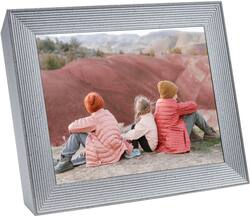
The Mason Luxe digital photo frame pairs simple design elements with meticulous craftsmanship for a striking sculptural effect. Its Ultra HD 9.7” display presents your memories with vibrant colors and brilliant clarity. Simply download the free app, pair your frame and start adding your photos. With unlimited storage, you can easily upload 10,000+ images, never having to choose between your favorites. Invite your friends and the entire family to share their photos too! It’s never been easier to stay connected to loved ones and enjoy all the amazing photos stuck on your phone. Changing the orientation of the frame from portrait to landscape is as easy as turning it on its side; our smart technology rotates the photo for you. Use the integrated touch bar to scroll through your images or customize the playback settings using the Aura app.
A: No. There are zero subscription fees associated with Aura..
A: Using the free Aura app, you can easily invite friends and family to your frame. Invited frame members need to set up a (free) Aura account and they can then contribute to the frame via their own Aura Frames app, the direct email-to-frame upload option or the Web Uploader.
Q: Does this frame work with 5G internet. Ou aura frame purchased several years ago doesn’t.
A: Aura Frames require a constant 2.4GHz WiFi connection in order to operate and does not connect with 5HGz WiFi. If you would like further assistance please get in touch with Aura's Customer Care here: https://auraframes.com/help-request.
Q: Is there a WIRELESS wifi photo frame???? I want to be able to move the frame around.
A: Aura frames needs to be plugged into a power outlet and constantly connected to a WiFi network to operate and receive new photos. There is no wireless version available.
Q: WHY DOESN'T YOUR HOW TO VIDEO WORK?
A: You can view Aura's 'How To' videos on YouTube here - https://youtu.be/zOEw0fjj7dQ
A: If you know your Dad's WiFi network name and password, you can use this option to pre-set it on the frame so it automatically connects to his network. This option is great if the frame recipient doesn’t own a smart device. Note: If you input the details incorrectly, an invited frame member needs to use the Aura app to change the WiFi settings onsite.