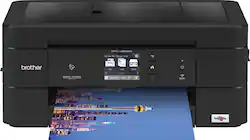
The Brother Work Smart Series MFC-J895DW is the ideal print, copy, scan and fax solution for home, home office or small office needs. This wireless color inkjet all-in-one delivers reliable, high-quality output and enables wireless mobile device printing from your desktop, laptop, smartphone or tablet. This easy-to-use wireless color inkjet all-in-one delivers affordable printing and has a 2.7" touch screen for effortless workflow navigation. The automatic document feeder, 150-sheet capacity paper tray and bypass tray handle a variety of sizes and specialty papers. Automatic duplex (2-sided) printing helps save paper while the compact design helps save desk space. Cloud connectivity lets you print from and scan to popular Cloud services directly from the printer. There's no network setup needed for Near Field Communications (NFC) one "touch to connect" mobile device printing and scanning. Includes a two-year limited warranty and free online, call, or live chat support for the life of the printer.
Prints up to 12 ISO ppm* in black, up to 10 ISO ppm* in color
Q: If one ink runs out will it still print?
A: Only 4-5 copies.
Q: What ink does this use and is it easy to find? I dont want to subscribe to the ink delivery
A: The LC3011 ink cartridges series is compatible with the MFC-J895DW.
Q: Will this work with Windows 10?
A: The Brother MFC-J895DW is compatible with Windows 10.
Q: Is this printer compatible with Asus VivoBook?
A: This printer is compatible with any computer, tablet or smartphone on your WiFi network. As far as direct wire to computers I’ve only had to download files from brother to get them to work. It was easy and free.
Q: Can you print labels, business cards using card stock paper
A: Brother does not recommend using the Brother MFCJ895DW to print labels, as they are outside of the machine's stated paper specifications. In regards to printing on business cards and cardstock paper, I have included a FAQ that will provide you the specification of the recommended paper and weight for this machine: https://help.brother-usa.com/app/answers/detail/a_id/156594
Q: Does it print envelopes and labels?
A: Yes, the Brother MFC-J895DW can print on envelopes and labels.
A: The paper is loaded directly below where the printed papers come out.
Q: Is this printer compatible with Chromebook (Chromebox)?
A: The Brother MFCJ895DW support the print function on Chromebook. However, the scan feature is not supported.