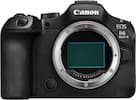
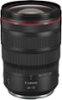
Canon - EOS R6 V 7K Video Mirrorless Camera with RF20-50mm F4 L IS USM Lens - Black
Model: 7250C010
SKU: 12810706
A versatile focal range paired with smooth, built-in power zoom control—designed for video-first shooting. Zoom with precision directly from the lens, enabling controlled transitions without disrupting your shot.
The EOS R6 Mark III features a 7K / 32.5MP full-frame sensor for cinematic video and impressive stills. Featuring beautiful full-frame image quality, background blur and low-light performance it can shoot stills at up to 40 fps, and use pre-continuous shooting to capture an additional 20 frames from half-second before you even press the shutter.
Designed through creator feedback to solve many of the pain points of video production the EOS R6 V features an exterior that was designed to be bold, modern, and untraditional in appearance while blending power, and portability for daily use. With a video forward design, it combines the best aspects of Canon’s two most powerful camera lines, EOS and Cinema EOS, bringing the ease of use and video performance to advanced creative videographers.
Built knowing that you often need to shoot vertical imagery in addition to your horizontal imagery, the EOS R6 V features both a vertical and horizontal tripod mount (located on the side of the camera’s grip and at the bottom of the camera). For maximum usability, the Movie mode UI screen will rotate automatically with the camera’s orientation.
We know that you don’t only work behind the camera, but you also work in front of it. So the EOS R6 V is equipped with a front Record button, in-addition to the shutter button record button providing convenience for working both behind and in-front of the camera.
The EOS R6 V’s Power Zoom lever enables smooth, professional zoom control essential for cinematic storytelling. When used with compatible Power Zoom lenses or optional PZ adapters, creators can execute precise, variable-speed zooms directly from the camera body, ensuring consistent movements, transitions and high-resolution results that are difficult to achieve manually.
Visible on the front of the EOS R6 V is a tally lamp, providing a clear red visual aid to let you know you’re recording when working in-front of the camera. Additionally, the camera is equipped with a red recording emphasis frame that will illuminate the camera’s LCD screen when a clip is recording.
Designed with a full-size HDMI terminal, the EOS R6 V supports easy connection to a multitude of video devices including monitors, HDMI switchers, capture cards, and more.
Equipped with In-Body Image Stabilizer the EOS R6 V provides steady handheld operation for videos and photos with up-to 7.5 stops of shake correction at the center of an image, and 7.0 stops at the image corner when using lenses without optical stabilization. Additionally, Movie Digital IS can be utilized to add improved stability to video clips and can be enabled in addition to the lens’ optical, and body’s In-Body Image Stabilizer system.
The EOS R6 V’s built-in active cooling enables long-duration recording for events, podcasts, or livestreams. Featuring a user-controlled fan with three speed settings, the system allows for unlimited 4K Fine (30 fps) and up to two hours of continuous RAW video recording at normal temperatures ² —far exceeding the limits of cameras without internal cooling.
The EOS R6 V features the combination of high-resolution and exceptional color depth with internally recorded 7K video at up to 59.94p in 12-bit Canon RAW Light Movie.
For those seeking to work with ProRes RAW files, externally recorded 7K 29.97p ProRes RAW recording is available with use of a compatible external recorder.
3:2 aspect ratio “Open Gate” recording is available at 7K (6912 x 4608 — MP4; and 6960 x 4640 — RAW) and up to 29.97p in 10-bit, XF-HEVC S 4:2:2 and 4:2:0 MP4 in Intra, Light Intra and Long GOP recording, or Canon RAW Movie.
Today’s hybrid image makers face immense demands, often requiring social media videos to accompany photos and videos delivered to clients. With Open Gate recording enabled, the camera scans the full-frame, 3:2 aspect ratio image sensor area to record video imagery in the same 3:2 aspect ratio as still images. This allows post-production versatility to reformat the 3:2 ratio imagery to various formats, such as vertical 9:16, 16:9, 1:1, 4:3, or 4:5.
The EOS R6 V features powerful video options, including DCI/UHD 4K recording at up to 120p (up to 5x slow motion) and 2K/Full HD recording at 180p (up to 7.5x slow motion). Audio recording is available across all resolutions and frame rates, excluding S&F mode.
The Slow and Fast (S & F) Mode on the mode dial offers a UI control over resolution, frame rate, playback speed, and compression method. It provides precise control with incremental frame rates for tailoring the ratio of frame rate to playback speed. Though audio is disabled in Slow and Fast (S&F) mode, videographers can now embed their frame rate in-camera for easier social media content creation.
Discerning videographers rely on 4K FINE for sharp, high-resolution footage. This oversampled video mode delivers high resolution, clean DCI and UHD 4K video at up to High Intra-frame 60p rates using the XF-AVC S format.
Add a creative touch to your imagery with 14 easy to use color filters. Whether you’re a newcomer to editing or you’re looking to add a convenient color and tone adjustment, the Color Filters menu allows you to personalize your JPEG photo and MP4 video imagery to your desire. Simply press the new Color button, select Color Filter and start creating.
The Custom Picture menu adds incredible creative potential to your video imagery. Simply press the Color Button to access the Custom Picture menu where there’s access to Canon Log 2, Canon Log 3, HLG, PQ, Canon 709, BT.709 Standard, a host of user adjustments, and 14 different user customizable presets.
Unlock your video’s cinematic dynamic range with Canon Log 2 featuring up to 15+ stops of exposure latitude. Capture your scene’s brightest brights, to darkest darks with the flexibility to color grade ensuring new levels of video quality.
The EOS R6 V was made for agile video workflows. Create videos styled with your signature video LUT using the apply Look file function in the Custom Picture menu. You can register 17-grid, or 33-grid cube format 3D LUT files created using an NLE application and register them as Custom Picture (CP) files to apply the color tone & contrast you want for the movies you record. From there you can download your styled videos with your creative LUT already applied.
New to Canon Camera Connect app is the ability to transfer and register your favorite Canon LUTs to the camera.
Enjoy the impressive precision, tracking ability and convenience of the EOS R6 V camera’s high-performance Dual Pixel CMOS AF II Subject Detection featuring People, Animals, and Vehicles detection.
With Register People Priority autofocus, simply photograph a person Footnote4 and register them in-camera to enjoy highly accurate autofocus in Video or Photo mode that prioritizes your most important subjects over other people in the scene. With up to 10 registerable people, and the ability to save up to 10 registered people to each card focusing on your top priority subjects just got easier.
The popular SCN mode “Movie for close-up demos” autofocus functionality is now available in all Creative Zone shooting modes; simply enable “AF for close-up demos” in the autofocus menu and enjoy high-speed focus transitions between subjects presented to the camera and the on-screen presenter.
We’ll try to get your question answered within 24 hours by a Best Buy customer or brand representative.
Pickup, shipping and delivery information available in checkout
The EOS R6 V Camera is the first full-frame EOS V series camera. It is designed for advanced videographers, cinematic social media content, vertical video productions and podcasts, livestreams, VR and more. It’s built for creative videographers seeking high-performance video with its 7K / 32.5MP resolution full-frame image sensor and includes a host of video creation features such as active cooling, an additional vertical tripod mount with vertical video UI, an additional front record button, Power Zoom lever, tally lamp, and a full-size HDMI terminal. The camera features powerful resolutions and framerates including 7K RAW recording at 60p, 7K 30p Open Gate recording for post-production versatility, 4K 120p slow motion, and high-quality oversampled 4K at up to 60p. With Canon Log 2 color, in-body image stabilization, and powerful Dual Pixel CMOS AF II focusing, this is the camera you’ll want to use to tell your stories.