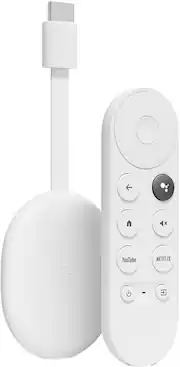
Chromecast with Google TV (4K) brings you the entertainment you love, in up to 4K HDR.¹ Get personal recommendations based on your subscriptions, viewing history, and content you own – all in one place. No more jumping between apps to decide what to watch. And use the remote to search with your voice.²
Enjoy the entertainment you love, including live TV, in up to 4K HDR.³ Discover over 700,000 movies and TV episodes. And cast directly from your phone or tablet to the TV.
Get personal recommendations based on your subscriptions, viewing history, and content you own – all in one place. It displays the shows you’ve been watching across services and suggests new ones – no more jumping from app to app to figure out what to watch. Use the included voice remote and ask Google to find movies, shows, or music. Also search based on mood, genre, and more.
Ask Google to dim the lights, adjust the temperature,⁴ or see who’s at the front door,⁵ without getting up from the couch. Can’t find the remote? You can control the TV by speaking into any Google Assistant-enabled device.⁶
Get fast streaming, and enjoy a crystal clear picture up to 4K and brighter colors with HDR.³
Just plug Chromecast into your TV’s HDMI port, connect to Wi-Fi, and start streaming. Or for hard-to-reach spots, use the optional Ethernet adapter to connect directly to your router.
Press the Google Assistant⁷ button on the remote and ask to search for specific shows, or by mood, genre, actress, and more. Talk to Google and say, “What should I watch?” And use the remote to control the volume, switch inputs, play music, and get answers on-screen.
Create a kids profile to access a fun collection of movies and shows for the family. Pick from a selection of playful avatars and themes, set parental controls to restrict what streaming services are shown, limit watching time, and set a bedtime.
You can browse live TV from broadcast, cable, and sports networks on YouTube TV and Sling TV.⁸
When you see an interesting show or movie on TV or in a Google search, add it to your watchlist to view later.⁹
Group Chromecast with your Google speakers or displays to fill your home with sound. Then control them just by using your voice or the app.
Use your phone to control your TV. Find something great to watch even when the couch has eaten your remote. And use your phone’s keyboard to quickly type complicated passwords, movie names, or search terms.
Enjoy a slideshow of your pictures from your Google Photos library right on your TV.
Everyone in your home can create a personalized profile on Google TV. Your profile has recommendations just for you, based on what you’ve watched and what interests you. Get easy access to the watchlist and library you’ve curated, and help from your account’s Google Assistant.
Learn more >