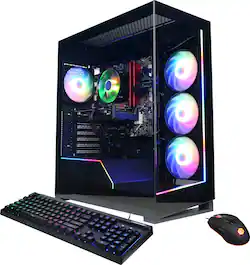
Dominate virtual battlefields with this CyberPowerPC Gamer Master gaming desktop computer. The six-core AMD Ryzen 5 processor and 16GB of RAM support seamless multitasking, and the 1TB SSD provides fast start-ups and in-game load times. This CyberPowerPC Gamer Master gaming desktop computer comes with an NVIDIA GeForce RTX 4060 graphics card for immersive, stutter-free action.
Q: What kind of storage does this gaming desktop use?
A: This gaming desktop uses a 1TB solid-state drive (SSD) for fast start-up times and data access.
Q: How much RAM does this CyberPowerPC gaming desktop have?
A: This CyberPowerPC gaming desktop is equipped with 16GB of DDR4 SDRAM.
Q: Does this CyberPowerPC desktop have Wi-Fi capabilities?
A: Yes, this desktop comes with built-in Wi-Fi 5 wireless connectivity for high-speed network access.
Q: Does this desktop come with a DVD/CD drive?
A: No, this computer does not include a built-in DVD/CD drive.
Q: What type of graphics card is included in this gaming desktop?
A: This gaming desktop features the NVIDIA GeForce RTX 4060 graphics card with 8GB of GDDR6 dedicated video memory.
Q: What operating system does this gaming desktop come with?
A: This gaming desktop comes with the Windows 11 Home operating system.
Q: How much RAM does it start with and can I replace the slots that are in use?
A: As stated in the specs section of this particular PC. Two sticks of DDR4 are provided by the manufacturer and they can be swapped out for faster memory sticks of DDR4 for a total of 4 memory sticks per indicated in the expansion section of the specs page. This PC motherboard will support up to a total of 128Gigs of DDR4.
A: on the top of the case, there are 4 buttons. The 2 under the usb c port (round small port) are power and reset. The power one powers of and the reset just does a reset (lol). Above all the ports, there are 2 small buttons. One with a small M and one with a dashed circle. The "M" button changes the mode and the dashed circle changes the color. Also, Holding The button with the "M" will turn off the LEDs. Hope this helps!