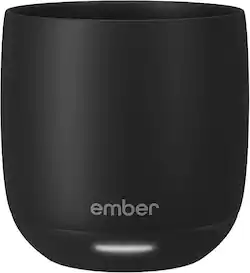
Customers frequently mention the Temperature Control, Battery Life, and Ease of use as significant advantages of the Temperature Control Smart Cup - 6 oz. Many appreciate the cup's size and design, although some find the price and capacity to be limiting factors. The app functionality is also highlighted, with some users noting its helpful features. However, a few customers expressed concerns about the charging method and the cup's weight.
Great product! Keeps my coffee hot and fresh, and very easy to control with the app!
Posted by TanyaP
The Ember mug does what it’s meant to do well, but requires some retraining and keeping your cup in one location (not that you couldn’t travel with it, just too cumbersome for me). And it’s pricey for being a cup. But if you are one to sip and enjoy a hot beverage over a longer period of time, this is something you should look at. I haven’t seen anything else like it, so if you’re reading this and thinking about getting it, you’re likely already intrigued. But there are a few practical things I think one should know when considering purchasing this product. IN THE BOX Inside you’ll find the Ember cup, a charging “saucer,” instruction book, and wall charger. The charging cable is proprietary, at least, it’s not USB-C, so you have to use the included charger. The cable should be long enough for most people but with my setup in my office, I wish I had about an extra foot. SETTING UP There are some stickers on the cup that tell you to charge fully before using. First thing, plug in the saucer to the wall outlet, then place the cup on the saucer to charge. The charging is similar to any wireless charging setup; there’s gold rings on the bottom of the cup that make contact with two gold pins in the saucer that charges it. There’s a light on the bottom of the cup that blinks red when it’s charging and glows green when it’s fully charged. From there you download the Ember app. I’m one to loathe having dozens of unnecessary apps on my phone (at least apps I don’t use frequently) but nonetheless, this is an app you arguable don’t need to access once you set it up. Once the app is downloaded and cup is charged, you hold the power button on the bottom of it until the aforementioned light blinks blue to tell you it’s in pairing mode. From there, the app should find it pretty quickly. Once it’s connected, you’re all set up. APP The app is basic, there’s not much for it to do. You can slide the temperature bar on the app which tells the cup what to hold the temperature of your beverage at. There’s also presets for tea, coffee, etc. You can even make your own presets. I noticed a timer for steeping your tea, but I didn’t use that (I always “eye ball” the length of time to steep my tea). The temperature differences between the coffee preset and green/black teas are just several degrees. To me personally, that temperature difference doesn’t warrant me opening the app each and every time I pour something in it. The app will give you a notification when your drink hits the optimum level (you can disable this). USE Pretty self explanatory, as long as your cup is charged, once you pour liquid in it, it will begin warming it up to the right temperature. The light blinks white on the cup to let you know it’s not quite to the optimal temperature yet and it’s working on it. It can detect if it’s empty and if so, it won't heat up. The cup itself gets slightly warm on the outside, but never does it feel too hot to hold. It’s pretty insulated. The battery purportedly lasts for 2.5 hours. I found this to be pretty accurate. I’ve left the cup off the charging saucer for a few days and used it without issue. But I keep the saucer near my desk (I use mine at work) so I’m always able to simply leave it on the charger. By the time I bring my thermos of coffee into work and pour it into the cup, the temperature is usually in the 118 degrees range. The preset for coffee temp is about 134. I’d say it takes about 5 minutes to bring the temperature up 15-16 degrees which isn’t too bad. It’s not as if I don’t drink it as it’s heating up. As someone who brings in what seems to be a half cup of coffee to work, I really do enjoy the ability to keep it hot all morning. Otherwise, my last sips are almost cold coffee. So for me, this Ember cup is nice to have. As I said, you don’t really need to open the app when you use the cup outside of the initial setup. So I don’t want to give the impression you’re constantly having to open your phone and the app to use the cup. QUIRKS A couple things to mention during my experience. It’s not necessarily advertised in the box, but if you Google search it you can easily figure this out, but it does not heat cold liquids to hot. So don’t expect to pour in a cold cup of coffee or tea and expect it to heat it. If the liquid is too cold, the cup will think it’s empty. Think of this cup as simply maintaining hot temperatures. I don’t know the effective range of the temperatures it will maintain, but something to keep in mind. The charging saucer can be finicky. There’s two gold pins at the bottom. There’s a sticker warning to not let it get wet. Easy enough. But I found the cup failing to charge at one point (after only having it a few days). I reset the cup and repaired it and it didn’t work. But at some point, it started charging again. I don’t know what happened, but it was a tad bit concerning to me when thinking about the device’s longevity. CONCLUSIONS Other than my last two observations, I must say, this cup works as intended and works well. Of course this particular model only holds 6 ounces, so it’s a bit small. But that doesn’t bother me. It’s clearly a luxury item, but if drinking hot liquids over a long period of time (when they would otherwise get cold) is important to you, I would definitely recommend this Ember cup - or any of them for that matter.
Posted by callmeageeth
EMBER - TEMPERATURE CONTROL SMART MUG - 6 OZ MODEL:CM210600US Best Buy Tech Insider Network NICE ENDULGENT HEATED SMART MUG FROM THE FUTURE OVERALL I can’t help but thinking of various SI-FI movies as I download a firmware update to my coffee mug! At first, I thought what a silly idea, I already have an old-fashioned coffee warmer on my desk, that , if we are hones, really only works in for the last centimeter of coffee and otherwise just seems to heat up the outside of my mug making it too hot to hold. Along comes the EMBER - SMART MUG to change my mind about how I enjoy my morning drinks. I like to savor my morning tea and coffee as I ease into the morning. Which usually means after a few minutes I’m drinking tepid liquid as best, even with my electric warmer. Now with the EMBER - SMART MUG it is always as hot (or hotter) than the moment it came out of the coffee/tea/espresso maker. We have 2 coffee makers one with decaf and one with regular beans. The one with regular beans makes a better brew, but its temp is a little low. Now with the EMBER - SMART MUG it is heated to the perfect temp. My wife likes her coffee as hot as possible, while I like it a few degrees cooler. With the EMBER - SMART MUG app we can adjust this with a single button press. SETUP I was a little worried with all the stickers, don’t microwave, don’t get the contacts wet, etc. Nevertheless, the setup was one of the better app installations in a while. Just put the EMBER - SMART MUG into pairing mode (I still can’t say that with a straight face), and the app finds it. Then you can control your temp, AND LED EFFECT COLOR! USAGE Somehow it magically knows when you have liquid in there and turns itself on. Then it does a fantastic job regulating the temperature until the liquid is gone. Next you rinse it out make sure it is dry and put it back on the base to recharge. It does take a long time to fully recharge (hours), and I wish it used USB-C chargers for example, instead of another proprietary charger. Yes, this version is only 6 oz, but that is OK as that is just about the size of output on the coffee settings from my espresso machines. I also look forward to having my espressos with the EMBER - SMART MUG which previously got cool too quickly. If you take cream or foam with your drinks, you will have a very small drink indeed. I also would have liked a lighter color. The mug is so dark it is like looking into a black hole and you can’t tell if you have any liquid left in the mug. Owing to the overall weight it always feels full. SUMMARY I like the EMBER - SMART MUG and make no mistakes, that this is a pure luxury item. But if, like me, you like to take your time to enjoy your hot drinks, then it is the perfect gift for yourself or others. I can already see us saving up enough Points to get another one (his/hers) before long.
Posted by TheOffice1234
The vast majority of our reviews come from verified purchases. Reviews from customers may include My Best Buy members, employees, and Tech Insider Network members (as tagged). Select reviewers may receive discounted products, promotional considerations or entries into drawings for honest, helpful reviews.