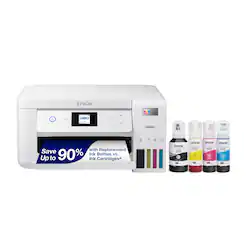
Epson - EcoTank ET-2850 All-in-One Supertank Inkjet Printer - White
Model: C11CJ63202
SKU: 6470013
This item is no longer available in new condition. See similar items below
Customers often highlight the excellent print quality and ease of use of the EcoTank ET-2850 All-in-One Supertank Inkjet Printer. Many also appreciate its compact size and straightforward setup process, along with its reasonable price. While some users experienced occasional paper jams, the printer is generally considered quiet during operation.
I’m in love! With this printer! For the longest time, I thought that if you wanted a printer that didn’t need a new $50 cartridge every 70 pages, you’d have to buy a laser printer. Boy was I wrong! This epson printer just keeps printing and printing! I print about 30 pages a week, and after a month the printer ink is still full! I love the windows into the ink tank, it’s such a good idea. I always wondered if my old printer still had ink in the cartridge and was just lying to me - this printer I will know for sure. I also love that it has a scanner built in. This model doesn’t have the ADF, which I’m fine with. I only scan a couple of things a month, and this printer is more than adequate for scanning. Better than that, the scans are high resolution and crystal clear. Much better than scanning documents with my iPhone. I also love the form factor of this printer. It’s so little and cute! It fits well on my shelf, and it’s lightweight in case I want to move it anywhere else. It’s been an amazing printer, and I hope it lasts me many years. And in case it doesn’t, I also got the protection plan with it ;)
Posted by Nate
Really like this printer. It’s compact and lightweight, and really like the white color instead of the usual boring black. Setup was a breeze using the app on my iPhone. Took about 20 minutes, including filling the ink tanks and initializing them. I didn’t even have to enter my WiFi password. Print quality is fine for my needs, since I rarely print photos. The gigantic ink supply is the best thing. I got so sick of having to buy ink every time I had more than a few pages to print. The ink cost for my old printer was nearly the cost of the printer itself, and it came with ink when I bought it. Go figure! The only con for me so far is that I haven’t been able to scan a document from the printer dashboard itself to my iPhone or iPad unless I use the app from my device. The only option there is to scan to a USB connected computer or laptop, which I no longer own. I did learn one tip on YouTube for dull colors or lines through the copies. You have to make sure that the paper type you select on the printer is identical to the paper type selected on your computer or device. It definitely made a difference for me; the colors were definitely more vibrant. Also, I did purchase 2 reams of Epson Bright White Pro paper. It’s great - a tad heavier than other copy paper. I think it’s worth the couple of extra dollars over the regular copy paper. Only time will tell if the longevity of the printer justifies the higher cost. I like that you get a two-year warranty with online registration. Right now, I think this was definitely a worthwhile purchase.
Posted by Lsmachado
This was very easy to set up. It to roughly ten minutes to initialize the ink system which in my opinion isn't unreasonable. Easy to switch from media sources, easy picture sheet arrangements, takes up very little space, and prints great quality pictures. Great price for the quality of product, I caught it on sale which was a double bonus!
Posted by CWM1
The vast majority of our reviews come from verified purchases. Reviews from customers may include My Best Buy members, employees, and Tech Insider Network members (as tagged). Select reviewers may receive discounted products, promotional considerations or entries into drawings for honest, helpful reviews.