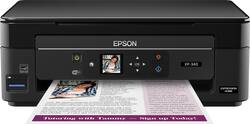
Keep it simple with this Epson Expression all-in-one printer. Its compact size lets you print, scan and copy in small spaces, while its 100-sheet capacity keeps it printing longer. The wireless capability of this Epson Expression all-in-one printer lets you print from a variety of devices, including tablets and smartphones.
Q: Can you still print in black if color cartridges are empty?
A: Yes you can just change the print to black and white instead of just the default which is color.
Q: Can the drivers be downloaded from the internet? My laptop doesn't have a cd or dvd player.
A: yes and even I did it which is not only amazing but means it must be simple also-
A: I've had the latest couple of models of this printer. I keep buying it because it is capable of great quality printing in either color or B&W and is nice and compact and is inexpensive. However, one issue I have had with each model is that the print heads easily become misaligned when moving the printer. Since I print infrequently and do not have a home office, I store the printer on a shelf in a closet when not in use. I have found that I have to be extremely gentle in moving the printer from place to place or print quality is poor. It seems the slightest bump when setting it down is too much for it. It usually takes just a few minutes to use the printer's tools to readjust the print heads, but it's something to consider. I do not know if this is common to this style and price point of other printers, so this could be common for small inkjet printers. Other than that, I quite like the Epson All-In-One or even the Small-In-One line. Great little printers for the money, IMO.
A: 288
A: you got that right Lennie...the cost of Epson ijk is outragous...they don't make money on equipment...it is all ink for profit I find replacement cartridges to be as good or better than Epson...I use them...if the printer I use goes bad it is cheaper to buy a new printer than to buy Epson ink...what a racket...lots of good replacement inks in Epson original cartridges...try the you can't go wrong
Q: Is this printer compatible with Windows 7
A: Yes, this is compatible with Windows 7.
A: We don't print very often either. I mostly scan to my laptop or google drive. But when I do need to print ... this one hasn't failed me yet. It also has ink monitoring software to let you know if the cleaning routine needs to run or if you need more ink
Q: Is this printer comparable to use with a google chrome book ?
A: Yes. this is the reason I bought this printer.