Outlet EventEnds Jan. 19. Limited quantities. No rainchecks.Shop now

Main Content
product image

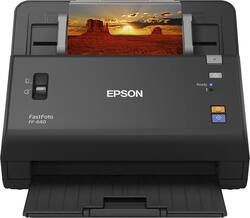
Epson - FastFoto FF-640 High-speed Photo Scanning System - Black

Model: EPSON FASTFOTO FF-640 B11B24
SKU: 5495311
This item is no longer available in new condition. See similar items below
  • Key Specs
    • Networking: Not Applicable
    • Scan (Color) Speed: 60 copies per minute (The number of color pages able to be scanned per minute.)
    • Scan Method: Single pass
    • Duplex Scan Function: true
  • General
    • Brand: Epson
    • Model Number: EPSON FASTFOTO FF-640 B11B24
    • Product Name: FastFoto FF-640 High-speed Photo Scanning System
    • Color: Black
  • Connectivity
    • Scanner Connectivity: USB 2.0
    • Minimum System Requirements: Microsoft Windows 7 / 8 / 8.1 / 10, Apple MacOS X 10.9.x - 10.11.x
  • Dimensions
    • Product Height: 7.9 inches (The out of box height of the item. Height is measured as the vertical distance from the bottom of the item to the top as it would be primarily used or placed.)
    • Product Width: 11.8 inches (The out of box width of the item. Width is measured as the horizontal distance from one side of the item to the other as it would be primarily used or placed.)
    • Maximum Document Length: 120 inches
    • Maximum Document Width: 8.5 inches
    • Product Weight: 8.82 pounds (The out of box weight of the item.)
  • Features
    • Automatic Document Feeder Capacity: 80 sheets
    • Automatic Document Feeder Included: true
    • Scanner Type: Other
    • Scanner Resolution: Up to 600 x 600 (Refers to the number of pixels/dots, both horizontally and vertically, of the image produced by the scanner. Generally, the higher the resolution, the sharper and cleaner the produced image.)
    • Grayscale Depth: 16-bit (64K gray levels) (Refers to the number of bits used to define each pixel in the captured image, which determines the number of tones, or levels, that can be represented. Generally, the greater the bit depth, the better the image quality.)
  • Scanner Info
    • Scan (Monochromatic) Speed: 60 copies per minute (The number of monochromatic grayscale pages able to be scanned per minute.)
    • Scanner Bit Depth: 48 (Refers to the number of bits used to define each pixel in the captured image and determines the number of colors or tones that can be represented. Generally, the greater the bit depth, the better the image quality.)
  • Included
    • Included Software: EPSON Scan, ABBYY FineReader OCR, EPSON Document Capture, EPSON FastFoto with Smart Photo Fix
  • Certifications Listings & Approvals
    • ENERGY STAR Certified: true (Devices carrying the ENERGY STAR service mark, such as computer products and peripherals, kitchen appliances, and other products, generally use 20% to 30% less energy than required by federal standards.)
    • TWAIN Compliant: true (Products with this label are compliant with standards set by the TWAIN Working Group for regulating communication between software and digital imaging devices. Devices that are TWAIN compliant are compatible for use with each other without requiring additional software, even if they have different capabilities.)
  • Other
    • UPC: 010343928053

Make digital copies of treasured photographs or important documents with this Epson FastFoto photo scanner. Red-eye removal and color enhancement tools let you quickly touch up scanned images for optimal results. This Epson FastFoto photo scanner has a maximum optical resolution of 600 dpi to ensure accurate electronic reproduction.

  • Up to 600 x 600 dpi optical resolution (1200 x 1200 dpi interpolated resolution): To capture every word and image detail with clarity.
  • 48-bit internal color depth, 24-bit external color depth: Along with a 16-bit internal grayscale depth. 8-bit external grayscale depth for realistic detail.
  • 8.5" x 120" maximum scan size: Enables you to capture entire pages.
  • Scans a page in about 1 second: For fast performance.
  • Control Panel Buttons: Allow you to start, stop.
  • USB 2.0 interface: Offers easy connectivity.
  • System requirements: Microsoft Windows 7 / 8 / 8.1 / 10 and Apple MacOS X 10.9.x - 10.11.x.
  • ENERGY STAR certified: Designed to use less energy and meets strict energy efficiency guidelines set by the Environmental Protection Agency and U.S. Department of Energy.
  • Up to 600 x 600 dpi optical resolution (1200 x 1200 dpi interpolated resolution): To capture every word and image detail with clarity.
  • 48-bit internal color depth, 24-bit external color depth: Along with a 16-bit internal grayscale depth. 8-bit external grayscale depth for realistic detail.
  • 8.5" x 120" maximum scan size: Enables you to capture entire pages.
  • Scans a page in about 1 second: For fast performance.
  • Control Panel Buttons: Allow you to start, stop.
  • USB 2.0 interface: Offers easy connectivity.
  • System requirements: Microsoft Windows 7 / 8 / 8.1 / 10 and Apple MacOS X 10.9.x - 10.11.x.
  • ENERGY STAR certified: Designed to use less energy and meets strict energy efficiency guidelines set by the Environmental Protection Agency and U.S. Department of Energy.
Whats Included
  • ABBYY FineReader OCR
  • EPSON Document Capture
  • EPSON FastFoto with Smart Photo Fix
  • EPSON Scan
  • Epson FastFoto FF-640
  • USB cable
  • ABBYY FineReader OCR
  • EPSON Document Capture
  • EPSON FastFoto with Smart Photo Fix
  • EPSON Scan
  • Epson FastFoto FF-640
  • USB cable

Q: One review mentioned doing the recommended maintenance. What maintenance is required, and how often?

A: I bought mine a few weeks ago. The manual states two maintenance activities are needed; replacement of the roller assembly after 120,000 scans, and more frequent and vital routine cleaning of the rollers. I cleaned the rollers with the microfiber cloth after about every 300 scans for the first 3,000 scans or so. The manual recommends only the use of microfiber. This was working fine until about 3,000th scan. Then the typical symptoms of the dirty rollers (white lines and distortions) started to appear, in spite of the cleaning. Now I clean after each 50 scans but the distortion still appears on some scans. Oddly, the distorted copies appear on about 2 to 5% of the batch scan, not on all or not continuously. I escalated the cleaning method to the use of a vacuum cleaner, both suction and blow, and sticky tape but the distortions still occur. It's a great machine when it is working right.

Q: I will want to organize my photos after they are scanned. Does the software provide a tool to tag each picture so they are easy to locate? Is there a search function?

A: The default settings ask you to first choose the year, then the month (from drop down menus), then your tag. The scanner automatically creates the subdirectories and file names from you choices. The directory structure would look something like this: fastfoto/2000/December/Christmas.

Q: After the photos are scanned can I import them into Photoshop Elements or something like that?

A: Yes, the scanned photos are just standard jpeg files and can be loaded into any kind of picture software. I am using Adobe LightRoom in order to do face recognition and tagging. Still haven't found a good way to share the photos with the rest of the family.

Q: What is the largest and smallest size photo that can be scanned?

A: I have use e sheet feeder with photos 1 3/4 by 2 1/2 (wallet size), enlarging them by scanning at 600 dpi. The largest that I have scanned have been 8 1/2 by 11.

Q: When you scan a picture with writing on the back, does it create one file showing the front and back, or does it create two files, one of the back, and one of the front? I have a lot of old pictures with writing on the back that I want to scan in.

A: Front side (side facing down) is numbered your_name_001 back side (side facing up) is numbered your_name_001_b. Plus you can checkmark that this group has its own folder.

Q: Can you scan to memory cards or flash drives with this scanner?

A: You need to 1st download to computer than save to card

Q: Will this scanner output to an uncompressed Tiff format? And can it output to TIFF while autoscanning a stack of photos and still create two versions, one original and one auto-enhanced/corrected? Thx!

A: You can output to an uncompressed tiff in the advanced scanning with EPSON scan option. It output tiffs while autoscanning a stack of photos, but advanced scanning does not have the option to create the two versions.

Q: how quick is the scanning

A: there are two scan settings relating to quality of the scan (dpi)and the resulting size of the file. It is very very fast; I put 30 4x6 photos in the feeder and it is finished in less than one scan per second. I only use the highest setting now. I have scanned in square photos, b&w, 8x10 etc. and just love it. I am having a ball, scanning in old photos and using Adobe Lightroom to make adjustments to color and renaming of files.