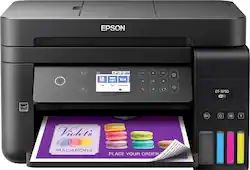
Customers find value in the WorkForce EcoTank ET-3750's excellent print quality and ease of setup and use. Many appreciate its compact size and wireless functionality, which makes it convenient for home or small office use. However, some users express disappointment with the lack of a touchscreen and find the printer's noise level to be somewhat noticeable. The small control panel is also a point of concern for some customers.
The vast majority of our reviews come from verified purchases. Reviews from customers may include My Best Buy members, employees, and Tech Insider Network members (as tagged). Select reviewers may receive discounted products, promotional considerations or entries into drawings for honest, helpful reviews.
The Epson Workforce ET-3750 is a wonderful printer. The printer is slick and black, with an lcd screen that is very intuitive to navigate, though it is not touch screen and I almost always automatically assume it is. The paper tray opens to the front so you don’t have to be concerned with additional space and it is easy to set it on a shelf. It is not very loud and it reasonably fast (though not as fast as a BW laser printer). Connecting to it was very easy from my computer and my phone, and now that it is setup I can click print from anywhere. This has come in more handy than I expected. Once you have this ability then suddenly you realize what you’ve been missing out on. It prints very nicely in color with sharp bright images. I am very happy with the quality of it and its performance. A few notes about the ink- It comes with 2 sets of ink. So basically you have a backup set of each color. Each one is individually wrapped so they shouldn't cause any problems while storing. Loading the ink was quite easy. I was nervous, I wont like. I expected it to be at least a tad messy but it wasn't. Each bottle nozzle fits like a puzzle into the appropriate tank in the printer and then you hear "glug glug glug" and see the tank fill with ink. When you do this for the first time there will be some left in the bottles. This is because AFTER you pour the ink and BEFORE you hook it up to a computer, you have to turn it on and let it gobble some of the ink down. Then you top it off with the remaining ink.The ink provided is a perfect amount to fill the entire thing up. My favorite part about this printer is that I feel absolutely no guilt when I print something. Before this, I would be frugal with printing things, especially anything in color. If you have a mother/ father/ partner/ spouse or any other form of Helicopter Printer Boss that constantly tells you not to waste the ink then you know what I'm talking about. Now, I just hit print when I need and my husband says nothing. That's a winner. This is a review for the EpsonWorkForce ET-3750 EcoTank All-in-One Printer that I received free of charge to do a beta test and review.
Posted by Dmem
The Epson WorkForce ET-3750 EcoTank All-in-One Printer: I will start off with the step by step guide to make it running. From: * Unpacking, *Filling the ink tanks, *Loading the paper, *Connecting the fax line, and *Installing the software. The process was not complicated at all and the two page step by step guide that comes with printer was very helpful and precised. I just followed all the directions stated and no problems encountered. Refilling the ink was easy because the bottle of ink fits perfectly into the tank. Once the tank was fully filled, time to power up the printer. When it's powered up, there are intructions appeared on the LCD screen which I basically follow the steps again. The charging the ink takes around 10 minutes to finish and once it is fully charged another instruction will follow like loading the paper and stuff. On LCD screen will show the options of paper sizes and I just select the size of paper I put in which is size 8.5"x11".a2.4". Next step was connecting the fax line and Installing the software. I used the the DVD that comes with printer. While doing that, the printer is still not connected to my computer. Once installation of the software is done I have the option to connect it through a USB port or wireless connection and in this case I used the wireless one. Again, the whole process went well and no problem occur during the connectivity step. And I have successfully installed the new printer. I did a few test printing first that was prompted on the screen, I registed the printer on my name and all that stuff. Printing, Scanning, and Photocopying: Through my mobile phone I installed the Epson Print Enabler from Google play. Went to my phone to do a test printing. I just selected a picture fom my phone then select the print option and instantly find the printer which the Epson ET-3750, and then print. What I love about it is, it printed so fast like instantly unlike the printer I have it take few second to process the document especially through wireless printing. I have done printing from my laptop through WiFi, done WiFi scanning as well which for me a very convenient process. I have tried the photocopying which also comes out perfectly. I love the fact that the printer comes with a 2 year supply of ink. 2 Bigger Bottles of Black Ink, 2 Botthels of Magenta, @ Bottles of Yellow Jaune, 2 Bottle of Cyan Which for me, is not very common in buying a printer. I think this is a plus factor to choose Epson WorkForce ET-3750 EcoTank Wireless Color All-in-One Supertank Printer. Probably the overall procees in installing the printer to make it running, takes less than an hour. Overall impression: The Epson WorkForce ET-3750 EcoTank Wireless Color All-in-One Supertank Printer is a high quality all-in-one printer. Gives me a great quality printing results. Which at home I do a lot of printing for my small business especially when I am doing some inventory with my supplies. My husband's paper for his Master's Degree which he does a lot of printing on that. My kids kids love to do coloring and this would be a great help in printing their printable coloring activity. I would high recommend this kind of printer to family and friends. "This is a review for the Epson WorkForce ET-3750 EcoTank All-in-One Printer that I received free of charge to do a beta test and review.”
Posted by ChazC
I'm a first time printer owner. Printer was well packaged. Really easy to take out of the box. Everything inside the box was well preserve. Set up was easy. I usually let my wife set up this kind of things. This time I decided to do it myself. Software download took about 30 minutes. Really easy to find website and download software. Easy to find and connect laptop to printer. This is a review for the Epson WorkForce ET-3750 EcoTank All-in-One Printer that I received free of charge to do a beta test and review.
Posted by Elrey35