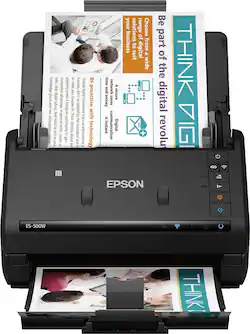
Customers have good things to say about the WorkForce ES-500W Wireless Document Scanner's ease of use, scan quality, wireless functionality, and compact size. Many appreciate the straightforward setup process and reliable performance. However, some users have expressed dissatisfaction with the provided software and occasional paper handling challenges. A few users reported issues with the scanner jamming, though this was not a widespread concern.
This device was well packaged and easy to set up. It scans items quickly and easily of various sizes of photos and documents - automatically on both sides of there is writing on the item. Even though it’s wireless, it’s ideal to have it situated near a computer so you can decide where to file the digital images and move between scanning and saving. Dark photos don’t scan in as much detail but it’s not bad. It does not scan slides or negatives. The software is very good too; business cards, OCR for creating searchable documents and more.
Posted by StuffMart
Not everyone has a need for a 50-sheet document scanner, but those of us who do, the Epson WorkForce ES-500W is a fast and reliable document scanner and has been a welcomed addition to my home office. The ES-500W quickly recognized and connected to my home network with ease and began downloading the software and necessary drivers, I was up and scanning in a matter of minutes. The wireless connectivity allows for scanning wirelessly so no need to be constantly wired to your computer. I was pleasantly surprised at the small footprint of this device, it's very compact and fits neatly upon the desk without being too big or bulky, and the rear paper guide serves as a cover and dust protector. Scanning couldn't be any easier, you place your documents in the rear tray face down and press the scan button. Scanning is quick at lower resolutions (up to 35 PPM) but slows down at higher settings, which is typical for all scanners. Scans to BITMAP, JPEG, PNG, TIFF, Multi-TIFF, PDF and Searchable PDF. Scanned output is clean and easy to read, I've had no complaints from any of my clients regarding clarity or readability. The one-pass double-sided scanning is a blessing, no waiting for a duplexer to flip the paper over or having to flip the paper manually, both sides of the paper are scanned at the same time. This feature is either on or off though, would be nice if there were an option for automatic mode as some of the other options have. Initially I had issues with skewing of my scanned documents but after a quick stop in the settings I was able to correct this and now the results are nicely aligned. The 'Epson Scan 2' software is a bit Windows 95-ish to be perfectly honest but it gets the job done. Scanning directly to cloud storage via 'Epson Scan 2' is apparently absent, instead you must use 'Document Capture Pro'. And although Dropbox is one of the services advertised in literature I've seen online, I couldn't figure out how to do it, perhaps Dropbox support has been since discontinued? I'm not sure, but I had no issues sending to other cloud storage services, such as Google Drive or OneNote. The ES-500W also scans photographs fairly well. I threw a stack of 4x6 pictures at it and it scanned them all with no issues. The photos were scanned adequately however I did notice there were visible scan marks on some of the scanned images which I was unable to resolve via the settings, not a big deal far as I'm concerned after all this is a document scanner and not a photo scanner but it's nice to know I can quickly scan a photo if need be. The ES-500W also works great for scanning receipts and other miscellaneous paperwork lying about your home, scanning is fast and efficient, it's been excellent for getting rid of all the clutter on and around my desk. Overall, this is a pretty nice compact document scanner, it's fast & it's quiet, and other than the lack of Dropbox support which honestly I probably wouldn't use much anyway it's the perfect companion to my Workforce printer. I would recommend. This was a review for the Epson ES-500W Wireless Duplex Document Scanner that I received free of charge to do a beta test and review. All opinions expressed here are genuine and 100% my own, based solely on my observations during the beta period.
Posted by mendivil
This is a review for the Epson ES-500W Wireless Duplex Document Scanner that I received free of charge to do a beta test and review. I got this scanner last week , I already have a copy ,print and scan device but the scanner I have is one doc at a time. So I have a suitcase full of documents which I am too lazy to scan and save a soft copy. But since I got this all powerful scanner I have scanned around 400 pages so far and more to go next weekend. You can get all the tech details from Epson site but here is what I saw The initial setup was easy with wire but setting up WI-FI was a little tricky . You need to get a direct connection with the wireless printer with your laptop ,then use the Epson .Net connection to WIFI and save settings. So I would suggest to look in FAQ section of Epson. But after one set up you are good to go. Document Pro application provided by Epson is great. You can skip blank pages, do Text enhancement, sharpen the image quality ,double sided scans , gray or color printer. I had some docs where the background was darker , 1099 from a bank ( its tax season) , but the application removed those dark background and the numbers in those blocks are visible. I like the searchable pdf’s so that after you have more docs you can search the words you are looking for. The size is very compact , you can put it in a very small space. The WIFI connectivity is also good . Depending on your internet speed. I have 25 mbps , 60 page doc I was able to do in 5 min. So Far I really liked the scanner and it is well worth the money and to remove clutter. But make sure you make backups or backups before you destroy your hard copy just to be safe and secure..
Posted by nishantgoyal
The vast majority of our reviews come from verified purchases. Reviews from customers may include My Best Buy members, employees, and Tech Insider Network members (as tagged). Select reviewers may receive discounted products, promotional considerations or entries into drawings for honest, helpful reviews.