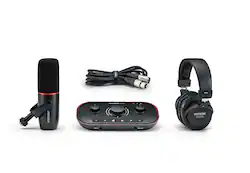
How do you get the ultimate studio setup your podcast needs? The answer has never been clearer. Get professional sound with the included broadcast-quality studio mic. Hear your show in perfect detail with closed back studio headphones. Capture the conversation in the studio, over the phone or online. Set levels, enhance your sound with one click, and stand out with Vocaster Two Studio in seconds. Get your podcast sounding pro more easily than ever with Auto Gain, Enhance and all the tools you need to get recording straight away.
Q: Can I connect the Vocaster Two Studio to my camera?
A: Yes, you can send audio from the Vocaster Two Studio directly to your camera using a single TRS cable.
Q: What type of headphones are included with the Vocaster Two Studio?
A: The Vocaster Two Studio comes with HP60v closed-back studio headphones.
Q: Can I connect my phone to the Vocaster Two Studio?
A: Yes, you can connect your phone to the Vocaster Two Studio via Bluetooth or a TRRS cable.
Q: What is the purpose of the Enhance feature on the Vocaster Two Studio?
A: The Enhance feature offers three preset options that are designed to improve the quality of your voice recording.
Q: Does the Vocaster Two Studio allow for two microphones and two headphones to be used simultaneously?
A: Yes, the Vocaster Two provides separate headphone outputs and Show Mix capabilities for both presenters.
Q: How does the Auto Gain feature on the Vocaster Two Studio work?
A: Just press the Auto Gain button, start speaking, and the Vocaster Two Studio will automatically set the appropriate input level.
Q: Does this bundle come with a mic stand?
A: undefined