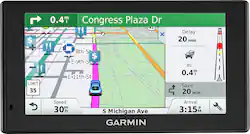
Customers find value in the DriveSmart 60LMT's ease of use, large screen size, and accurate GPS navigation, frequently praising its clear directions and voice command functionality. Many appreciate the lifetime map and traffic updates, although some users note that the battery life could be improved and the price point may be high for some. The device's features and graphics also receive positive feedback.
The vast majority of our reviews come from verified purchases. Reviews from customers may include My Best Buy members, employees, and Tech Insider Network members (as tagged). Select reviewers may receive discounted products, promotional considerations or entries into drawings for honest, helpful reviews.
This GPS is a supper navigator that it's narrative is so clear that one can not miss it's way. Very simple to sycronise with my iPhone.
Posted by Warambe
I purchased this unit to replace a Nuvi 65LMT that bricked after an update. I was in a crunch but wanted the 6 inch screen and the full North America maps. Here are my observations so far: A lot of people have made a big deal about the screen being glossy and not matte. Yes it is hard to see in direct sun, but adjusting the angle slightly seems to fix this problem easily. Also the glossy glass screen is way easier to clean and also clearer at night. This unit wants to warn you. About every thing. Repeatedly. I am still struggling to turn it all off, but in the space of driving one block I received notifications for: an upcoming school, a church, a curve, an animal crossing (still confused about that one). I would;t mind but by default these are visual and audio warnings. Basically, the GPS would never shut up. I finally found out how to turn off the auditory alerts, but you still get visual warnings that can block out the maps and the distance indicator. I am hoping this is fixed in a future firmware release. The search function has a preference for locations that are tagged in foursquare, Unfortunately this can get confusing when you have more than one location around with the same name as it will rank the foursquare higher ever when it is farther away. Luckily it changes the location icon so you get a hint that it was picked due to foursquare and not distance. It seems to have a weird problem with detours. If you detour on a route it will occasionally disable the turn by turn prompts. I have had this happen 4 times so far. After talking to Garmin support I found out this is a known bug and will be fixed in a future upgrade. It loves giving you a ton of info. Between the lane information, turn assistance and the years old snap shots of some intersections it always seems to be popping up a sun screen. As I live at the edges of suburbia I probably see this more than some one more rural so your milage will very on this. Keeping all this in mind, I have barely gotten into all the features that are packed into this unit. I just wanted a simple offline GPS that could do turn by turn voice prompts with a big screen. This device does so much more that it can actually be distracting. All in all it is a good unit if you LOVE gadgets and it does as advertised. But if all you want is a basic widescreen GPS with turn by turn and lane indicators - you might want to keep looking.
Posted by LouisK
I love the wide screen. I mainly use this for traffic because I only travel to Denver to work. I like that it tells me of the delay time and reroutes me if needed. I like the voice commands and Bluetooth,also
Posted by leckhardt