Rating 4.6 out of 5 stars with 71 reviews
4.6- Camera Quality (11)
- Design (9)
- Ease of Use (9)
- Overall Performance (5)
- Accessories (3)
- Battery Life (7)
- Bluetooth (3)
Customer Images
The vast majority of our reviews come from verified purchases. Reviews from customers may include My Best Buy members, employees, and Tech Insider Network members (as tagged). Select reviewers may receive discounted products, promotional considerations or entries into drawings for honest, helpful reviews.
- Rated 4 out of 5 stars
Functional basic cute and nostalgic phone
I got this phone since I wanted to take a break from my smartphone. Also mainly because it’s very cute and nostalgic. I love pink and I love the accessories that comes with it. Great for doing just the basic texting and calling. Camera isn’t bad. I actually kinda like it’s retro quality. I like the mirror in the front although it does get dusty very easily. It’s quite hard to open the back case. Battery isn’t the best if you plan on accessing the internet on it. But if you only use it for text and calls - battery lasts for days. I’m a bit clumsy so it did drop a couple of times but it didn’t do any damage so I can say it’s durable even though it seems flimsy. But overall it’s functional. Most importantly pink, cute and nostalgic - one of my main reasons why I got this flip phone. Only gave 4 stars though coz figuring out MMS on this phone was a hassle and isn’t the best.
Posted by MayS
- Rated 5 out of 5 stars
Barbie phone
I bought this phone for my daughter, she really likes it, thank you Best Buy!!!
Posted by YulduzT
- Rated 4 out of 5 stars
bright pink phone for the tween Barbie fan - KaiOS
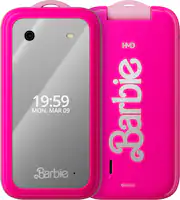
I'm the parent of an elementary student who has asked for about a year now, when will they get a phone. But there's a risk/reward - if I got her an iPhone or Android, there's social media and all the risks of cyber bullying. I also have a concern about data overage and not understanding a phone is a privilege. Fortunately, I'm still in the good range - where a basic phone would win parent points, but it still has to be a cool phone. Enter the Barbie Phone by HMD. I didn't know who HMD are, so had to do some research - they're the company that bought all the old Nokia rights. And if you don't know Nokia... well you're younger than me! -= In the Box =- I hope your daughter likes pink! I had to write this review in the middle of their inboxing, so if I miss something - it's because I was making notes while she was excited. - Barbie Phone - Phone Charms/Lanyard - Stickers (Sequins and Barbie stickers) - Pink USB C Charger - 2x Extra Barbie Rainbow Backplates There are no included headphones, but there is a true proper headphone jack! -= First Impressions =- Technically second impressions, as my daughter got it first. This phone is pink, it's a Barbie phone - so you expect pink. It's a bright neon almost glows because it's so bright pink. The phone feels lightweight, but the flip phone hinge is solid. The front is mirror reflective, it does show the time and date behind the mirror when you turn it on... and when you turn it on it says "Hi Barbie". That made me laugh, my daughter thinks it's cute. All of the menus are pink, the buttons are backlit but also have backlit flamingos, hearts, and the stylized Barbie B. It's definitely 100% all Barbie. The screen is bright, rich. I'm not sure of the resolution. -= Setup =- The SIM slot is located behind the battery. It was easy enough to remove the backplate, then the battery (the battery is even pink! attention to detail!) I decided to use a prepaid plan, so picked up a H2O sim. The phone is unlocked - so any SIM should work. I had to setup the SIM on the H2O website, as the software on the Barbie Phone is KaiOS - so mobile apps are limited and without a touchscreen, I am slow to type using T9 (I could do it once!). But once the SIM was setup, put the battery back, backplate on, and ready to go! Oh, beside the SIM slot is room for a microSD card, although not sure my daughter or even other users would need that because, again, KaiOS is limited. TIP: Make sure you hear a click when you push the backplate back on. -= What's Good =- As a first time user of KaiOS, the operating system on the phone - there are some good things. The phone does support WiFi. There are privacy controls and you can actually set a rule that the owner is under 18. It's a nice touch for parents who want to look after their kids. There is an app store, but it's limited - you won't find WhatsApp, TikTok, Snap. There are games (the phone has Snake!) and you don't need an account to download them. There are clones of popular games (Fruit Ninja) that are easy enough to play even without a touch screen. There's also Google, Maps, and weather and news. You can also setup email - although I didn't do that for my daughter. -= What's Not So Good =- I have a very specific use for this phone, my tween daughter. So to me, the phone is just the right mix of a phone she can use in emergencies with some Barbie fun and basic games. If you're an adult, this phone is probably not for you - as KaiOS is limited. If I had to pick something that's not so good, it would be it's not a phone for adults and HMD would need to make a different version for adults i.e. Android, Touchscreen, etc. If you're an adult Barbie fan, get yourself a Barbie case instead for your Android or iPhone. -= Final Thoughts =- The HMD Barbie Phone is a perfect first phone for the tween Barbie fan, where you, as a parent, don't want them exposed to social media and a full app store. It's well built, light, and has a good mix of privacy controls. If you're an adult though, this is not for you.
Posted by teasten
- Rated 5 out of 5 stars
Cute phone, perfect for your favorite Barbie fan!
TL;DR: 1. SETUP: Overall, it was easy (more below). 2. USE: Works great - just as expected…and with a “Welcome Barbie” tune when you power it on. 3. USABILITY: It works well. It actually had service in an area where smartphones struggle. 4. OVERALL: It is a solid basic, flip phone. It works well, is cute and comes with some fun accessories. Unboxing the phone, it’s all about Barbie-style. The “jewelry” style box with fun accessories, like a wrist strap, 3 back covers, charms and stickers. The box is felt-lined and is actually a cool little jewelry box that can be used as one. It even has a magnetic closure! If you like pink and are a Barbie fan, this is your phone! When you power it on, it even says, “Hello Barbie!” Very cute! In regards to the setup, taking the original back off to put your SIM card and the included pink colored battery in, was a little difficult. I used the edge of a flathead screwdriver to pop it off. Also, when putting your SIM card in, I used the same screwdriver tip and gently slid the metal frame of the SIM card holder to pop it up, and then slide in the card and secure it. You can put a MicroSD card in for added memory storage, but I didn’t. I then put the battery in and powered it on. I was happily surprised but the “Hello Barbie” audio. Once powered on, it asked if I wanted to connect to WiFi - I didn’t and clicked cancel. We didn’t have any saved contacts, so we added a few. It automatically connected to the network - we have AT&T on that line. We made some test calls and it worked great. There are several apps. We tested the preloaded game, Snake. It was fun. Also, we searched Google Maps (preinstalled) for a phone number of a local pizza shop. Everything worked well. We are very happy with our Barbie phone. It’s well made, seems durable, is really cute for a Barbie fan of any age!
Posted by MKLight
- Rated 4 out of 5 stars
Quality Fun Phone but does not have Bluetooth
Strange as it may seem, I got this for my husband. He refuses to use anything but a flip phone and they are hard to come by these days. The one he’s been using is dying and he’d rather carry a pink phone than get a smart one. The pink color will also make it easy to find. Except for the color and the Barbie features, it’s almost identical to the phone he’s been using. There are many cool things about this phone that a child would love. It comes in a sturdy box that looks like a jewelry box and has a magnetic closure. Inside are a lanyard, two optional backs, and charms and stickers for customization. Palm trees, flamingos and hearts subtly show under the numbers on the keypad. There is a Barbie button shortcut to change the wallpaper and the sounds. All the menu options (call log, contacts, etc.) are pink. Even the battery and the charger are pink. An FM radio option and some games are pre-installed. The camera feature can take still shots or videos. Both are of marginal quality. There is a section to enter In Case of Emergency information and contacts. The silver button on the side of the phone is an SOS button that when long pressed, calls the first ICE contact. If no answer, it goes to the second contact, etc. Removing the back to insert the SIM card and battery wasn’t easy. The instructions say to use a fingernail, but it broke mine off. I found that a light twist using a flat tip screwdriver did the trick with no damage to the case. The phone requires a nano-SIM card, approximately 9 x 12mm that is not included. I was able to transfer the one from my husband's current phone. There is only 4 GB of internal storage, which is enough for someone who only uses it as a phone. If pictures are stored and apps and music are downloaded, the optional microSD card will be needed. The included printed instructions are minimal and vague, consisting of 4 pictures. I did find the online user manual which was somewhat better. Since the phone is designed for a pre-smart phone child, an adult will need to set up the phone, figure out how it works, and explain it. An initial set up question is whether the user is over 18 years of age. I assume that answering “no” would cancel the set up. The texting instructions are incomplete. Texting is complicated, which is a good thing if a parent wants to limit the amount of texting their child does. Once I accidentally brought up a dictionary that made texting easier, but I haven’t been able to find the right key combination to do it again. I did have a little trouble switching phones because the phone carrier customer service wasn’t available when I started the set up. By the time I got the IMEI number switched, several voicemails got stuck in limbo between the 2 phones. I could see them on the call log, but couldn’t access them. I tried resetting the phone per the owner’s manual instructions, but it didn’t work. I got a prolonged “please wait” message, but nothing happened. It could be that the SIM card has to be removed before a reset can be done. I don’t like the mirrored front. The date/time and notifications are almost impossible to read and reflections off the mirror can be blinding when using the phone outside. It would be nice if there was an optional cover for it. The biggest negative is the fact that the phone has no Bluetooth. The on-line manual has Bluetooth instructions, but Bluetooth does not exist in the phone settings. I found this out when trying to sync it to my husband's truck so that he can take calls while driving. It would also mean that Bluetooth headphones cannot be connected. Some forums say the UK version has Bluetooth, but not the US version. That’s just crazy. Even a 5 year old dinosaur flip phone has Bluetooth. Not having Bluetooth is a big disappointment. Other than that, the phone is a quality flip phone and not a toy. Younger Barbie fans who need a phone for limited use and for safety will love it.
Posted by jkj1