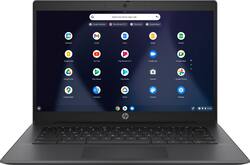
Power through the day: Delivers plenty of power to take on your day with an Intel® Celeron™ processor and seamless, brushed metal keyboard deck. With plenty of storage and long lasting battery life, expect a full day of productivity for work or play. Immersive entertainment: Make this the perfect PC for your daily dose of entertainment. Includes dual HP speakers and Audio by B&O. Plus, a 180° hinge that makes it easy to collaborate with others. Apps for everything: An ecosystem designed to seamlessly keep you in sync, your favorite Chrome browser and the Google Play Store, filled with apps that can help you do everything from work to play.
A: Your Chromebook will NOT be a paperweight when auto updates end. I have a Chromebook that I bought open-box at Best Buy in 2013 for about $100, the AUE was 2018, and I am still using it 3 years later with no significant issues.
Q: What's the aue date on this chromebook?
A: The AUE date on this Chromebook is June 2024. You'll still be able to use it after that date, but you'll no longer get updates to the Chrome operating system
Q: What type of printer will work with this laptoo
A: This Chromebook will "find" a WIRELESS printer that is on your home network, and printing should work fine. I recently bought a Chromebook, and it "found" my HP wireless printer on my home network, and printed fine. Best Buy sells wireless HP printers at various price levels, as well as other brands of wireless printers. A wired printer connection might not work with this Chromebook--better to use a wireless printer. Hope this helps.
A: No, this Chromebook does not have a touch screen.
A: So far I’ve used Google Docs. Works well.
Q: is this laptop good for homeschooling?
A: This Chromebook should be good for homeschooling, especially if most of the child's work is done on a website or is web-based. If you use homeschool apps or programs, be sure they will work with the Chrome operating system (Chrome OS) or Android operating system, rather than the Microsoft Windows operating system or the Apple operating system (iOS). Hope this helps, and good luck!
Q: What cable do I need to connect this Chromebook HP 14" to a TV to view Netflix
A: Hello, Alex. You would need the USB C to HDMI cable or adapter to connect this HP Chromebook to a TV.
Q: Can this chromebook access Zoom meetings, video AND audio?
A: Yes, just download the app