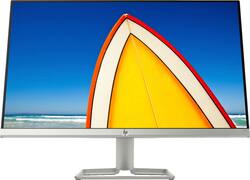
View work and entertainment comfortably with this 23.8-inch HP monitor. The anti-glare panel lets you see content clearly in various lighting conditions, and the virtually frameless design lends a minimalist aesthetic to your home office. Prevent eyestrain by switching to this HP monitor's Low Blue Light mode for a warmer appearance.
A: No, not this model. An upgrade model does have speakers iirc.
Q: Does this unit come with its own HMDI/VGA cables or do you have to buy those separately?
A: This monitor comes with the HDMI cable.
Q: Is this monitor compatible with MAC and is it appropriate for photo editing?
A: Yes it is compatible with MAC. Im using both of mine with a 13" macbook pro. However, my text is very fuzzy and grainy. not very defined like a macs. Its very difficult on the eyes after a hour of use because im squinting to read. i have played with all the mac settings as well as the computer settings. somethings make it better such as turning down the contrast and disabling smooth text in general settings. I purchased two and theyre identical so i know i didnt get a dud. If youre like me and appreciate the crisp graphics of a mac, i would not recommend this to you.
Q: Does this monitor have the ability to Mount to bracket for moveable arm Mount
A: This monitor is not a VESA Mount monitor so it does not have the ability to be mounted.
A: It doesn’t have height adjustment but has tilting mechanism .
A: Very few standalone monitors come with a camera and microphone. By far the easiest and cheapest way to go would be to buy an external webcam (which will include a microphone) and mount it on the top of your existing monitor.
A: The monitor includes a power cord, HDMI cable and VGA support if needed.
Q: Do you need to download software onto your computer to use this monitor?
A: I did not have to install any software. Just plugged it in and it worked.