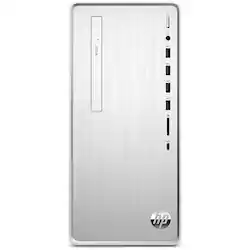
Power through your to-do: Everything you do feels easier and faster than ever before with a high performance processor and integrated Bluetooth technology. Brand you trust. Built to last. For 80 years, we've had your back. That’s why our PCs go through over 230 individual tests to ensure you’re getting a powerful, reliable PC that's going to last. Made for the modern family: Ditch the dull black box with a polished silver brushed finish that perfectly fits in any space. Designed with multiple ports located on the front so you can quickly and easily connect your devices.
A: On the front of this desktop, there are (4) USB 3.2 Gen 1 Type-A port (5 Gbps data transfer); (1) USB 3.2 Gen 1 Type-C port (5 Gbps data transfer). On the back, there are (4) USB 2.0 Type-A ports, (1) HDMI 1.4b/HDCP 2.2 port and (1) VGA port.
Q: what soundcard does this have in it or do i have to buy a sound card
A: I honestly don’t know the name of the sound card I am sure tech-support could tell you but it does have a sound card in it I’m very happy with it I have it about three weeks now and pleased with the product
A: Hi Bill! The external expansion Bays comment is incorrect. Yes, you can add a 3.5" SATA hard disk drive. The computer has a cage and cables to support adding this.
Q: Does this computer have an ethernet port in the back?
A: Hello. Yes, this HP Pavilion desktop model does have a RJ-45 (ethernet) port in the back.
A: The fastest RAM the specs show for the motherboard is DDR4-2933. The 3200 will probably work, but run at the lower speed. Generally two sixteen gigabyte modules will run faster than one 32 gigabyte module, because with two modules, the memory will run in "dual channel" mode for increased performance.
Q: Can this connect to my Wi-Fi without using an ethernet cord?
A: No, this desktop does not have wifi capabilities. You will need to use an ethernet cable to connect to your network.
A: No. That is something that you or the tech can change out after you get the desktop.
A: Thank you so much for your question! Yes, you can connect a printer to the HP Pavilion Desktop using a USB A to B cable or wirelessly depending on the model of printer that you have.