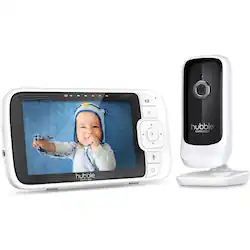
See, hear and speak to your baby from anywhere with Hubble’s Nursery Pal Link Premium. Our 5 in Smart Baby Monitor is ushering the future of emotional tech and making it crystal clear that baby monitors are no longer just for parents. Digitally zoom from your phone or tablet to maintain the perfect view of your infant via the large 5 in HD color monitor or on your smartphone via our FREE HubbleClub app. Monitor baby’s room temperature and sooth your little one with the sweet sound of your voice through the two-way talk function. Come bedtime, you’ll have the same High-Definition picture quality in the dark with Infrared Night Vision, so you can watch your child lull to a peaceful slumber as you control lullabies, audiobooks and nature sounds.
A: Happened to me as well (with more than one purchased Cloud Pal). Hubble finally admitted it was a hardware problem. They sent a replacement….which also didn’t work. I’ve now seen this issue with four cameras!
A: Hello DKelley, You can pair up to 4 cameras to the parent unit of the Nursery Pal Link Premium, and it will also allow you to access the live stream remotely and many more features using our HubbleClub app. However, this model does not support pan/tilt in any way, only zoom. Additional cameras are expected to be available beginning of next year through us, Hubble Connected, directly. Please let me know if you have any more questions, and I will be happy to help. You can reach me directly via LiveChat or email on our website. Thanks, Mike & the Hubble Connected Team
Q: Getting audio feedback humm. How to correct?
A: Hello there, I'm sorry to hear you've run into issues with your device. Please try resetting the units: 1) Monitor: With the parent unit plugged in, turn it on, insert a paperclip or something small enough that fits inside into the reset hole above the power port. The parent will reset and turn itself off. Turn back on. 2) Camera: A) Turn your camera off. B) Press and hold the PAIR button while turning the unit on. Continue to hold the PAIR button until a long BEEP is heard. NOTE: The camera should not become unpaired with the monitor or HubbleClub App. C) Turn your monitor (parent unit) back on and check for normal operation. D) If the camera becomes unconnected or unresponsive on the monitor refer to the instructions for Re-Pairing your Camera. If you have more questions or need further help, please feel free to reach out to us directly via LiveChat or email. Kind regards, Crystal & the Hubble Connected Team.
Q: Does the Hubble Nursery link have a 1/4 treaded input for a mount?
A: Hello Jfuller99, Yes, the Nursery Pal Link Premium camera has a golden screw-hole on the bottom indicating it's compatible with the Hubble Grip, our accessory to wall mount cameras. If you have more questions about this product, please feel free to reach out to us directly via LiveChat or email Kind regards, Crystal & the Hubble Connected Team.
Q: Can you watch in real-time on the app?
A: Hello, The Nursery Pal Link Premium is a WiFi-connected model and is compatible with our Hubble Club app. Once the camera is set up, you can view it from wherever you are provided you have Internet and it's a password-protected network. If you have more questions about this product, please feel free to reach out to us directly via LiveChat or email. Kind regards, Crystal & the Hubble Connected Team
Q: Can the camera be mounted on the wall? If so, does it come with the necessary hardware?
A: Hello, The Nursery Pal Link Premium camera can be wall-mounted with the Hubble Grip, our accessory to wall mount cameras. Such an accessory is not included in the box but sold separately. If you have more questions about this product, please feel free to reach out to us directly via LiveChat or email. Kind regards, Crystal & the Hubble Connected Team