Only at Best Buy
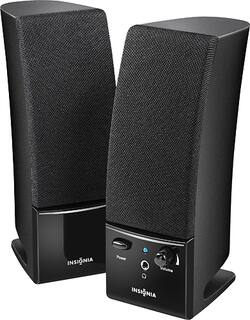
Amplify your computer's sound with these 2.0 powered speakers that feature controls on the unit and a headphone jack for private listening.
Q: Do there speakers get power theough a USB connection or a regular A/C plug-in?
A: Speakers do not connect to USB. There is a line going to a power supply which plugs in to a 110 volt outlet. There is another line which plugs into a round outlet in the computer. Outlet is about 1/8 inch or less.
Q: What about audio quality measured in numbers?
A: The speakers were very clear. I could hear my music beautifully I just could not hear it loud enough in the next room. When I sat at my computer with the speakers they were fantastic.
A: With the speakers facing you, each one is 2.5 inches wide. Sideways, each are 3 inches They are 7 inches tall
Q: Can these speakers be connected to an HDTV?
A: Yes, they can be hooked up to a HDTV through the ear jack on side of the tv
A: Your insignia speakers are not a microphone. You can only use them to hear your grandchildrens voices. For them to hear you, you must speak into a microphone of some sort. Sometimes computers have them built in, sometimes they don't. Hope that helps! Cheers!
Q: volume button light does not work
A: Blue light comes on when power button is pushed in on right speaker. If not get another set.
A: These speakers are not USB compatible.
A: Check the connection at the computer. Try moving the headphone jack around, plugging and unplugging while something is playing. If no improvement, replace the speakers. Also check your computer's audio settings. Some computers allow you to adjust the speakers separately.