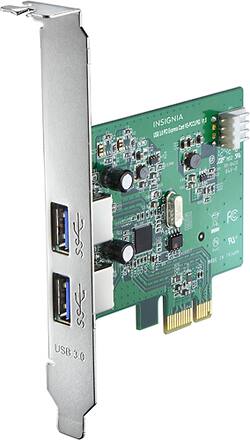
Easily add USB 3.0 functionality to your PC with this Insignia™ NS-PCCUP53 PCI Express interface card that offers data transfer rates up to 5 Gbps per port and is backward compatible with USB 2.0 and 1.1 devices for flexibility.
Q: Where can I find Device Drivers for windows 7 for this card?
A: This card Says it is Windows 8 and up. This is a half truth. Windows will auto detect the card for Windows 8 and up, but for Windows 7 THERE IS A DRIVER. The card uses a USB controller "Renesas µPD720202". You can find Windows 7 drivers here: https://plugable.com/drivers/renesas/ Note: This is not an Insignia driver, they use an off the self chip. I don't know why Insignia cannot provide this driver to people who ask.
Q: Will this work in a Dell xps 8300
A: Yes, the USB 3.0 card should work just fine. I checked the specs on the Dell XPS 8300 line, and you should have a couple of free PCI Express slots. You'll need to open the case, remove one of the back slot covers, insert the card, and connect a free floppy disk power line from the power supply to the card. I didn't have to install any drivers when I did it for mine, but they include a driver disc just in case you need to. Refer to page 37 of the Dell XPS maintenance manual if you need official guidance on installing PCI Express cards here: ftp://ftp.dell.com/Manuals/all-products/esuprt_desktop/esuprt_xps_desktop/xps-8300_service%20manual_en-us.pdf
Q: Does this card include a half height (small form factor) PC bracket?
A: Yes, a bracket is included.
A: Due to the lack of 5 volt lines on the PCIe bus it is highly recommended that the power be applied to the PCIe USB 3.0 Card. This will ensure proper functioning of devices that require that power. Failing to do so would give a false indication that your device or card has malfunctioned. While cable management might be a nightmare there are accessories at Best Buy that should allow easy eye pleasing installation. Best Regards
Q: power connector to card what type
A: The connector is the one used on 3 1/2 inch floppy drives to the power. Small 4 pin flat connector.
Q: What chipset is on this card? Is it on the VMWARE ESXi hardware compatibility list for passthrough?
A: undefined
Q: Will this ca will this card work in an all-in-one
A: Unlikely unless you can open it and the is a free PCIE port and space for it.
Q: I have a Dell Optiplex 3010 .What kind of cable to use and where to plug the cable into.Thanks
A: Internally it doesn't need a cable, externally a USB cable.