Rating 4.6 out of 5 stars with 5158 reviews
4.6- Compatibility (1159)
- Ease of use (828)
- HDMI (491)
- Price (306)
- Performance (216)
- Power (19)
- Resolution (15)
- Cord Length (11)
Customer Images
The vast majority of our reviews come from verified purchases. Reviews from customers may include My Best Buy members, employees, and Tech Insider Network members (as tagged). Select reviewers may receive discounted products, promotional considerations or entries into drawings for honest, helpful reviews.
- Rated 5 out of 5 stars
Just as I expected...
I have an older InFocus LCD Projector and, while it is no longer new, it *was* top-of-the-line in its day and is still super portable. It produces a lot of color and punch when used with my older laptops, but I was really hoping to use it with my newer ones, but they don’t have VGA ports. Enter HDMI to VGA adapter! Plug and play, just like before. No screws to “lock in” the connector to the VGA cable on the projector, but that’s ok. I got some electrical tape and secured everything well. Works great, no issues with signal or connection.
Posted by Dave
- Rated 5 out of 5 stars
these are perfect for what I need
I am now into online trading. I bought 3 large display screens which must have this type connection to the USB on my computer. They work PERFECTLY and I would advise anyone who needs the same setu pto buy these :)
Posted by krun11
- Rated 5 out of 5 stars
Good product. Worth the money.
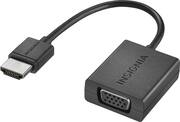
Insignia™ - HDMI-to-VGA Adapter - Black worked well with my desktop monitor.
Posted by Bestbuyer
- Rated 5 out of 5 stars
Good value for the price.
This is a good accessory to have around when you need to view files.
Posted by Jackie0
- Rated 5 out of 5 stars
Video Adapter
Plug n play made it easy to use this adapter. nice
Posted by covenantrider