Early Black Friday DealsNew Doorbusters every Friday.Shop now

Main Content
product image

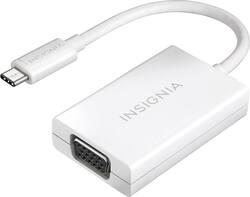
Insignia™ - USB Type-C-to-VGA Adapter - White

Model: NS-PU369CV-WH
SKU: 4480402
This item is no longer available in new condition. See similar items below
  • Key Specs
    • Cable Length: 0.33 feet
    • Connector Type (End 1): VGA
    • Gender (End 1): Female
    • Connector Type (End 2): USB-C
    • Gender (End 2): Male
  • General
    • Brand: Insignia™
    • Model Number: NS-PU369CV-WH
    • Product Name: USB Type-C-to-VGA Adapter
    • Color: White
  • Connectivity
    • Cable Type: USB, VGA
    • Cable Length: 0.33 feet
    • Product Type: Adapter, Cable
    • Connector Type (End 1): VGA
    • Gender (End 1): Female
    • Connector Type (End 2): USB-C
    • Gender (End 2): Male
  • Warranty
    • Warranty - Parts: 1 year limited
    • Warranty - Labor: 1 year limited
  • Other
    • UPC: 600603194504

Quickly connect your Apple® MacBook® or Chromebook to a TV, monitor or projector with this Insignia™ 4" USB Type-C-to-VGA adapter, which features a USB Type-C connector and supports up to a 1080p video resolution.

  • Designed for use with Apple MacBook or Chromebook: For an easy way to connect your device to a TV, so you can share videos, movies and photos with family and friends.
  • USB Type-C output: Offers a simple way to connect your device to another computer monitor or projector.
  • Supports up to 1080p: For a crisp and clear video resolution.
Whats Included
  • USB Type-C-to-VGA Adapter
Product Manuals

Q: Will this adapter work with a 2018 Macbook Pro and a 2019 Samsung UHDTV?

A: If your laptop has a type c port and your connecting it to a monitor that has a vga connection, it will work

Q: will this adapter work wtth the new mac mini

A: This adapter works for Apple computers.

Q: Does this adapter transmit in both directions, in and out?

A: No, this is not a VGA to USB-C adapter.

Q: Will this work with an hpSpectre x360 laptop? I tried another product (Benfei-Thuderbolt) that did not work.

A: It's not so much as the brand/model of laptop as it is the capabilities of the USB-C port. The USB-C port on your laptop must support DP (DisplayPort) Alt Mode. As best I can tell online, if it does, you should see a D or DP icon next to the port. Other reviewers seem to indicate this works on Macs and Chromebooks. In my case, I think I need to buy a VGA-to-USB (old school) from Amazon.

Q: Does this adapter also have an audio jack? Or is it only to project image ?

A: Hi, MG79. This adapter is for picture projection only. Cesar G. - Insignia Support

Q: I bought this to connect a view sonic monitor to a microsoft surface and its not working. No signal on the monitor. I have the vga monitor cord into the insignia device and the usb c then into an i5create dock that then plugs into the Surface usb-c.

A: Hello Dan, Note: If your computer does not have a disc drive, you can download the driver from www.insigniaproducts.com. Search for your model number (NS-PU98505) to find the driver on the product page. Or, attach an external disc drive to your computer. 1.Insert the driver CD into the optical drive on your computer. The software should run automatically. The initial installation screen opens. Note: If the software does not run automatically, locate and double-click Run.exe on the driver CD. 2.Click on your operating system, then follow on-screen instructions. Note: Windows 10 and Windows 8.1 have a built-in driver. It allows you to use the adapter's basic functions without installing the drivers. For other situations, you must install the drivers from the CD. 3.When the installation is complete, click Finish to restart your computer and finish the installation. 4.Connect the USB connector on the adapter to an open USB port on your desktop or laptop computer. 5.Connect a network cable to the Ethernet port on the adapter. Insignia Support, Merjorie www.insigniaproducts.com/support