Main Content
product image

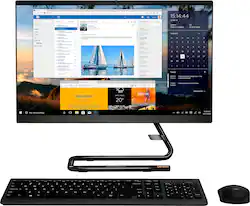
Lenovo - IdeaCentre AIO A340 22" Touch-Screen All-In-One - Intel Pentium - 8GB Memory - 1TB Hard Drive - Black

Model: F0EA0088US
SKU: 6476237
This item is no longer available in new condition. See similar items below
  • Key Specs
    • Screen Size: 21.5 inches (Size of the screen, measured diagonally from corner to corner.)
    • Processor Model: Intel Pentium (Your computer's processor is like its brain. Working in combination with system memory, the power of the processor determines the complexity of software you can run, how many programs you can have open at the same time, and how fast those programs will run. Most computers feature an AMD, Intel or Snapdragon processor.)
    • Storage Type: HDD
    • Total Storage Capacity: 1000 gigabytes
    • System Memory (RAM): 8 gigabytes (Random-access memory (RAM) is a computing device's short-term data storage, which allows active information to be accessed quickly. The size and type of RAM determines how efficiently the device can handle large amounts of information at one time. For example, gaming or video editing requires more RAM for optimal performance.)
    • Graphics: Intel UHD Graphics 605 (Often referred to as a "graphics processing unit" (GPU), this device is responsible for displaying image content and decoding/encoding video content in programs and games.)
  • General
    • Brand: Lenovo
    • Model Number: F0EA0088US
    • Product Name: IdeaCentre AIO A340 22" Touch-Screen All-In-One - Intel Pentium - 8GB Memory - 1TB Hard Drive
    • Color: Black
    • Year of Release: 2019
  • Display
    • Display Type: LED
    • Screen Type: IPS
    • Screen Size: 21.5 inches (Size of the screen, measured diagonally from corner to corner.)
    • Screen Resolution: 1920 x 1080 (Full HD) (Screens come in a range of resolutions (measured in pixels, horizontal x vertical). The higher the resolution, the greater the picture quality.)
    • Touch Screen: true (Touch-screen devices make navigating more intuitive. Using a touch-screen display, you can do things such as tap to select, hold and drag to move items, swipe to scroll, and pinch to zoom.)
    • Multi-Touch Screen: true (A screen that recognizes multiple points of contact, allowing for intuitive navigation functions such as pinch to zoom.)
  • Processor
    • Processor Brand: Intel
    • Processor Model: Intel Pentium (Your computer's processor is like its brain. Working in combination with system memory, the power of the processor determines the complexity of software you can run, how many programs you can have open at the same time, and how fast those programs will run. Most computers feature an AMD, Intel or Snapdragon processor.)
    • Processor Model Number: J5040
  • Storage
    • Storage Type: HDD
    • Total Storage Capacity: 1000 gigabytes
    • Hard Drive Capacity: 1000 gigabytes (The amount of data that can be stored on the device's mechanical hard drive. Hard disk drives (HDDs) typically have larger capacities than solid state drives (SSDs) but may have slower speeds.)
    • Hard Drive Interface: SATA (Connects the hard drive to the host system for transferring data between the hard disk cache and system memory. IDE and SATA interfaces are primarily used for personal computing, while larger servers and workstations typically use SAS or SCSI.)
    • Hard Drive RPM: 5400 revolutions per minute (A hard drive's data is stored on disks, or platters, that spin while transferring information to the host system. The higher the RPM, the faster the hard drive's performance.)
  • Memory
    • System Memory (RAM): 8 gigabytes (Random-access memory (RAM) is a computing device's short-term data storage, which allows active information to be accessed quickly. The size and type of RAM determines how efficiently the device can handle large amounts of information at one time. For example, gaming or video editing requires more RAM for optimal performance.)
    • Type of Memory (RAM): DDR4 (Each type of RAM delivers a different level of speed, bandwidth, energy efficiency and performance.)
    • Number Of Memory Slots: 1
    • Number of Memory Sticks Included: 1
  • Graphics
    • Graphics Type: Integrated (Dedicated graphics uses a separate graphics card for processing video images. Because it does not use memory from the system's RAM, there is no extra burden on the CPU and graphics are processed more efficiently. Integrated graphics shares system RAM to process video images.)
    • GPU Brand: Intel
    • Graphics: Intel UHD Graphics 605 (Often referred to as a "graphics processing unit" (GPU), this device is responsible for displaying image content and decoding/encoding video content in programs and games.)
  • Compatibility
    • Operating System: Windows 11 Home (The operating system manages all software and hardware, including files, memory and connected devices. Most importantly, it lets you interact with your device and your programs in a visual way; otherwise, you'd be typing computer code to get anything done.)
    • Operating System Architecture: 64-bit (An operating system (OS) manages computer hardware, software resources, and programs in conjunction with the system's processor. 64-bit operating systems can handle more data at once than 32-bit systems, resulting in faster speeds, more effiency, and overall improved performance.)
  • Connectivity
    • Display Connector(s): 1 x HDMI (The number and type of connectors used to connect to an external display.)
    • Number of HDMI Outputs (Total): 1
    • USB Ports: 2 x USB-A 2.0, 2 x USB-A 3.2 (The number and type of USB ports the product has.)
    • Number of USB Ports (Total): 4
    • Wireless Connectivity: Bluetooth, Wi-Fi (The manner in which a device sends data to another device over a short distance without the use of wires or cables.)
    • Ethernet Card: 10/100/1000 (Also known as an Ethernet adapter, this card plugs into a computer's motherboard and enables it to access an Ethernet network. Ethernet data transmission speeds are measured in Mbps (megabits per second) and Gbps (gigabits per second). For example, a 10/100 Ethernet port transmits 10 and 100 Mbps, while a 10/100/1000 Ethernet port transmits 10 and 100 Mbps and has a maximum speed of 1000 Mbps (1 Gbps).)
    • Number Of Ethernet Ports: 1
    • Network Connectivity: None (The manner in which a device sends data to another device over a long distance using a cellular network.)
  • Camera
    • Built-In Webcam: true
    • Front-Facing Camera: true
    • Front Facing Camera Video Resolution: 720p (Refers to the number of pixels, both horizontally and vertically, used by the camera facing the user to capture video. The higher the resolution the finer the video detail that can be seen.)
    • Built-In Microphone: true
  • Features
    • Media Card Reader: true (A hardware device that allows for access to data on a memory card and enables the transfer of its files to a computer. These devices may have one or multiple slots for various types of memory cards, and may be integrated into the computer or available as an external device.)
  • Dimensions
    • Product Height: 16.49 inches (The out of box height of the item. Height is measured as the vertical distance from the bottom of the item to the top as it would be primarily used or placed.)
    • Product Width: 7.3 inches (The out of box width of the item. Width is measured as the horizontal distance from one side of the item to the other as it would be primarily used or placed.)
    • Product Depth: 19.31 inches (The out of box depth of the item. Depth is measured as the distance from the front of the item to the back as it would be primarily used or placed.)
    • Product Weight: 11.64 pounds (The out of box weight of the item.)
  • Certifications Listings & Approvals
    • ENERGY STAR Certified: true (Devices carrying the ENERGY STAR service mark, such as computer products and peripherals, kitchen appliances, and other products, generally use 20% to 30% less energy than required by federal standards.)
    • EPEAT Qualified: false (The Electronic Product Environmental Assessment Tool (EPEAT) was designed to provide an environmental assessment tool for purchasers. In order to qualify for EPEAT, a product must meet all 23 required criteria.)
  • Included
    • Optical Drive Type: None (An optical disk drive (ODD) uses a laser light to read data from or write data to an optical disc. These discs include CDs, DVDs, and Blu-ray Discs. This allows you to play music or watch movies using prerecorded discs.)
    • Wireless Keyboard: true
    • Wireless Mouse: true
    • Speaker(s) Included: true
  • Warranty
    • Warranty - Parts: 1 year limited
    • Warranty - Labor: 1 year limited
  • Other
    • UPC: 196118310220

With its sleek, modern stand and thin bezel display, the Lenovo IdeaCentre A340 is sure to catch your eye. Fire it up and marvel at the super fast, smooth performance, where 8th Generation Intel® Core™ processing is backed by the latest graphics and memory technology. And with the vast storage space, you’ll see why this space-saving all-in-one makes the perfect family PC.

  • All-in-one design saves space and cuts clutter: A full computer is housed inside the monitor, so you get all the power of a PC in a streamlined design that involves fewer cables and takes up less space on a desk, table or kitchen counter.
  • 21.5" Full HD multitouch screen: Native 1920 x 1080 resolution showcases your games and HD movies with impressive color and clarity. Anti-glare technology reduces glare and mirror-like reflections. 16:9 aspect ratio.
  • Quad-core Intel® Pentium® Silver J5040 processor: The perfect combination of performance, power consumption, and value helps your device handle multitasking smoothly and reliably with four processing cores to divide up the work.
  • 8GB system memory for advanced multitasking: Substantial high-bandwidth RAM to smoothly run your games and photo- and video-editing applications, as well as multiple programs and browser tabs all at once.
  • 1TB hard drive for ample file storage space: Holds a significant collection of digital photos, music, HD videos and DVD-quality movies. 5400 rpm spindle speed for standard read/write times.
  • Built-in HD webcam with stereo microphone: Makes it easy to video chat with family and friends or teleconference with colleagues over Skype or other popular applications.
  • Built-in media reader for simple photo transfer: Supports SD, SDHC, and SDXC memory card formats.
  • 2 USB 3.1 ports maximize the latest high-speed devices: Also includes 2 USB 2.0 ports to connect more accessories and peripherals. The USB 3.1 ports are backward-compatible with USB 2.0 devices (at 2.0 speeds).
  • Next-generation wireless connectivity: Connects to your network on all current Wi-Fi standards. Connect to a Wireless-AC router for speed nearly 3x faster than Wireless-N. Gigabit Ethernet LAN port plugs into wired networks.
  • Bluetooth 4.0 interface syncs with compatible devices: Wirelessly transfer photos, music and other media between the computer and your Bluetooth-enabled cell phone or MP3 player, or connect Bluetooth wireless accessories.
  • Wireless keyboard and wireless mouse: Allow freedom of motion during use and help reduce desktop cable clutter.
  • Basic software package included: 30-days trial of Microsoft Office 365.
  • Additional ports: HDMI and 3.5mm Microphone/Headphone combo outputs.
Whats Included
  • PC
  • Keyboard
  • Mouse
  • Power Cord

Q: does the lenevo FOEA0088US HAVE A DVD BURNER

A: No. The Lenovo IdeaCentre A340 22 All-In-One System, model number F0EA0088US, does not have a built in CD/DVD drive. You can use an external, USB-based Windows compatible CD/DVD drive with this computer, like this one: https://www.bestbuy.com/site/lg-8x-external-usb-double-layer-dvdrw-cd-rw-drive-black/5852919.p?skuId=5852919

Q: Can external speakers be connected to this computer?

A: Yes. You can use the 3.5mm audio jack to connect compatible external computer speakers to this Lenovo IdeaCentre A340 22 All-In-One system. Because this is an All-In-One computer, there are stereo system speakers - 3Wx2 - built in as well.

Q: I can’t connect the mouse and keyboard. And usb was not there when I bought this computer. How can I get this things connected

A: You must first install the USB WiFi 2.4GHz receiver into a USB port on the computer, then turn on any on/off switches on the mouse and keyboard, before the wireless mouse and keyboard will operate. The USB receiver for both the mouse and keyboard (they use the same one) is stored within the battery compartment of the wireless mouse. Install the USB receiver then install the batteries within the mouse and keyboard. If you continue to have issues, we recommend you contact Lenovo Tech Support at: 877-453-6686.

Q: I would like to use for work can I add an additional monitor?

A: Yes. This Lenovo IdeaCentre A340 22 All-In-One System, model number F0EA0088US, ships with 1x HDMI-out 1.4 port for video out to an external monitor. We always recommend you check the requirements and compatibility of any software you will be installing on your new computer, before you invest in any computer. Be sure your new computer can support the software you will need to use and your workload.

Q: does it come with windows 11

A: Mine came with Windows 11 installed.

Q: Can I connect my Xbox to the monitor and play video games

A: No. This Lenovo IdeaCentre A340 22 All-In-One system, model number F0EA0088US, ships with 1x HDMI-out 1.4 port only, for video out to an external monitor. There is no HDMI-In capability for connecting a gaming console to this A340 22 AIO system.

Q: Can Microsoft office and web root be added to this computer and how much

A: There is a 30-day trial of Microsoft Office 365 included as part of the Windows 11 operating system. In order to keep the program active after the trial period, you will need to purchase a product key. You will not need to download any additional software. Additionally, The Lenovo IdeaCentre A340 22 All-In-One system, ships with a 30-day trial of McAfee Virus Protection Software installed. It will activate automatically with the initial activation of Windows 11 and protect your computer for the 30-day trial period. You do not need to use McAfee VPS. You can uninstall McAfee and use the free Windows Defender VPS that comes with Windows 11 or you can uninstall McAfee and then install your choice of any compatible 3rd party VPS. The key is to uninstall McAfee if you will not be using it, as there can only be one active VPS on the computer at a time. Here is a link to information on uninstalling McAfee from Windows: https://service.mcafee.com/?locale=en-us&articleId=TS100162&page=shell&shell=article-view

Reviews