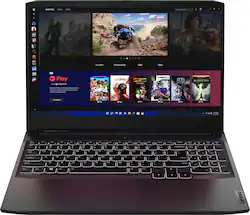
Time to elevate your game and esports experience beyond the realm of the “just acceptable." Engineered with the latest generation AMD Ryzen processor and NVIDIA GeForce graphics, DDR4 memory and SSD storage options, the Lenovo IdeaPad Gaming 3 stays cool with a reengineered high-performance thermal system.
A: OK I can understand the LENOVO rep spouting the party line, and not knowing either how the chips and CPU work... but really should be able to read Lenovo-speak in the tech documentation even for this laptop. For others who choose to make noise in the echo chamber, well you might as well test before you speak, or keep silent, since it misleads many to parrot incorrect information. So: 1. This machine can do DDR4 3200 in dual channel, with 22-22-22-54 timing (standard JEDEC 12/13), using two (T W O) up to 32 GB RAM modules, 64 GB total. 64GB is the limit, its architecture not Ideapad 3 design causing this 64GB limit (e.g., not Lenovo's fault). 2. Modules do not _have_ to match (I wont go into a modern memory controller diatribe for DDR4). Only on rare cases (eg, by exception) will it not work to mix. 3. If you mix an 8GB and a 32 GB, for example, you will 8+8=16 in Dual Channel mode, and memory use beyond 16GB will be single channel. On this machine, that means a significant performance hit if that single channel is used, unlike the Legions (which have a different NB/SB/CPU setup on the Mobo). But it will work fine. 4. This exact machine will get a HUGE performance increase going from 8GB single channel to 16GB dual channel. Huge, including about 10 to 15% FPS using the 3050ti. 5. Performance to 16+16 and 32+32 is negligible, for general use and for gaming. More RAM is good for things like video editing of course, but if you do that a lot (or professionally), you do not want a 6-core machine with this mobo architecture to begin with.
Q: What games are playable? Would Genshin Impact, Minecraft, Roblox, and The Sims 4 all be playable?
A: This laptop would very easily run those games with zero issues, as those games are all old, or otherwise designed for low-end systems with simplistic graphics. This laptop will above even recommend specifications for all of those games, and dare I say a bit overkill even!
A: The fix for the missing Standoff and screw for the M.2 2280 slot, worked perfect for me. Do a search QTEATAK PCIe NVMe M.2 2280 SSD Standoff Mounting Screws Screwdriver Kit for ASUS
Q: Is this computer user upgradable?
A: Yes, I added a 500Gb, 2.5" SSD, and replaced the original 8Gb single memory stick with (2) 16Gb RAM sticks.
A: Hi, Not sure of the brand of RAM it comes with but I added an 8 gig stick of PNY RAM, giving me a total of 16 gigs and it's working perfectly. I also added an additional Crucial M.2 2280 1 TB SSD and it's working perfectly as well so I'm sure the Samsung you mentioned will work too. Hope this helps!
A: This Lenovo IdeaPad 3 15 Gaming Laptop, model number 82K201XCUS, ships with the discrete, NVIDIA GeForce RTX 3050 Ti GPU, with 4GB GDDR6 VRAM on the card, and has a Boost Clock of 1485 / 1597.5MHz with a TGP of 85W, and has 1x HDMI 2.0 video out connection and supports up to 2 independent displays (native display and 1 external monitor via HDMI). HDMI supports up to 3840x2162@60Hz. HDMI 2.0 carries combinations like 1440p 165Hz with no issue, and for 1080p, frame rates of 240Hz are no problem, depending on the capability of the monitor you use.
A: You must not block the cooling intake or exhausts. Keyboard spill proof membrane is OK. If you block the cooling, it should thermal limit CPU, graphics, etc. , but I am not going to test it to prove it wont destroy something which is not thermal protected, rotfl.
Q: Can I play Minecraft java on this ???
A: Yes. Very well.