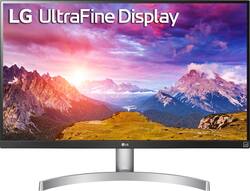
Experience crisp, immersive multimedia viewing with this LG LED monitor. The 27-inch UHD IPS display with VESA DisplayHDR 400 high dynamic range produces sharp, vivid visuals, while Radeon FreeSync technology reduces stuttering and tearing for smoother, fluid motion while gaming. This LG LED monitor features 99 percent coverage on the sRGB spectrum for highly accurate color reproduction.
A: Hi Dave. The LG 27'' Class 4K UHD IPS LED Monitor with VESA DisplayHDR 400 (27'' Diagonal), Model # 27UK650-W does not have built-in speakers. It has a Headphone Out that you can connect a pair of computer speakers to ...^IFV
Q: How compatible would this be with a MacBook Pro (15-inch, 2019)?
A: Works great but you need a hdmi connection
Q: When will you be receiving more stock?
A: undefined
A: No, it doesn't have Bluetooth.
A: The LG 27'' Class 4K UHD IPS LED Monitor with VESA DisplayHDR 400 (27'' Diagonal), Model # 27UL650-W has 2 x HDMI ports and a DisplayPort input. If your MacBook Pro 2017 only has ThunderBolt 3 ports then you will need an appropriate adapter to connect to the HDMI ports or to the DisplayPort or a combination dock. The monitor does not have built-in speakers...^IFV
Q: Hi... does this monitor allow split screen viewing?
A: You will need to download and install LG's On-Screen Control with Screen Split 2.0 and Dual Controller software on your computer or use the screen split feature in your computer's operating system to have screen split on the 27'' Class 4K UHD IPS LED Monitor with VESA DisplayHDR 400 (27'' Diagonal) Model # 27UL650-W. LG's [Windows] OnScreen Control - version 4.78 or [Mac OS] OnScreen Control - version 3.76 can be downloaded and installed from the support page for the monitor on our site...^IFV
A: I just mounted mine over my primary monitor using a arm mount. The plate has holes that are in a 10 cm square. This fits my mount. Just use the screws (washer?) that come with the mount. If using a over/under arrangement of two mounters be sure you have both monitors on hand before drilling any holes for the mount. You don't want to run out of head room for the upper monitor!