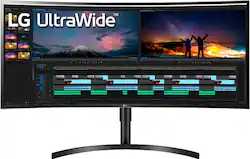
38” UltraWide Curved WQHD
A: The differences between the monitors is that the 38” UltraWide Curved WQHD+ IPS HDR10 Monitor - Black, Model # 38WN75C-B has a DisplayPort 1.4 (v DisplayPort 1.2 for the 38WK95C-W) it has a slightly lower PPI ( 109 v 111), it does not feature a USB Type-C (USB 3.1 / USB 3.2 Gen 1) or the two USB Type-A (USB 3.1 / USB 3.2 Gen 1) featured on the 38WK95C-W, it does not support AMD FreeSync™, it does not have a Game Mode, it does not have Six Axis Control, or Dual EDID. It has an Anti-Glare Surface Treatment that the 39WK95C-W does. It does not have In Screen Split and it does not support PBP (Picture by Picture) like the 38WK95C-W does. It has the same panel, but it is not a replacement for the 38WK95C-W and it is priced at $200 less than the 38WK95C-W...^IFV
Q: can I hang this monitor on the wall/What mount should I buy.....
A: The LG 38” UltraWide Curved WQHD+ IPS HDR10 Monitor - black, Model # 38WN75C-B is a VESA compliant Display that has a VESA Wall Mount Pattern of 100 x 100 mm. Any VESA compliant Wall Mount, regardless of type, brand or manufacturer that supports the monitor's wall mount pattern can be used to mount it...^IFV
Q: What video cables are included in the box?
A: The LG 38” UltraWide Curved WQHD+ IPS HDR10 Monitor - Black, Model # 38WN75C-B comes with an included HDMI cable...^IFV
Q: Hi Does this monitor supported in a Surface Book 2 with Surface dock? Carlos
A: The LG 38'' 21:9 Curved WQHD+ IPS HDR10 Monitor, Model # 38WN75C-B has a native resolution of 3840 x 1600 and a refresh rate of 60Hz.It features 2 x HDMI ports and a DisplayPort for connectivity. The monitor is a Plug and Play monitor. Check the specifications for your Surface Book 2 with Surface Dock to ensure that the graphics card supports the monitor's native resolution and has the right ports to connect to the monitor or if you will need adapters to make the necessary connections...^IFV
Q: Is this monitor compatible with Mac Book Pro M1 - 2020
A: Hello, yes it is.^Venette
Q: where can i download onscreen control? thanks
A: I found it on the LG site. https://www.lg.com/us/support/software-firmware-drivers?customerModelCode=34UM58-P&csSalesCode=34UM58-P.ATT&category=CT10000030&subcategory=CT30000200 Hope that works for you too.
Q: Does this monitor have Auto Dimming?
A: Hello, unfortunately it does not have.^Venette