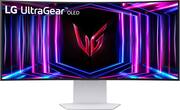
Customers consistently note the exceptional picture quality, refresh rate, and OLED display of the UltraGear 34" monitor, praising its vibrant colors and immersive 800r curvature. Many appreciate the sturdy stand and HDR capabilities, enhancing the overall gaming experience. A common drawback mentioned is the lack of built-in speakers.
The LG UltraGear 34” OLED curved monitor has changed my thoughts on curved monitors and now I found that they are great for me to use, especially when it comes to gaming. This monitor features very high-end specs and performance numbers that you would expect from a gaming monitor and has taken my gaming PC set up to the next level for sure. The HDR true black 400 really makes the colors pop and look fantastic. The 240Hz anti-glare / low reflection OLED screen is curved in a way that it helps you feel like you are more immersed in the game as you play. The resolution is not 4k, but to be honest, I don’t need 4k currently, and the 3440x1440 (WQHD) looks great with this size of this monitor. The pixel count is great, but I do think if you go up to a larger size, you may notice the pixels more, but this 34” is perfect for this WQHD resolution. I am using this with my Nvidia GeForce RTX 4090 powered laptop, and I am very happy with the results. The anti-glare coating does not cause any issues and helps with the normal glare of the lamp that is positioned behind me in my room. The monitor stand is hefty and holds this monitor very nicely, it is an L shaped metal and plastic mount that allows you to adjust the height, angle, and swivel it, and the design allows you to pretty much back this up right against a wall which is nice if you have a shallower desk. The connections on the monitor include all the options that you would need. 2 HDMI 2.1 ports, a DisplayPort 1.4, two USB type A ports and an upstream USB port as well, and finally a 3.5mm DTS Headphone:X compatible audio jack rounds out the ports. On the back of the monitor are LED lights that you can customize with different colors if you wish, they are off by default, but you can adjust in the general Settings of the monitor. Speaking of the settings, you access them by the joystick type button on the back of the monitor right in the middle. It took me a little bit of time to find it and it does take a little getting used to in order to turn off the monitor and navigate using this, but it is not that bad. Overall, this is one fantastic monitor that I am happy to be using and it is a bit on the pricey side of things, however, add the fact that you get a 2 year warranty that includes screen burn in and you have a great option to take your gaming sessions to the next level as well.L
This review is from LG - UltraGear 34" OLED Curved WQHD 240Hz 0.03ms FreeSync and NVIDIA G-SYNC Compatible Gaming Monitor with HDR400 - Black
Posted by AliA
My 33” LG OLED monitor has honestly surprised me. The picture quality is crazy good colors look natural, and the deep blacks make everything pop without feeling overdone. The size is perfect too; it feels big enough to enjoy games and movies, but not so huge that it takes over my whole desk. Everyday stuff like browsing or doing homework just looks cleaner and sharper. It’s not cheap, but it really does feel like an upgrade every time I turn it on.
This review is from LG - UltraGear 34" OLED Curved WQHD 240Hz 0.03ms FreeSync and NVIDIA G-SYNC Compatible Gaming Monitor with HDR400 - Black
Posted by Jean
This monitor has completely changed my gaming experience. I use it to play Call of Duty: Warzone, and the difference after switching to PC with this 34-inch curved screen is unreal. The gameplay is smooth, crisp, and super fast — it really gives me an edge and makes the game way more immersive. The ultra-wide curved display pulls you right into the action, and the colors and sharpness are top-notch. The high refresh rate keeps everything fluid, and the responsiveness is exactly what you want for competitive gaming. Outside of gaming, the wide screen is also perfect for productivity — I can run multiple windows side by side without ever feeling cramped. The design is sleek, and the adjustable stand makes it easy to get the perfect setup. Overall, the LG UltraGear 34-inch curved monitor is a game-changer. If you want smooth, crisp, and immersive gaming (and an upgrade that makes Warzone feel brand new), this is the one to get.
This review is from LG - UltraGear 34" OLED Curved WQHD 240Hz 0.03ms FreeSync and NVIDIA G-SYNC Compatible Gaming Monitor with HDR400 - Black
Posted by BryanG
The vast majority of our reviews come from verified purchases. Reviews from customers may include My Best Buy members, employees, and Tech Insider Network members (as tagged). Select reviewers may receive discounted products, promotional considerations or entries into drawings for honest, helpful reviews.