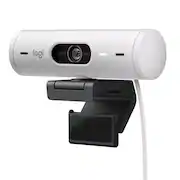
Customers consistently note that the product delivers excellent image quality and offers a user-friendly experience, highlighted by its simple setup and convenient built-in privacy lens cover. While users appreciate the elegant design and clear field of view, some have expressed reservations regarding the mounting system and the limitations of the included USB-C cable. Additionally, a few customers mentioned that the device lacks compatibility with Windows Hello and noted that the cord length may be restrictive for certain setups.
Full HD 1080p webcam resolution provides outstanding image quality so everyone can see you clearly during meetings.
RightLight 4 video lighting technology automatically adjusts to the lighting in your environment, so you can be seen clearly even in low light.
Auto-framing centers the video camera on you, allowing you to stand and move during meetings without leaving the frame.* **
Present your work or other objects on your desk with Show Mode, which lets you tilt the web camera up or down with one hand.
Be heard clearly in noisy environments thanks to noise canceling mics that filter out background sound during calls.
To protect your privacy between meetings, simply rotate the integrated webcam privacy shutter to completely block the camera.
A wider-than-normal FOV gives you extra space to move around or have a second person on the camera with you; use Logi Tune to zoom in or out to a full 90º width.
Pair with Logi Tune to customize your Logitech Webcam experience; zoom in or out, mute the microphone, adjust color and image resolution, manage auto-frame, and set automatic updates.
* This feature requires Logi Tune. Logi Tune not available for Chrome OS.
** RightSight availability and support may vary by operating systems. See Logitech’s support page for latest information.
Learn more >