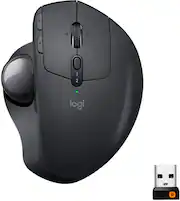
Customers appreciate the ergonomic design and ease of use of the MX Ergo Plus Wireless Trackball Mouse, frequently citing its positive impact on comfort and control. Many also praise the long battery life and Bluetooth connectivity. While some find the price and size to be drawbacks, the overall feedback highlights the mouse's effectiveness in reducing wrist strain.
The vast majority of our reviews come from verified purchases. Reviews from customers may include My Best Buy members, employees, and Tech Insider Network members (as tagged). Select reviewers may receive discounted products, promotional considerations or entries into drawings for honest, helpful reviews.
I spend way too much time in front of a computer, both for work and as a pastime. Between Photoshop, tech work, video editing, and video games, my wrist was shot. I decided rather than cycling between going to hard and recovering that I would check out some ergonomic mice. My main mouse was the G502, so I tried getting the Logitech Lift, and it's a decent mouse. It was easier on my wrist the motions still meant I experienced discomfort occasionally. Then I tried the MX ERGO and it's now my go-to for everything outside video games and even some games. It's angle is adjustable and I find full tilt to be great. The ball is very smooth, though I've heard it's worth finding an aftermarket upgrade. The additional buttons are easy to reach and programmable by application with the Logitech software. The scroll wheel is smooth and has additional buttons when tilted left/right. It also works both with the RF dongle and Bluetooth which means I can use it with multiple machines without having to swap the dongle or worry about which machine it will pair with. The battery is rechargeable and lasts months. It charges using micro-USB, which might mean it charges slowly but since I make sure to plug it in every 4-8 weeks, I've never been in a spot where I can't use it because it needs to charge.
Posted by Adrian
I was hesitant about switching to a trackball, but the Logitech MX ERGO Plus won me over quickly. The adjustable tilt feature is a lifesaver, especially if you spend hours clicking and scrolling. My wrist feels better at the end of the day, which is a significant improvement during long sessions at the computer. The trackball is incredibly smooth and precise. It works well for selecting text, editing images, or managing multiple open windows without requiring much desk space. I'm also impressed with the battery life, which seems to last for an extended period. Additionally, the customizable buttons allow me to set shortcuts for my most-used tools. While using the trackball is a pleasure, I’ve noticed that dust can occasionally accumulate around the sensor, causing the cursor to jump. Fortunately, this is an easy fix, just pop the ball out and give it a quick blast of compressed air, and you’re good to go. Overall, this mouse is a solid choice if you want something comfortable, reliable, and hassle-free for everyday use. It has transformed my work routine, and my wrist is grateful for it. If you’re curious about trackballs, the MX ERGO Plus is an excellent place to start.
Posted by JamesD
Expensive for a non-gaming mouse? Yes, however it is a high quality solution for a laptop trackpad. This mouse lives by the couch when I want to use my laptop seated, or anywhere where I dont have room to manuver a normal mouse. I used the cheaper version from logitech for years, but found the quality lacking. This fixes all the physical issues I had with the smooth opporation of the ball, and buttons. The added option to significantly tilt the mouse to aid in wrist ergonomics is actually not a gimic, but very comfortable. Logitech's button customisation is great for any use as well. I do wish the usb reciever (I don’t use it since theres blutooth) would stow in the mouse, but it does not.
Posted by LoristonF