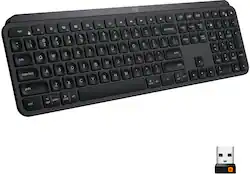
Logitech - MX Keys Advanced Full-size Wireless Scissor Keyboard for PC and Mac with Backlit keys - Black
Model: 920-009295
SKU: 6366560
This item is no longer available in new condition. See similar items below
Customers regard the MX Keys Advanced keyboard highly, praising its excellent build quality, satisfying key feel, and impressive battery life. The ease of use is also frequently cited as a significant positive. While some users find the keyboard expensive, connectivity issues are reported less frequently.
I use a MacBook Pro hooked up to a 34” curved monitor on my desk at home. As I’ve always used Apple’s Keyboards I will mostly talk about how this compares to that. If you own a Mac and are looking to change it up I highly recommend this. I had been using an Apple Magic Keyboard and Apple Mouse and recently switched to the Logitech MX Master 2S mouse when I heard about the MX Keys keyboard. I decided to give it a try and I’m so glad I did. I like it a lot more than the Magic Keyboard 2 in Space Gray. It looks great with my setup and the backlighting works really well. I leave it off during the day and turn it on at night to improve battery life. The fit and finish is excellent, it’s very solid metal and heavy, it doesnt’ move around on my desk at all. It feels like Apple’s build quality. I have used Magic Keyboards since 2007 starting with the original and now I own several of the Magic Keyboard 2 and this MX Keys is the best replacement I’ve found that mimics the typing on the Magic keyboard with smooth scissor mechanisms and short key travel while making improvements. The little dimples in the middle of each key are really comfortable when typing. I like that the Logitech is slightly more angled than the newest version of the Magic Keyboard. I find the newest version a little too flat, this has about the angle of the first Apple keyboard that had the battery compartment. This also has lots of additional functions, all of the media keys work perfectly and can be programmed to other things, for example I have one programmed to put my system to sleep. This keyboard can also be paired to three different devices and you can switch easily. I’ve used it with my iPad Pro a few times on my desk but it’s really to heavy to be mobile. I hope this comparison helps some who are deciding between Apple’s keyboard and this as I think it improves on it in most ways.
Posted by Chad
This keyboard is a lot slimmer and a bit smaller than my current keyboard, K800, that I use in the office. I purchased this second keyboard, MX full-size, to use at home with my laptop when I am WFH. I thought of getting the MX Mini, but the price difference wasn't much and I do use the 10 key often. So I opted for the full-size version. I figured if I had to travel, I would not lug an additional keyboard to use. I would just use the built-in keyboard on my laptop! LOL When I do WFH, I typically work at my lift top coffee table and place my laptop on a stand, which helps with my posture so I don't slouch. So an additional keyboard was needed. Additionally the space I work at, is a bit cluttered and not a whole lot of room. As you can see in the picture. (I know, I need to clean it!) Which is why I decided to go for a wireless keyboard. One less cord to deal with. You can pair up to 3 devices and toggle through. But I haven't had the need to use it with different devices, so not sure how seamlessly it toggles between devices. I've only used it a few times since receiving it. So I have not charged it yet. I've been using it straight out of the box on whatever charge it had. So not sure of the battery life since it is not my daily used keyboard. I love the backlit keys. The smart illumination is a neat feature. As soon as it senses movement, it lights up. The keys themselves are quiet and smooth. It has good weight to it, so it feels sturdy. And with the non slip pads on the bottom, there is no movement. I do wish you could adjust the height though. It's a single solid bar along the bottom. Not a deal breaker by any means, just wish it was a tad bit thicker for a slightly steeper slope. The only thing I wish it had, was a storage place for the dongle. Kind of like they have for small laptop mice. I know it's not meant for travel, but for those who like to switch up their keyboards or those who don't have a dedicated space to just leave it out, I'm sure they would appreciate the small storage so as to not lose it when needing to clear the space or change keyboards. But that's my only little minor complaint. Overall, it's a great little keyboard!
Posted by JamieK
I purchased this to use with an older Mac mini and also to be able to use with multiple devices. I haven't had to use it on the other devices yet but I am happy with my purchase so far. The keyboard is not that quiet compared to the Logitech k750 I had before - it does have a definite click to each key that can be heard on a microphone. I like the feel of the keys and the way each key is slightly indented to ease your fingers into pressing the correct key. I purchased a mat to put under the keyboard so it didn't slide on my desk but there rubber feet on the bottom of the keyboard so that likely wouldn't be an issue for use on a smooth surface (one of my desks is wood and the other has a glass top). The keyboard is at a set height so be prepared for that - ergonomically it is good but I imagine some people would prefer it to be adjustable. It may be that I don't have it setup correctly, but the way I realized that it needed to be charged was the red light at the top right corner started being red. I was able to use it for a while before charging but at some point the backlit function stopped working until I plugged it in to charge. I left it on most of the month since I got it and use it 5 days a week for maybe 2 hours at a time. I think it will get more once I fully charge it and use it more frequently. The keyboard came charged and has lasted about a month before needing to be recharged. I am able to use it while it's charging so that is helpful.
Posted by AmyM
The vast majority of our reviews come from verified purchases. Reviews from customers may include My Best Buy members, employees, and Tech Insider Network members (as tagged). Select reviewers may receive discounted products, promotional considerations or entries into drawings for honest, helpful reviews.