MEE audio - Connect T1CMA Wireless TV Headphone System with Over-the-Ear Headphones and Bluetooth Audio Transmitter - Black
Model: CMB-T1CMA-MEE
SKU: 6358603
Sold byBest Buy
Customers are delighted by the exceptional sound quality and the user-friendly design of these headphones. Users also frequently praise the long-lasting battery life and the convenience of having both wired and Bluetooth connectivity options. Additionally, the adjustable fit, integrated volume controls, and lightweight construction contribute to a comfortable and versatile listening experience.
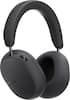
Includes Connect Bluetooth audio transmitter and Matrix Cinema wireless headphones
Enjoy your TV without bothering roommates, children, or other family members, or watch TV in bed without disturbing your significant other
Matrix Cinema headphones let you switch between four different sound enhancement profiles at the touch of a button,
Hear dialogue more clearly with two "Clear Voice" audio modes tuned to improve clarity and make dialogue easier to understand in movies, TV shows, audiobooks, and sportscasts
Compatible with new and old TVs and other audio devices – audio transmitter supports connection via optical S/PDIF (Toslink), RCA, or 3.5 mm headphone/AUX jack
Qualcomm aptX Low Latency technology delivers the best wireless audio quality and eliminates wireless audio delay for improved lip-syncing in movies and TV shows
Matrix Cinema headphones feature a lightweight, over-the-ear fit with ultra-soft memory foam padding
Included headphones can also be connected via Bluetooth to phones, tablets, and other devices and feature a built-in headset for phone calls
The Connect transmitter can be left plugged in to avoid recharging, while the Matrix Cinema headphones feature a built-in rechargeable battery offering up to 30 hours of use on a single charge
A compact form factor and built-in rechargeable batteries make the Connect and Matrix Cinema perfect for use on the go and let you add Bluetooth audio streaming to any device you encounter, such as in-flight entertainment systems
Add another Bluetooth headphone or speaker and stream audio to both simultaneously*. Each listener can adjust the volume of their headphones independently and listen without bothering each other or those around them
USB Power cable and three different audio cables are included
Plug the Connect into your TV’s audio output with one of the three included audio cables. For the best results, use the optical cable and change the Digital Audio Output Format setting to “Stereo” or “PCM” in your TV’s menu if you don't hear sound right away
Reviews coming soon
Learn more >