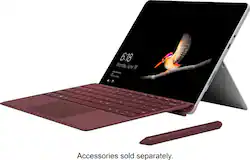
New 10” Surface Go is perfect for all your daily tasks, giving you laptop performance with tablet portability, a stunning touchscreen, and the Windows and Office* experience you know. From email, browsing, and home projects to unwinding with a favorite TV show, Surface Go is by your side wherever you are — with up to 9 hours¹ of battery life, built-in HD cameras, hassle-free connectivity, and all the ports you need, including multi-tasking USB-C. * Sold separately. 
Q: Why is this cheaper than the surface pro core i5
A: It is cheaper than the Surface Pro because of many factors. For one, the processor is a lot slower than the i5 (phenomenally slower than the more-expensive Core i7), and the Pentium included with the Surface Go is a dual-core CPU, while the Surface Pro has a quad-core CPU. Also, this model uses eMMC storage, which compared to the speed of an SSD, like that of the higher model Go and both Pro models, is like comparing a hard drive to a USB flash drive. In short, the storage in the Go is slower than the Pro. Also, this Surface Go model comes with 4GB or RAM, and I believe the Surface Pro includes either 4GB, 8GB, or 16GB of RAM. Another factor is screen size. With the screen being smaller, you end up using a lot less material when building the device, unlike the larger Surface Pro. The resolution of the Surface Pro is also higher than that of the Surface Go. The last big difference I noticed is the battery. The Pro boasts a 13.5 hour battery life, while the Go sits at a not-bad-but-not-as-good-as-the-Surface-Pro 9 hour battery life.
A: Purchased it for the same purpose. I would get the base model, with cloud storage and it has a USB C port so you could get a USB C flash drive it’s a waste in my opinion to spend more.
Q: Can you run google chrome on the surface go? That’s what my daughter uses for all her school work.
A: out of the box, the Surface Go comes with Windows 10 S mode. The catch with S mode is that it can only run Windows Store Apps. Similar to Apple IOS apps can only run App Store Apps. However, the Surface Go can be converted to Windows 10 Home Edition at no cost and at that point will function like a regular Windows computer and allow you to install any application that you can on a traditional Windows computer, including Chrome.
Q: Does the surface go come with a keyboard?
A: THE KEYBOARD IS A SEPARATE PURCHASE. Depending on your use, a pen OR a mouse will suffice.
A: The Surface Go is a fantastic tool for students. Able to carry on-the-go from class to class, this is the perfect note-taking companion. When you're ready to unwind, the Surface Go is great for streaming your favorite videos from anywhere!
Q: Will this be compatible with the online schooling platform Blackboard Collaborate? Thank you!
A: The Surface Go should be able to run Blackboard Collaborate just fine. Just double check that the program you are downloading from their site is compatible with the specs of the Surface Go which for this model are an Intel Pentium Gold processor, 4GB RAM and 64GB storage.
A: Like any laptop, you will want to be sure to check the system requirements of the programs you wish to run, and compare them to the specs of the Surface Go to ensure that they will run optimally. As far as storage goes, you will want to check how much room is recommended for storing your animations. You can always add external storage to your device using Microsoft OneDrive in the cloud, the USB C port, or the MicroSD card slot. We hope this helps!