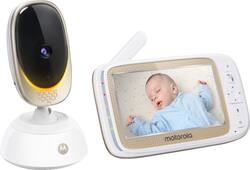
Monitor your baby from anywhere with the Motorola Comfort85 Connect. The remote pan scan and digital tilt functions allow for viewing the entire room, while the digital zoom lets you get a closeup view of your baby. This Motorola Comfort85 Connect integrates with the Hubble connected app, enabling monitoring from your smartphone or tablet, and the two-way talk feature lets you hear your little one from another room.
Q: Can the camera be mounted on a wall, or is it designed to sit flat on a shelf or table-top?
A: Yes. It has 2 little holes on The bottom for mounting
A: Hello, Sarah! Yes, it's possible to view one Hubble camera from multiple phones provided they are all using the same Hubble account. Please feel free to reach us either via live chat or email for any questions or assistance you may need. You can find us at https://motorolastore.support/en/ or email to [email protected] and we will get back to you as soon as possible. Kind Regards, Cassia & the Motorola Support Team.
A: Hello! Unfortunately, it's not possible to turn off the indicator lights without turning off the unit. Please feel free to reach us either via live chat or email for any questions or assistance you may need. You can find us at motorolastore/support or email to [email protected] and we will get back to you as soon as possible. Kind Regards, Cassia & the Motorola Support Team.
A: Hello CRedd, The parent unit itself does not detection motion or sound, only the Hubble app does and you also get notified through the app if set. If you have any more questions or would like a recommendation, reach out to us via email or live chat. We'll be happy to help. Our Live Chat is open Monday to Friday from 8 am to 8 pm EST. Our support contacts can be found on the box or in the user's guide, and we will get back to you as soon as possible. Kind Regards, Mike & the Motorola Support Team
Q: How do I keep the screen on on the monitor? It goes dark after only a few minutes.
A: Hello Jess, Possibly you have the power saving mode activated. This feature allows the monitor to turn off after a few moments of no activity. To activate or deactivate this feature: 1. Press the M button, and the menu bar will pop up. 2. Press the < LEFT button or > RIGHT button until 'video on timer' is highlighted. 3. Press the + UP button or - DOWN button to select auto video off after 5min, 30min, or 60min if operating on batteries only. If you have any questions left or need further assistance, please reach us via email or live chat. Our support contacts can be found on the box or in the user's guide. We will get back to you as soon as possible. Kind regards, Crystal & the Motorola Support Team.
A: Hello, Dadofthree! The Comfort85CONNECT has the scan feature. The monitor will go throw each camera paired every few seconds. Please feel free to reach us either via live chat or email if you have any further questions or need further assistance. You can find us at motorolastore/support or email to [email protected] and we will get back to you as soon as possible. Kind Regards, Isabelle & the Motorola Support Team
Q: What is the difference between this and the Connect40?
A: I've been searching for an answer to this question. From Motorola support, they said it was the same hardware, but different software. When I asked about the differences in the software, they said the differences were "proprietary." When I asked about the different features, if any, I was told that there are no differences except for "the software." Very vague answers led me to believe Motorola is simply changing the model numbers with a small/inconsequential software tweak so Best Buy and/or other retailers can have an exclusive and avoid price matching if any other retailer decides to put it on sale. The last part is total speculation, but I can't find another reason for 2 different model numbers with the same hardware and same features at the same price.
A: Hello, Dc10! The Comfort85CONNECT camera needs to be plugged in all the time to work as it doesn't have battery backup. Please reach us at [email protected] should you have further questions and we will get back to you as soon as possible to help. Kind Regards, Cassia & the Motorola Support Team.