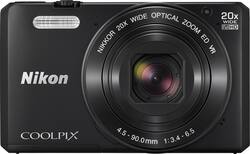
Easily capture special moments as they unfold with this Nikon Coolpix S7000 digital camera, which features optical image stabilization, 1080/60i high-definition video recording and long-zoom capability to help you shoot the subjects you want.
Memory card sold separately.

A: Battery can be charged when exhausted or when the yellow flashing light comes on, however charging a fully charged battery could cause damage to the battery. See the Reference Manual for more details.
A: The COOLPIX S7000 is set for AUTO right out of the box. The user would have to go into the menus to change to another mode. In addition, the S7000 has various automatic Scene Modes, including an automatic scene mode where the camera recognizes the scene you are trying to photograph and automatically changes to the correct Scene Mode.
A: The COOLPIX S7000 allows for either a just the date or both the date and the time stamp. It is the user's choice via a menu setting.
Q: Does this camera have an electronic viewfinder
A: No, you have to use the viewing screen on the back. However, that works very well in all of the light conditions that I have dealt with. My father-in-law prefers the larger image to squinting through a view finder, though I am a little more old school.
Q: Does image stabilization compensate for shaky hands of the photographer?
A: The camera worked wonderfully under all conditions, including shake hands! Also, when I subject was moving it captured it perfectly with no blurry image.
Q: How long can a video clip be?
A: Individual movie files cannot exceed 2GB or 29 minutes in length even when there is sufficient free space on the memory card for longer recording.
A: Take the memory card out of the Nikon COOLPIX s7000 and take images to see if the freezing issue stops. If it does try using another memory card in the camera. If the freezing issue continues please contact Nikon Support for further assistance.
A: The Nikon COOLPIX S7000 has built-in WiFi which allows you to connect it to a compatible smart device. The Nikon WMU app has to be installed on your smart device before you can use the remote options. These options will allow you to use the camera to take images that transfer straight to the smart device or use the smart device to trigger the shutter on the camera. Images are then available as they are written on the memory card within the camera. Telephoto zoom can be controlled by using the W/T function button displayed on the bottom tray of the app when you are taking an image with the smart device.