The vast majority of our reviews come from verified purchases. Reviews from customers may include My Best Buy members, employees, and Tech Insider Network members (as tagged). Select reviewers may receive discounted products, promotional considerations or entries into drawings for honest, helpful reviews.
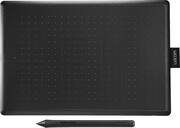
Customers are delighted by the overall performance of the One by Wacom Student Drawing Tablet, finding it great for editing. Users appreciate the tablet's size and pressure sensitivity, noting that the pen's pressure points work perfectly. Additionally, customers have found the tablet connects easily to laptops.
I ordered it and picked it up the next day , no problems at all with Best Buy and Wacom’s are always great period when it comes to using some art work on my computer.
Posted by BrianRB
I got this pad to begin learning digital art and to improve my tool kit for making designs on stream, I love the interfacing feel and it is worth using as part of your digital art tool kit.
Posted by Manny
This is a great/budget-friendly drawing and pen tool device that is very easy to install. However, there is a learning curve to set it up to take full advantage of everything it has to offer and it takes some time to get the settings where you will need them to be to use this well. I recommend watching a few videos with different set ups and trying out multiple settings configurations for the apps you intend to use it for to see what will work best for the way you will want to use this. Major Pro: The Price. For the money and if you set this up to suit your drawing/writing style, this will get the job done and you can have pressure based fine detail control for a fraction of the price of a drawing tablet or wacom with a screen. CONS: If you aren't aware if the learning curve and the need to specifically set this up to suit your needs, it may seem frustrating. CONCLUSION: i promise it works well, you just have to set your settings the way you need them to be.
Posted by CatalystEcho