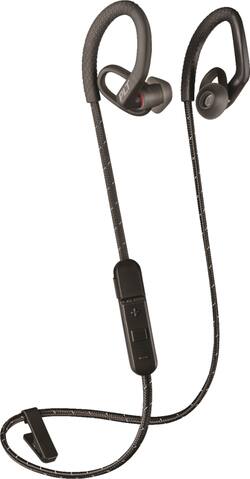
Up your tempo with these Plantronics BackBeat FIT wireless sport earbuds. Secure-fit ear loops and ear tip stabilizers stay in place while you're moving, and 6mm drivers produce rich sound at 20Hz - 20kHz. Attach these Plantronics BackBeat FIT wireless sport earbuds to your shirt via the two-in-one stability clip.
Q: How long do they last on 1 charge
A: Hello! The BackBeat FIT 350 has up to 6 hours of Listen/Talk Time when it is charged. For more details related to this unit, please click here: https://goo.gl/XWeJGW. Feel free to contact our Customer Care Team at: https://www.plantronics.com/us/en/support/contact if you have other questions!
A: Hi! We're glad to hear you're interested in our BackBeat FIT 350. This model was released shortly after the 300 and with every new release Poly actively works on improving our products. The 350 shares many of the 300 features, having the ear loops as the main difference. Scenarios where the same issue takes place through consecutive units are very unlikely. In case you experience any technical issues, you can always contact our Customer Care Team at: 1-855-765-7878
Q: Will these connect to more than one device at once?
A: Hi Fred! Please note the BackBeat FIT 350 does not count with Multipoint Technology. Multipoint enables you to pair and connect your headset to two different Bluetooth audio devices at once. Note that you will not be able to use two devices simultaneously; instead, the benefit is that you will be able to answer an incoming phone call from either device using the headset. You can change between devices but only by setting the ear buds in pairing mode by holding the power button for 6-8 seconds when the unit is off and wait until LED flashes red and blue repeatedly. If you have any further questions, please contact our Customer Care Team at: 1-888-363-0726
A: It is unlikely that it won’t pair. Support can be reached here: Consumer Headsets & Headphones: 1 888 248 4143 or 1 916 928 7561 This is from the Poly.com website. Plantronics was bought out. Good luck
Q: Can I, and how do I advance/skip song(s)
A: Hi Bob! The user guide doesn't contain any instructions on how to advance songs. To skip to next track: Press the Volume up (+) button for 2 seconds. To play previous track: Press the Volume down button until you hear the confirmation tone to restart the current track. Press the button twice (each press until the confirmation tone sounds) to go to the previous track. These are the functions we can guarantee, but you could try holding the volume up button for longer and see if it works. For the complete user guide: https://bit.ly/2RMJJDA.
Q: Are they compatible with iPhone and android?
A: Hi! Yes, this headset model can be used by any device that supports Bluetooth headsets and audio streaming. Bluetooth technology works through several Bluetooth Profiles. The Bluetooth enabled device needs to support the following Bluetooth profiles to at least allow a connection to the headset: A2DP (Advanced Audio Distribution Profile), AVRCP (Audio/Video Remote Control Profile), HFP (Hands-Free Profile), HSP (Headset Profile). We hope you will find this information useful, if you require further assistance, please don't hesitate to contact our Customer Care Team at 1-888-363-0726.
Q: Does this product contain cancer causing chemicals?
A: Hello! No, for more details on the materials we use: https://bit.ly/2N9EUS5
A: Yes you can answer calls. When a call is received the earbuds will alert you.