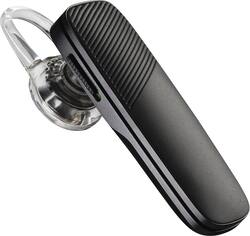
With a Bluetooth 4.1 interface, this Plantronics Explorer 505 203621-63 headset allows you to wirelessly pair with up to 2 compatible Bluetooth-enabled devices from up to 33' away. GSMA-certified HD Voice promotes vocal clarity.
Q: I dont know how to charge my bluetooth.
A: The magnetic strap that comes with the Bluetooth is the charging cable. The larger end does not look like a USB cable, but it is.
Q: my PLT_E500 chnaged language, how do I change it back to english?
A: To select the language on your Explorer 500/505: Press and hold both the volume + and - buttons until you hear the headset say "Welcome". Follow the voice-guided prompts to select your language. You can use the following url to view a video of the steps. https://www.youtube.com/watch?v=pwKJRR02G-Y&feature=youtu.be&t=42s
A: Yes, this headset is able to give voice commands to smart phones. The process is the same for Android, iPhone, and Windows Phone, and I have had no problems with the phone being able to interpret what I told it through the headset.
Q: Does the 505 come with a 'behind the ear' attachment ?
A: The headset does come with a over the ear attachment.
A: Hello- Unfortunately, the Explorer 505 cannot announce callers by name. This feature requires the PBAP Bluetooth profile, which the Explorer 505 does not support.
Q: Can the plastic ear loop and ear tip be replaced on this model?
A: Yes, our Explorer 500 and 505's eartips and ear loops are user replaceable and you can find them as part of an eartip kit (which includes 3 eartips and 1 earloop). Please don't hesitate to contact our customer care group at www.plantronics.com/support if you have other questions!
Q: Can you listen to music with Explorer 505?
A: Yes, you can use this headset for any kind of audio. The quality is pretty good, too.